Category: Data Analyst

  • 10 Topics of Data analysis of the UCI Machine Learning Repository’s Online Retail dataset using R

    10 Topics of Data analysis of the UCI Machine Learning Repository’s Online Retail dataset using R

    เป็นบทความสำหรับการวิเคราะห์ข้อมูลโดยโปรแกรม R เพื่อที่จะหากลุ่มลูกค้าที่จะเก็บข้อมูลมาว่าลูกค้ากลุ่มไหน ควรออกแบบ Campaign อะไรที่จะสามารถตอบโจทย์และบอกได้ว่าลูกค้ากลุ่มไหนควรแนะนำให้เพิ่มบริการหรือลดบริการ

    เนื่องจากปัจจุบันการสูญเสียลูกค้ากันเยอะขึ้น ในหลายๆ รูปแบบจึงอยากหาสาเหตุว่าลูกค้ากลุ่มไหนควรที่จะทำ Campaign อะไรให้เพื่อฟื้นฟูความสัมพันธ์กับลูกค้าเหล่านั้น โดยการสร้าง RFM Feature Engineering ขึ้นมาจากข้อมูลที่มี

    RFM Feature Engineering คือมันคือการแปลงประวัติการซื้อของลูกค้า (ที่เป็นข้อมูลดิบ) ให้กลายเป็น 3 คำดังนี้ Recency, Frequency and Monetary เพื่อนำไปใช้สำหรับการวิเคราะห์การตลาด จากข้อมูลดิบของการซื้อขายครับ คือ การเปลี่ยนข้อมูล Transaction ที่เข้าใจยาก ให้กลายเป็น 3 คอลัมน์ใหม่ที่เข้าใจง่าย เพื่อใช้วิเคราะห์พฤติกรรมลูกค้าครับ

    โดย 3 Features ที่เราสร้างขึ้นมานั้นย่อมาจาก:

    1. R = Recency (ความสดใหม่): ลูกค้าซื้อครั้งล่าสุดเมื่อไหร่? (เช่น 10 วันที่แล้ว)
    2. F = Frequency (ความถี่): ลูกค้าซื้อบ่อยแค่ไหน? (เช่น 5 ครั้ง)
    3. M = Monetary (มูลค่าการใช้จ่าย): ลูกค้าใช้เงินไปทั้งหมดเท่าไหร่? (เช่น 8,000 บาท)

    Data Analyst with R

    1. Install Library
      1. Install readxl
      2. Install tidyverse
    2. Read data
      1. Read excel
      2. Head data
      3. Glimpse
    3. Definition of Column
      1. InvoiceNo
      2. StockCode
      3. Description
      4. Quantity
      5. InvoiceDate
      6. UnitPrice
      7. CustomerID
      8. Country
    4. Data Cleaning
      1. Clean missing CustomerID value
      2. Cancel transaction that have C before Invoice NO.
      3. Manage Quantity and UnitPrice
      4. Create Column TotalPrice
      5. Change InvoiceDate into Date/time
      6. Summary Data
    5. Create RFM Feature Engineering
      1. Snapshot Date
      2. calculate RFM
    6. K-Means (Customer Segmentation)
      1. K-Means
      2. Prepare Data for K-Means (choose specific column R, F, M)
      3. Manage with Outlier
      4. Standardize
      5. Elbow method
        1. WSS
      6. Create dataframe for plot graph and plot graph with ggplot
      7. K-Means clustering
    7. Segment Profiling
      1. Calculate average of R, F, M with Cluster
    8. Storytelling and Visualization
      1. Analyst from four cluster
        1. Cluster 1
        2. Cluster 2
        3. Cluster 3
        4. Cluster 4
    9. Recommended Campaign
    10. Export Data for search cluster in excel

    Install Library

    ก่อนที่จะเริ่มต้นวิเคราะห์ข้อมูล ก็เริ่มต้นด้วยการ Download Library เพื่อที่จะสามารถใช้ Function ต่างๆได้หลากหลายขึ้น เช่น tidyverse และ readxl ก่อน


    Install readxl

    • install.packages(“readxl”) download มาเพื่อสามารถอ่านข้อมูลจากไฟล์ Excel ได้
    • library(readxl)
    install.packages("readxl")
    library(readxl)
    

    Install tidyverse

    • install.packages(“tidyverse”) Download มาเพื่อสามารถวิเคราะห์ข้อมูลทั้งหมดได้ ไม่ว่าจะ dplyr และ ggplot
    • library(tidyverse)
    install.packages("tidyverse")
    library(tidyverse)
    
    • หลังจาก run code จะสามารถดึงอุปกรณ์ในการช่วยวิเคราะห์ข้อมูลได้ตามรูปด้านล่าง
    install (tidyverse)

    Read data

    Read excel

    • สามารถอ่าน File Excel ชื่อ Online Retail.xlsx แล้วเลือก Sheet ที่ต้องการวิเคราะห์ข้อมูล ซึ่งก็คือ Sheet ที่ 1 ของไฟล์นี้
    ## read file from excel
    retail_data <- read_excel("Online Retail.xlsx", sheet = 1)
    View(retail_data)
    
    image.png
    read file from excel

    Head data

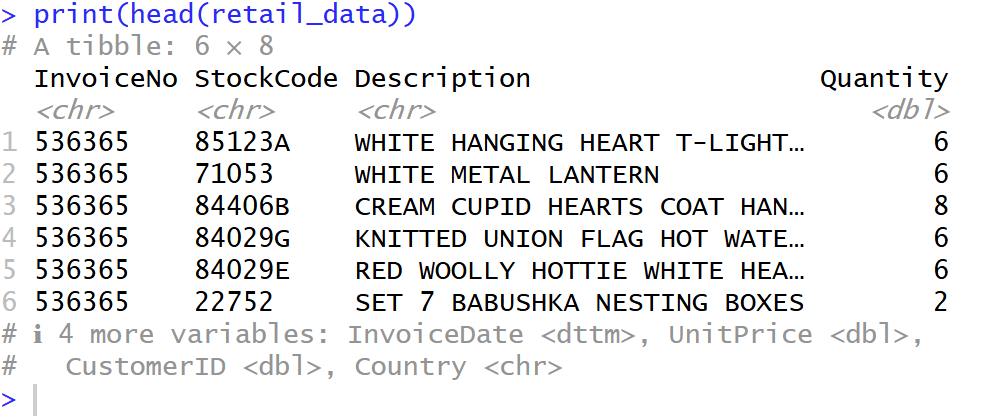
    • เลือก head มาเพื่อที่จะดูข้อมูล Column ของมีข้อมูลแถวบนเป็นยังไงบ้าง
    ## show head data
    print("Example:")
    print(head(retail_data))
    
    head data

    Glimpse

    glimpse จะแสดงโครงสร้างข้อมูลของ data frame จะสามารถรู้ได้ว่ามีคอลัมน์อะไรบ้าง, แต่ละคอลัมน์มีชนิดข้อมูล (Data Type) อะไร, และมีข้อมูลตัวอย่างหน้าตาเป็นอย่างไร ดังรูป

    ## show data structure
    print("data structure:")
    glimpse(retail_data)
    
    Glimpse

    Definition of Column

    เราเริ่มจากการดูข้อมูลเบื้องต้นก่อนว่า แต่ละ Column คืออะไรบ้าง


    InvoiceNo

    • InvoiceNo คือ (เลขที่ใบแจ้งหนี้)
    • เป็นรหัสที่ใช้ “จัดกลุ่ม” สินค้าที่ถูกซื้อในธุรกรรม (Transaction) เดียวกัน
    • จากตัวอย่าง InvoiceNo “536365” มีหลายแถว หมายความว่า ลูกค้าคนนี้สั่งสินค้าหลายอย่างในใบเสร็จใบเดียวกัน

    StockCode

    • StockCode คือ รหัสสินค้า
    • รหัสเฉพาะของสินค้าแต่ละชิ้น (คล้ายกับ SKU)

    Description

    • Description คือ รายละเอียดสินค้า
    • ชื่อหรือคำอธิบายของสินค้า (เช่น “WHITE HANGING HEART T-LIGHT HOLDER”)

    Quantity

    • Quantity คือ จำนวนสินค้า
    • จำนวนสินค้า ชิ้นนั้น ที่ถูกสั่งซื้อในใบเสร็จนี้
    • ข้อควรระวัง: ในข้อมูลชุดนี้ บางครั้งค่า Quantity อาจ ติดลบ ซึ่งหมายถึงการยกเลิก (Cancellation) หรือการคืนสินค้า (Return)

    InvoiceDate

    • InvoiceDate คือ วันที่สั่งซื้อ
    • วันที่และเวลาที่ธุรกรรมนั้นเกิดขึ้น (เช่น 2010-12-01 08:26:00)

    UnitPrice

    • UnitPrice คือ ราคาต่อหน่วย
    • ราคาของสินค้าชิ้นนั้น 1 หน่วย (เช่น 2.55)

    CustomerID

    • CustomerID คือ รหัสลูกค้า
    • รหัสประจำตัวของลูกค้าที่ทำการสั่งซื้อ (เช่น 17850)
    • ข้อควรระวัง: ในข้อมูลชุดนี้ บางแถวอาจไม่มี CustomerID (เป็นค่าว่าง หรือ NA) ซึ่งหมายถึงการซื้อแบบที่ไม่ได้ล็อกอิน (Guest)

    Country

    • Country คือ ประเทศ
    • ประเทศที่ลูกค้าคนนั้นอาศัยอยู่

    Data Cleaning

    Clean missing CustomerID value

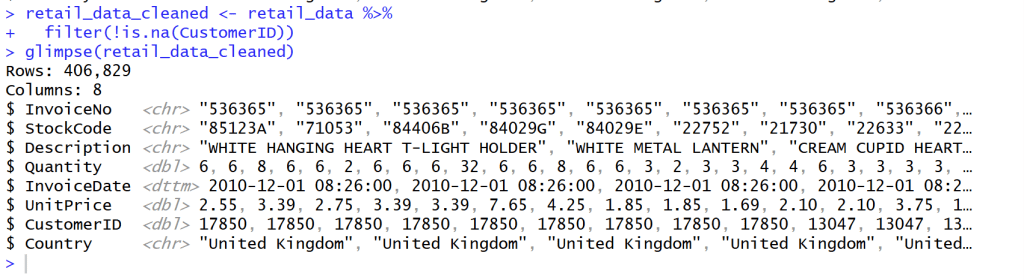
    • หลังจากสำรวจข้อมูลแล้วเห็นว่าข้อมูล CustomerID บาง Column ข้อมูลไม่ครบ จึงทำลบแถวที่ข้อมูลไม่ครบของ CustomerID จาก Rows 541,909 เหลือ 406,829 = 133,820 Rows
    • ใช้ Code นี้เพื่อที่จะสามารถข้อมูลที่ยังไม่สมบูรณ์ เช่น ที่ Column Customer ID ออกโดยใช้ filter(!is.na(CustomerID)) คือ ใช้ column CustomerID ‘ไม่’ ( ! ) ‘เป็นค่าว่าง’ ( is.na )”
    ## Clean missing data
    retail_data_cleaned <- retail_data %>%
      filter(!is.na(CustomerID))
    glimpse(retail_data_cleaned)
    
    Clean missing data

    Cancel transaction that have C before Invoice NO.

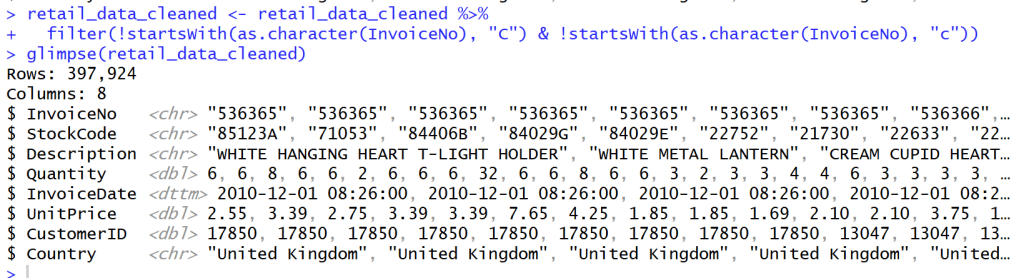
    • หลังจากสำรวจข้อมูลใน Column Invoice NO. แล้วพบว่า Column ที่ Invoice NO. ถูก Cancel จะมีตัว C อยู่ข้างหน้า Invoice เหล่านั้น
    • เราจึงต้องกรอง Invoice ที่ขึ้นต้นด้วย C และ c ออกไปเพื่อเหลือแค่ลูกค้าที่สั่ง Order กับเราจริงๆ โดยไม่ยกเลิก Order
    ## Cancel transaction that have C before Invoice NO.
    retail_data_cleaned <- retail_data_cleaned %>%
      filter(!startsWith(as.character(InvoiceNo), "C") & !startsWith(as.character(InvoiceNo), "c"))
    glimpse(retail_data_cleaned)
    
    Cancel transaction that have C before Invoice NO.

    Manage Quantity and UnitPrice

    • กรองค่าที่ Quantity และ UnitPrice ที่น้อยกว่า 0 ออกเพื่อให้ข้อมูลถูกต้อง
    ## manage Quantity and UnitPrice
    retail_data_cleaned <- retail_data_cleaned %>%
      filter(Quantity > 0 & UnitPrice > 0)
    glimpse(retail_data_cleaned)
    
    Manage Quantity and UnitPrice

    Create Column TotalPrice

    • เพิ่ม Column TotalPrice เพื่อคำนวณราคาของ Quantity * Unitprice จะได้รู้ปริมาณ * ราคาของสินค้าทั้งแถว
    • แล้วจะมี Column ชื่อ Total Price ตามรูปด้านล่าง
    ## Create Column Totalprice
    retail_data_cleaned <- retail_data_cleaned %>%
      mutate(TotalPrice = Quantity * UnitPrice)
    retail_data_cleaned
    glimpse(retail_data_cleaned)
    
    Create Column TotalPrice

    Change InvoiceDate into Date/time

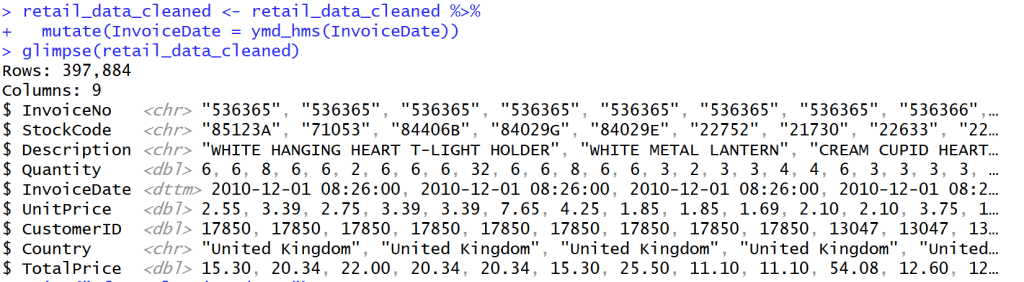
    • เปลี่ยนวันที่ในข้อมูลให้กลายเป็นวันที่สามารถบอกเวลาได้ ให้เป็นรูปแบบเดียวกัน
    ## Change InvoiceDate into Date/time
    retail_data_cleaned <- retail_data_cleaned %>%
      mutate(InvoiceDate = ymd_hms(InvoiceDate))
    glimpse(retail_data_cleaned)
    
    Change InvoiceDate into Date/time

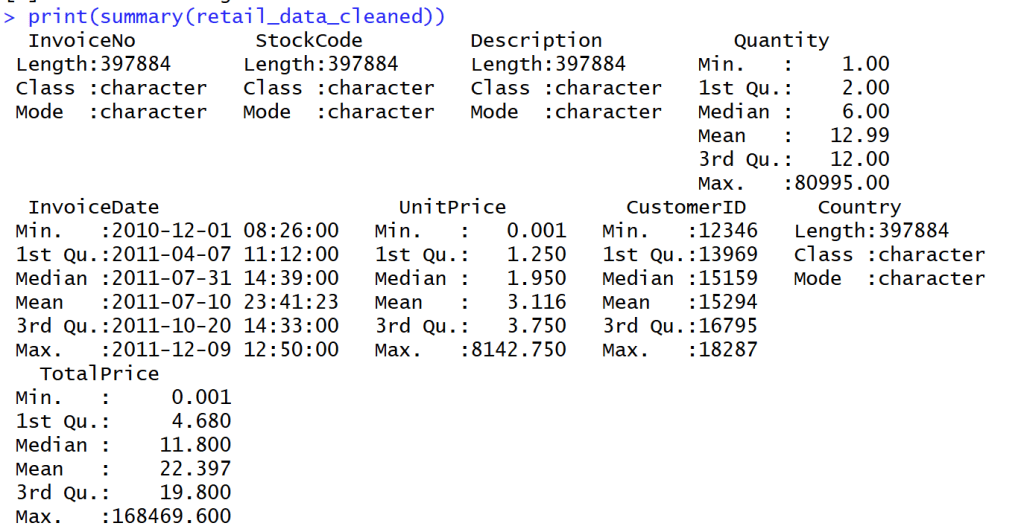
    Summary Data

    • สรุปข้อมูลออกมาได้ดังนี้
    • Summary ได้เฉพาะ Column ที่เป็นปริมาณ
    Summary Data

    Create RFM Feature Engineering

    Snapshot Date

    • หาวันที่ max ที่สุดของ data นี้ด้วยตัวแปร Snapshot
    ## snapshot Date
    ## use next date for last day from data
    snapshot_date <- max(retail_data_cleaned$InvoiceDate) + days(1)
    snapshot_date
    
    Snapshot Date

    calculate RFM

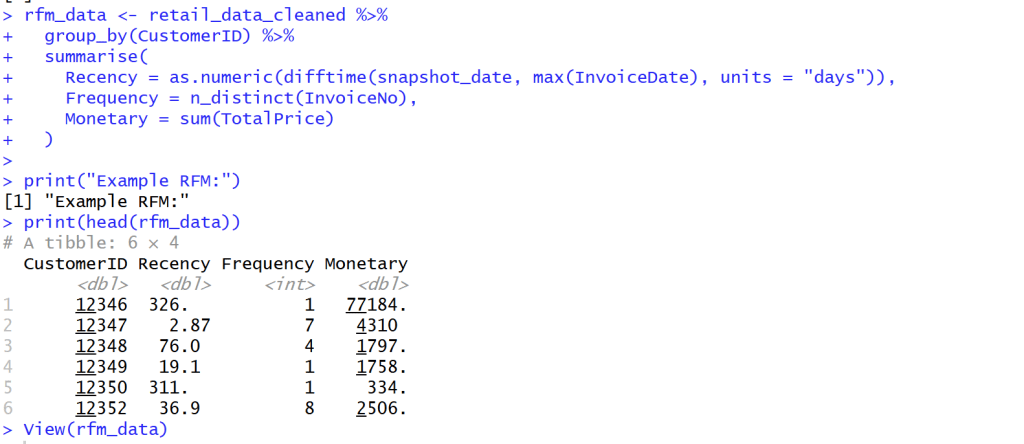
    • สร้างแถว Recency, Frequency and Monetary

    เพื่อจะได้รับตัวแปรช่วยให้รู้ได้ว่าลูกค้ากลุ่มไหนซื้อสินค้าเรา วันล่าสุดเท่าไร ความถี่เท่าไร และค่าใช้จ่ายเท่าไร

    1. Monetary (M): ยอดใช้จ่ายทั้งหมด
    2. Recency (R): จำนวนวันที่ผ่านไปนับจากการซื้อครั้งล่าสุด
    3. Frequency (F): จำนวนธุรกรรมทั้งหมด
    ## create new rfm_data with Recency, Frequency and Monetary
    rfm_data <- retail_data_cleaned %>%
      group_by(CustomerID) %>%
      summarise(
        Recency = as.numeric(difftime(snapshot_date, max(InvoiceDate), units = "days")),
        Frequency = n_distinct(InvoiceNo),
        Monetary = sum(TotalPrice)
      )
    print("Example RFM:")
    print(head(rfm_data))
    View(rfm_data)
    
    calculate RFM

    K-Means (Customer Segmentation)

    K-Means

    K-Means คือการแบ่งฐานลูกค้าทั้งหมดของคุณออกเป็นกลุ่มย่อยๆ (Segments) โดยที่คนในกลุ่มเดียวกันจะมีพฤติกรรมหรือคุณลักษณะที่คล้ายกัน แต่จะแตกต่างจากคนในกลุ่มอื่นอย่างชัดเจน

    ตัวอย่างผลลัพธ์ที่คาดว่าจะได้รับมีดังนี้

    เมื่อใช้อัลกอริทึม K-Means (สมมติว่าเราตั้งค่า $K=4$) เราอาจจะได้กลุ่มลูกค้า 4 กลุ่ม เช่น:

    1. กลุ่มลูกค้าชั้นดี (High-Value): ซื้อบ่อย (F สูง), ยอดซื้อสูง (M สูง), และเพิ่งซื้อไปไม่นาน (R ต่ำ)
    2. กลุ่มลูกค้าที่กำลังจะหาย (At-Risk): เคยซื้อเยอะและบ่อย (F, M สูง) แต่ไม่กลับมาซื้อนานแล้ว (R สูง)
    3. กลุ่มลูกใหม่ (New Customers): เพิ่งซื้อครั้งแรก (F, M ต่ำ) และซื้อล่าสุด (R ต่ำ)
    4. กลุ่มลูกค้าทั่วไป (Standard): ซื้อประปราย ยอดซื้อปานกลาง

    Prepare Data for K-Means (choose specific column R, F, M)

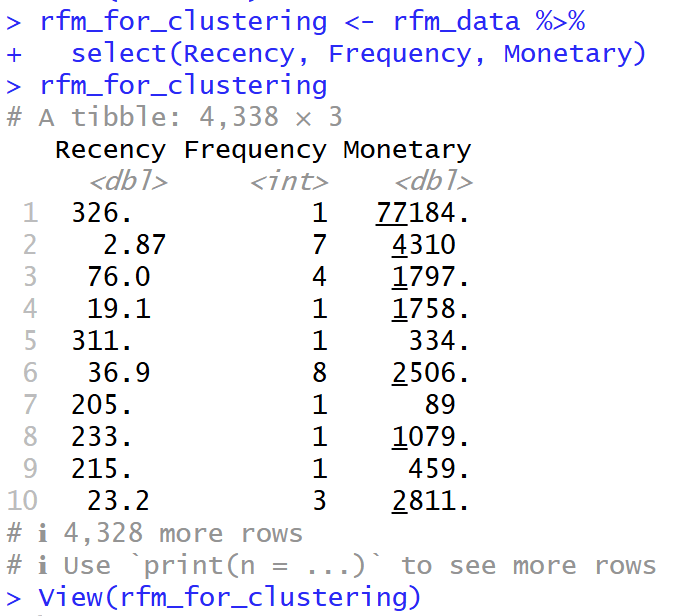
    • เลือกเฉพาะ Column R, F และ M จาก ตัวแปร rfm_data มาอยู่ในตัวแปร rfm_for_clustering เพื่อที่จะสามารถศึกษาข้อมูลต่อได้
    ## Prepare data for K-Means (Choose specially R, F, M )
    rfm_for_clustering <- rfm_data %>%
      select(Recency, Frequency, Monetary)
    rfm_for_clustering
    View(rfm_for_clustering)
    
    choose specific column R, F, M

    Manage with Outlier

    • เนื่องจาก Frequency and Monetary มีการเบ้ขวาของข้อมูล จึงใส่ค่า log เพื่อลดการคลาดเคลื่อนของข้อมูล (Outlier)
    • การเบ้ขวาของข้อมูล คือ ข้อมูลส่วนใหญ่กระจุกตัวอยู่ที่ฝั่งค่าน้อยกว่า
    ## manage with Outliers 
    ## column Frequency and Monetary have right skewed
    ## Log Transformation to reduce Outlier
    rfm_log <- rfm_for_clustering %>%
      mutate(
        Recency_log = log(Recency + 1), # +1 เพื่อหลีกเลี่ยง log(0)
        Frequency_log = log(Frequency + 1),
        Monetary_log = log(Monetary + 1)
      ) %>%
      select(Recency_log, Frequency_log, Monetary_log)
    glimpse(rfm_log)
    
    Manage with Outlier

    Standardize

    • Scale( ) ใน R เป็นเครื่องมือที่สำคัญมากสำหรับการ “Standardization” หรือ “การปรับสเกลข้อมูล” ครับ
    1. Centering (การปรับศูนย์): มันจะนำค่าในคอลัมน์นั้นไป ลบด้วยค่าเฉลี่ย (Mean) ของคอลัมน์ ผลลัพธ์คือ คอลัมน์ใหม่นี้จะมี ค่าเฉลี่ย = 0
    2. Scaling (การปรับสเกล): จากนั้น มันจะนำค่าที่ถูก Centered แล้ว ไป หารด้วยส่วนเบี่ยงเบนมาตรฐาน (Standard Deviation – SD) ของคอลัมน์นั้น ผลลัพธ์คือ คอลัมน์ใหม่นี้จะมี Standard Deviation = 1
    ## Standardize
    ## make average to be 0 and S.e. to be 1
    rfm_scaled <- scale(rfm_log)
    print("Adapt with propotion:")
    print(head(rfm_scaled))
    
    View(rfm_scaled)
    
    Standardize

    Elbow method

    • Elbow Method คือเทคนิคที่นิยมใช้เพื่อช่วยตัดสินใจว่า “จำนวนกลุ่ม (K) ที่เหมาะสมที่สุด” ควรจะเป็นเท่าไหร่ สำหรับการทำ Clustering, โดยเฉพาะกับ K-Means
    ## Elbow method to find K that fit to data
    wss <- (nrow(rfm_scaled)-1) * sum(apply(rfm_scaled, 2, var))
    for (i in 2:10) { # ทดสอบ k ตั้งแต่ 2 ถึง 10
      wss[i] <- sum(kmeans(rfm_scaled, centers = i)$withinss)
    }
    wss
    

    WSS

    wss คือ มันคือการคำนวณว่าข้อมูลทั้งหมดในกลุ่มนั้นๆ อยู่ “กระจัดกระจาย” หรือ “เกาะกันแน่น” แค่ไหน โดยวัดจากจุดศูนย์กลาง (Centroid) ของกลุ่ม

    ค่า WSS ต่ำ = ดีมาก

    1. หมายความว่า จุดข้อมูลต่างๆ อยู่ “ใกล้” กับจุดศูนย์กลางของกลุ่มมันมาก
    2. แปลว่ากลุ่มนั้น “เกาะกันแน่น” (Dense) และมีความแปรปรวนภายในกลุ่มต่ำ

    ค่า WSS สูง = ไม่ดี

    1. หมายความว่า จุดข้อมูลต่างๆ อยู่ “ไกล” จากจุดศูนย์กลางกลุ่ม
    2. แปลว่ากลุ่มนั้น “กระจัดกระจาย” (Sparse) และมีความแปรปรวนภายในกลุ่มสูง
    ## Calculate Within-Cluster Sum of Squares (WSS)
    wss <- (nrow(rfm_scaled)-1) * sum(apply(rfm_scaled, 2, var))
    for (i in 2:10) { # ทดสอบ k ตั้งแต่ 2 ถึง 10
      wss[i] <- sum(kmeans(rfm_scaled, centers = i)$withinss)
    }
    wss
    
    WSS

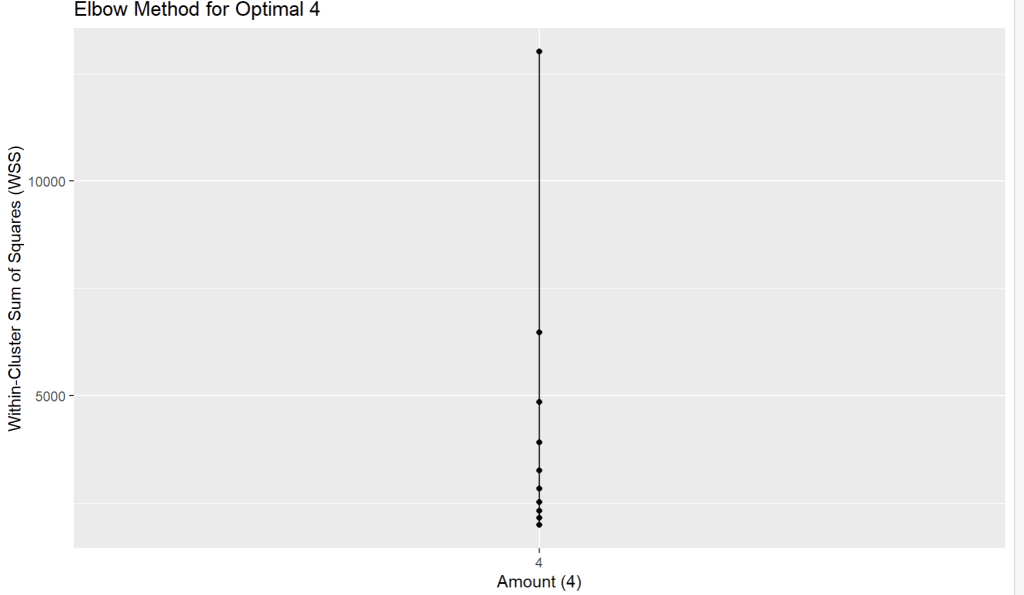
    วิธีดู “Elbow method” คือการดูว่า WSS “ลดลง” ไปเท่าไหร่ในแต่ละก้าว และมองหาจุดที่ “อัตราการลดลง” มันเริ่มน้อยลง (กราฟเริ่มแบน)

    1. K=1 -> 2: ลดลง 13011.0 – 6472.9 = 6538.1 (ลดลงเยอะมาก)
    2. K=2 -> 3: ลดลง 6472.9 – 4855.5 = 1617.4 (ยังลดลงเยอะ)
    3. K=3 -> 4: ลดลง 4855.5 – 3923.4 = 932.1 (เริ่มลดน้อยลง อย่างชัดเจน)
    4. K=4 -> 5: ลดลง 3923.4 – 3267.4 = 656.0
    5. K=5 -> 6: ลดลง 3267.4 – 2840.2 = 427.2
    6. K=6 -> 7: ลดลง 2840.2 – 2533.5 = 306.7 (หลังจากนี้คือลดลงน้อยมาก)
    7. K=7 -> 8: ลดลง 2533.5 – 2330.2 = 203.3
    8. K=8 -> 9: ลดลง 2330.2 – 2162.1 = 168.1
    9. K=9 -> 10: ลดลง 2162.1 – 1997.5 = 164.6

    จึงใช้ k = 4

    K=3 -> 4: ลดลง 4855.5 – 3923.4 = 932.1 (เริ่มลดน้อยลง อย่างชัดเจน)


    Create dataframe for plot graph and plot graph with ggplot

    • สร้างกราฟเพื่อดูว่าข้อมูลไหนห่างกันน้อยที่เมื่อเทียบกับด้านคือ K = 4
    ## create dataframe for plot graph
    elbow_data <- data.frame(k = 1:10, wss = wss)
    
    ## plot graph with ggplot
    print(
      ggplot(elbow_data, aes(x = 4, y = wss)) +
        geom_line() +
        geom_point() +
        scale_x_continuous(breaks = 1:10) +
        labs(title = "Elbow Method for Optimal 4",
             x = "Amount (4)",
             y = "Within-Cluster Sum of Squares (WSS)")
    )
    
    graph with ggplot

    K-Means clustering

    ## K-Means clustering
    set.seed(42) # make result same
    k_optimal <- 4 
    kmeans_result <- kmeans(rfm_scaled, centers = k_optimal, nstart = 25)
    
    1. set.seed(42) เพื่อให้ข้อมูลคงค่าเดิมเสมอทุกครั้งที่ Run model
    2. centers = k_optimal: บอก K-Means ว่า “ให้แบ่งกลุ่มข้อมูลนี้ออกเป็น 4 กลุ่มนะ” (โดยอ้างอิงค่าจากตัวแปร k_optimal ที่เราตั้งไว้)
    3. nstart = 25: บอก K-Means ว่า “ให้ลองสุ่มจุดเริ่มต้น 25 ครั้ง แล้วเลือกเอาครั้งที่ได้ผลลัพธ์ดีที่สุด (คือได้ค่า WSS ต่ำที่สุด)” มาเป็นคำตอบสุดท้าย (ช่วยให้ได้ผลลัพธ์ที่ดีและเสถียรขึ้น)

    Segment Profiling

    Calculate average of R, F, M with Cluster

    • คำนวณค่าเฉลี่ยตามกลุ่ม Cluster เรียงตามค่าใช้จ่ายจากน้อยไปมาก
    ## Calculate average of R, F, M with Cluster
    segment_profile <- rfm_data %>%
      group_by(Cluster) %>%
      summarise(
        Avg_Recency = mean(Recency),
        Avg_Frequency = mean(Frequency),
        Avg_Monetary = mean(Monetary),
        Count = n() # Number of Customers
      ) %>%
      arrange(Avg_Monetary) # arrange with expense
    
    print("Profie seperate of group R, F, M:")
    print(segment_profile)
    

    Storytelling and Visualization

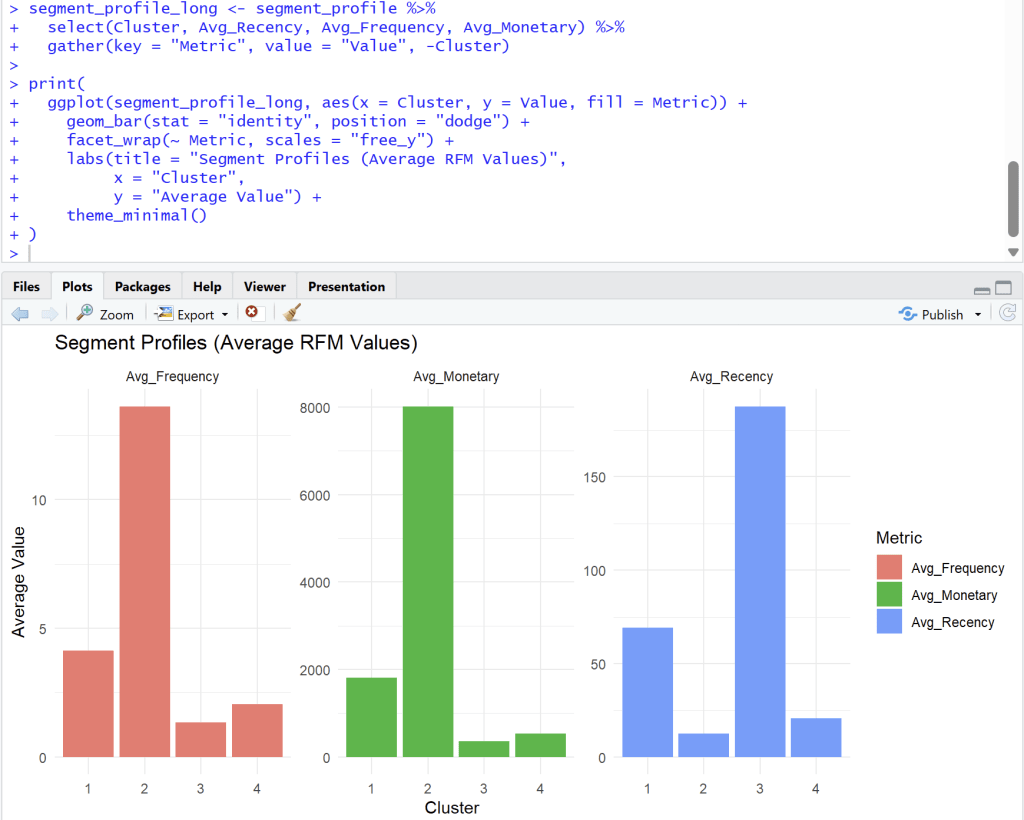
    1. Bar charts to compare average R, F, M of each segment
    ## Bar charts to compare average R, F, M of each segment
    
    segment_profile_long <- segment_profile %>%
      select(Cluster, Avg_Recency, Avg_Frequency, Avg_Monetary) %>%
      gather(key = "Metric", value = "Value", -Cluster)
    
    print(
      ggplot(segment_profile_long, aes(x = Cluster, y = Value, fill = Metric)) +
        geom_bar(stat = "identity", position = "dodge") +
        facet_wrap(~ Metric, scales = "free_y") +
        labs(title = "Segment Profiles (Average RFM Values)",
             x = "Cluster",
             y = "Average Value") +
        theme_minimal()
    )
    
    R, F, M of each segment

    Analyst from four cluster

    Cluster 1

    Cluster 1: ลูกค้าทั่วไป (กำลังจะห่าง)

    1. Frequency (ความถี่): ปานกลาง (Avg. ~4)
    2. Monetary (ยอดใช้จ่าย): ปานกลาง (Avg. ~1900)
    3. Recency (ซื้อล่าสุด): ค่อนข้างนาน (Avg. ~70 วัน)
    4. สรุป: กลุ่มนี้เคยซื้อค่อนข้างดี แต่เริ่มหายไปนานแล้ว (70 วัน) อาจต้องการการกระตุ้นเตือนให้กลับมา

    Cluster 2

    Cluster 2: 🏆 ลูกค้าชั้นดี (Best Customers / VIP)

    1. Frequency (ความถี่): สูงที่สุด (Avg. ~14)
    2. Monetary (ยอดใช้จ่าย): สูงที่สุด (Avg. ~8000)
    3. Recency (ซื้อล่าสุด): ต่ำที่สุด (Avg. ~10 วัน)
    4. สรุป: นี่คือกลุ่มที่ดีที่สุดของคุณ ซื้อบ่อย, จ่ายหนัก, และเพิ่งซื้อไปไม่นาน กลุ่มนี้คือกลุ่มที่ต้องรักษาไว้ให้ดีที่สุด (Loyalty Program, สิทธิพิเศษ)

    Cluster 3

    Cluster 3: 😥 ลูกค้าที่หายไปแล้ว (Lost Customers)

    1. Frequency (ความถี่): ต่ำ (Avg. ~1.5)
    2. Monetary (ยอดใช้จ่าย): ต่ำที่สุด (Avg. ~300)
    3. Recency (ซื้อล่าสุด): สูงที่สุด (Avg. ~180 วัน)
    4. สรุป: กลุ่มนี้ซื้อน้อย จ่ายน้อย และที่สำคัญคือ ไม่กลับมาซื้อนานมากแล้ว (เกือบ 180 วัน) การดึงลูกค้ากลุ่มนี้กลับมาอาจต้องใช้โปรโมชั่นที่แรงมาก (Win-back campaign)

    Cluster 4

    Cluster 4: ✨ ลูกค้าใหม่ (New Customers)

    1. Frequency (ความถี่): ต่ำ (Avg. ~2)
    2. Monetary (ยอดใช้จ่าย): ต่ำ (Avg. ~600)
    3. Recency (ซื้อล่าสุด): ต่ำ (Avg. ~20 วัน)
    4. สรุป: กลุ่มนี้เพิ่งเข้ามาซื้อได้ไม่นาน (Recency ต่ำ) แต่ยังซื้อไม่บ่อยและยังจ่ายไม่เยอะ (F, M ต่ำ) เป้าหมายคือต้องกระตุ้น (Nurture) ให้พวกเขากลายเป็น Cluster 2 ในอนาคต

    Recommended Campaign

    ClusterSegmentจำนวนลูกค้ากลยุทธ์ที่แนะนำ
    1At-Risk1158ดึงกลับ ส่งแคปเปญ We miss you
    2Champions723รักษา มอบรางวัล loyalty ให้สิทธิ์ VIP
    3Lost1579ไม่ต้องโฟกัส
    4Potential878พัฒนา กระตุ้นการซื้อถัดไป

    Export Data for search cluster in excel

    install.packages("writexl")
    library(writexl)
    write_xlsx(rfm_data, "rfm_data_export.xlsx")
    
    • install package write excel เพื่อที่จะสามารถนำไปดูต่อใน Excel ได้ว่า Customer ID ควรสร้าง Campaign อะไร
    • Loyalty for VIP, We miss you สำหรับลูกค้าที่จะหายไป, Potential ที่พัฒนาการกระตุ้นซื้อครั้งถัดไป, Lost ไม่ต้องโฟกัสเยอะ แล้วให้ไปโฟกัสลูกค้ากลุ่มอื่นๆ

    Github :

    ดูตัวอย่าง code ทั้งหมดได้ที่ https://github.com/Chayanonboo/code-for-articles/blob/main/code_R/Online_Retail_Data_Set_from_UCI_ML_repo30_10_2025.ipynb

    Reference :

    https://www.kaggle.com/datasets/jihyeseo/online-retail-data-set-from-uci-ml-repo


  • 5 Sample Case For Intro to Data Science

    5 Sample Case For Intro to Data Science

    เป็นบทความที่เขียนเพื่อที่จะช่วยให้สามารถเข้าใจตัวอย่างสำหรับข้อมูลที่มีในปัจจุบันว่าจะมีประโยชน์สำหรับนำไปประยุกต์กับธุรกิจในชีวิตจริงได้ในรูปแบบต่างๆ ตามที่เคสตัวอย่างที่จะนำมาเล่าสู่การฟังดังนี้


    Intro to Data Science for 5 Case

    1. Case Study 1 – Target
      1. Case 1 : Check Pregnant Girl
        1. Threshold Criteria
        2. Confusion Matrix
      2. Case 2 : A person infected with COVID-19
      3. Case 3 : Churn Prediction
    2. Case Study 2 – Tesco
      1. Case 1 : Tesco/ Sainsbury’s
        1. Evina Dunn and Clive Humby
      2. Case 2 : Loyalty Program 7-11
    3. Case Study3 : Netflix
      1. Case 1 : CEO Netflix
        1. Rule of Reed Hastings
      2. Problem Netflix Case
    4. Case Study 4 : Cambridge Analytica
      1. Case 1 : Brexit
    5. Case Study 5 : Moneyball
      1. Case 1 : Coach and Economist

    Case Study 1 – Target

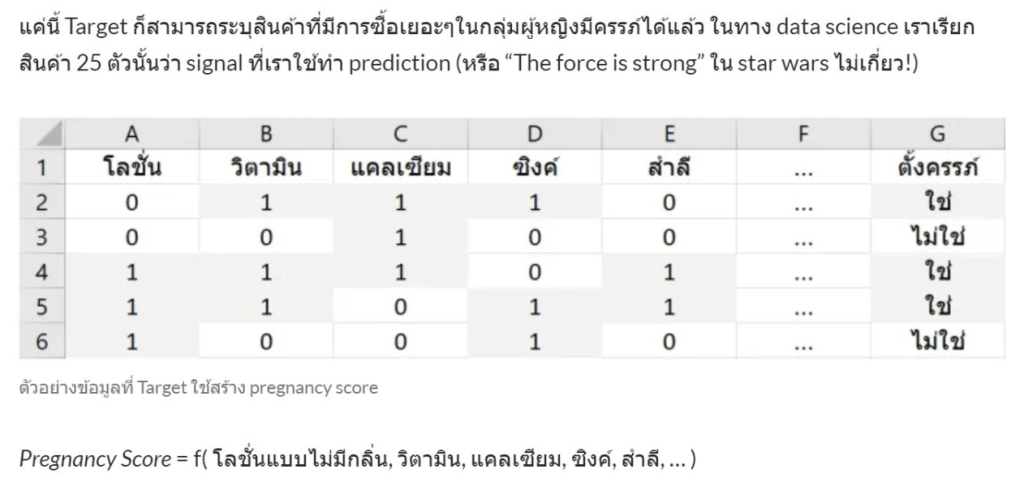
    Pregnancy prediction การที่จะสามารถทำนายผู้หญิงคนไหนท้อง หรือ ไม่ท้อง สามารถดูได้จากการซื้อสินค้าของผู้หญิง

    • โดยมี 3 พฤติกรรมหลักที่ผู้หญิงเปลี่ยนดังนี้
    1. การกิน
    2. การซื้อของ
    3. การดูแลตัวเอง
    Pregnant
    • จากข้อมูลที่ถูกเก็บทำให้สามารถบอกได้ผู้หญิงคนน่าจะท้องจึงทำให้มีส่ง Coupon ส่วนลดสินค้าสำหรับคนท้องไปให้เป็นเรื่องเวลา 9 เดือน เพื่อเพิ่มโอกาสที่ลูกค้าอยากจะซื้อสินค้าของแบรนด์

    ทำให้มีเรื่องกับครอบครัวบางครอบครัวเพราะไม่รู้ว่าลูกผุ้หญิงที่บ้านตัวเองท้อง ส่ง coupon ไปหาเด็กมัธยมผู้หญิง

    Target รู้ได้ว่าผู้หญิงคนนี้ท้องก่อนคุณพ่ออีก

    1. เพราะดูจาก Pattern การซื้อสินค้าของเด็กคนนั้น
    2. 3 เดือนแรกเมื่อผู้หญิงรู้ว่าตัวเองท้อง จะเปลี่ยนไปใช้แชมพูที่ไม่มีกลิ่น เริ่มซื้อ calcium สารอาหารดีๆ
    3. 6 เดือนซื้อครีมทากันท้องลางมาเพิ่ม
    4. 9 เดือนซื้อ big cotton สำลี big pack
    Check Pregnant Girl

    Case 1 : Check Pregnant Girl

    • ถ้าอยากรู้ผู้หญิงคนไหน ท้องบ้าง ไปตั้ง boot หน้า Target คือ baby shower boot

    ให้ลูกค้ากรอกชื่อและนามสกุล เบอร์โทรที่อยู่จะให้ Coupon discount 20-30%

    ColumnData
    Column A-Eข้อมูลใน database ในบริษัท with binary data (0,1) ทำนาย Column G
    Column Gข้อมูลใน baby shower booth
    Pattern Coupon
    • set threshold = 0.5 default to predict that women get pregnant.
    • ทีมการตลาดจะตัดสินใจส่ง decision ให้ทีมการตลาด

    การใช้ Threshold แบบไหนถึงจะดี


    Threshold Criteria

    Quality of ThresholdResult
    Threshold สูงSite ของ Audience น้อยลง
    Threshold ต่ำSite ของ Audience มากขึ้น
    • ต้องตรวจสอบต้นทุนการส่ง Coupon ไปที่บ้านประกอบการพิจารณาเนื่องจากมีต้นทุน

    Trade off ความคุ้มค่าระหว่าง แจกคูปองเยอะกับคูปองน้อย แล้วลูกค้าซื้อกลับเยอะหรือไม่


    Confusion Matrix

    Confusion Matrix คือตารางที่ใช้ในการประเมินโมเดล(Classification Model) สำหรับผลลัพธ์จริง (Actual Values) และผลลัพธ์ที่โมเดลทำนาย (Predicted Values) แล้วนำมาเปรียบเทียบกัน

    1. True Positive (TP): ค่าบวกจริง
    • คือ กรณีที่โมเดล ทำนายว่าเป็นบวก (ท้อง) และ ความเป็นจริงก็เป็นบวก (ท้องจริง)

    2. True Negative (TN): ค่าลบจริง

    • คือ กรณีที่โมเดล ทำนายว่าเป็นลบ (ไม่ท้อง) และ ความเป็นจริงก็เป็นลบ (ไม่ท้อง)

    3. False Positive (FP): ค่าบวกเท็จ Type I Error

    • คือ กรณีที่โมเดล ทำนายว่าเป็นบวก (ท้อง) แต่ ความเป็นจริงเป็นลบ (ไม่ท้อง)

    4. False Negative (FN): ค่าลบเท็จ Type II Error

    • คือ กรณีที่โมเดล ทำนายว่าเป็นลบ (ไม่ท้อง) แต่ ความเป็นจริงเป็นบวก (ท้อง)
    Prediction vs Actual

    Case 2 : A person infected with COVID-19

    • ช่วงโควิด ระบาดใหม่ ปลายปี 2019 คนป่วยไปโรงพยาบาลเป็น 100 คน ตรวจแล้วควรใช้ threshold ต่ำหรือสูงดีกว่า ?
    • ควรใช้ต่ำ เพราะโรงพยาบาลต้องการให้คนอยู่โรงพยาบาลมาก threshold 30% ก็ควรให้อยู่โรงพยาบาลเยอะกรณีผู้ป่วยโควิดยังน้อย
    • ถ้าเกิดเตียงเริ่มเต็ม ต้องตั้ง threshold 70% เพื่อให้คนอยู่โรงพยาบาลน้อยๆ ในกรณีโควิดระบาดมาก

    threshold สูงต่ำ ไม่ได้อยู่ที่ model แต่อยู่ที่สถานการณ์ประกอบด้วย


    Case 3 : Churn Prediction

    Churn Prediction
    • หาว่าใครมีแนวโน้มจะเลิกใช้แบรนด์หรือไม่ ?
    • ถ้ารู้ว่าลูกค้าที่มีแนวโน้มจะยกเลิกใช้บริการ Dtac จะแก้ไขยังไง
    • โทรหา offer promotion, โปรลับเพื่อไม่ให้คนเลิกใช้บริการ
    • prescriptive analytic
    • เก็บ data เดือน 1 – เดือน 3 ทดลอง เดือน 4 deploy model เดือน 5-7 แล้วทำนาย model ไปเรื่อยๆ

    Case Study 2 – Tesco

    Case Study : Tesco
    • TESCO เป็น Target ของ (Retail คือ การขายสินค้าหรือบริการโดยตรงให้กับผู้บริโภคคนสุดท้าย)
    • สมัย Tesco เมื่อ 30 ปีที่แล้ว 1990 Tesco ยังไม่ใช่เจ้าตลาด ณ ปัจจุบัน
    • Brand เบอร์หนึ่งตอนนั้นคือ Sainsbury’s (เซนส์เบอรีส์)

    Case 1 : Tesco/ Sainsbury’s

    • สมัยก่อน ที่ Sainsbury สามารถใช้เงินซื้อ 5 ปอนด์ ซื้ออาหารกล่องและ Spaghetti ที่กินได้ถึง 3 มื้อเลยครับ อยู่ได้ 2 วัน ปี 1990
    • TESCO จึงพยายามจะแซงหน้า Sainsbury’s (เซนส์เบอรีส์) ทำไงก็แซงหน้าไม่ได้
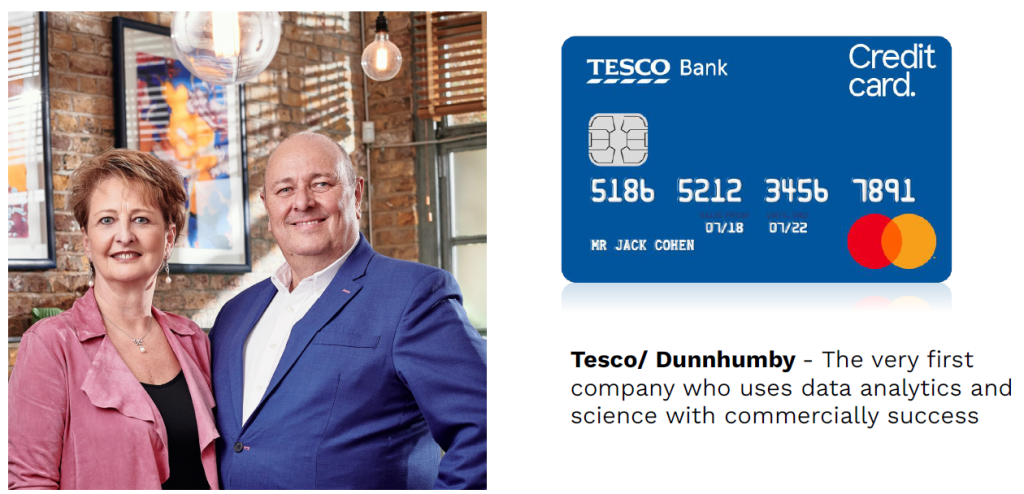
    • TESCO เลยไปหา 2 สามี ภรรยาจากรูปด้านบนนี้มาเพื่อคิดกลยุทธ์ใหม่ๆ ชื่อ Evina Dunn and Clift Country

    Evina Dunn and Clive Humby

    • รวมชื่อกัน เป็น Dunnhumby เสนอ Campaign เข้าไปทำกับ Tesco โดยสร้างเป็น Loyalty Campaign เพื่อให้ user มาสมัครได้แล้วใช้ Loyalty Club Card แล้วเก็บสะสมแต้มได้
    • พอทำงานได้ 3-4 เดือน เอาข้อมูลไปที่เก็บได้จากลูกค้าให้ผู้บริหารฟัง จึงได้ข้อมูล 5 part นี้ที่ควรจะพัฒนา
    5 Part

    วิเคราะห์ข้อมูลแบบนี้ ทำอะไรได้บ้าง

    • สกิลการตั้งคำถามคือ การที่จะสามารถทำให้รู้แนวทางในการวิเคราะห์ข้อมูลต่อได้
    1. จงหาว่า สาขาไหนขายปริมาณเยอะสุด
    2. จงหาว่าลูกค้า Top 10 ที่ซื้อสินค้าเยอะสุด คือใครบ้าง สาขาไหน ซื้อเยอะ ช่วงเวลาในการซื้อ
    3. วันที่สามารถทำให้เรารู้ได้ วันที่ที่ลูกค้ากลับมาซื้ออีกครั้ง เพื่อดูความถี่ในการซื้อของลูกค้า

    Case 2 : Loyalty Program 7-11

    • ยิ่งลูกค้าคนไหน ซื้อของให้เยอะก็จะยิ่งส่ง Coupon Size ใหญ่ไปให้ลูกค้าเหล่านั้นได้เลย
    • ลูกค้าแต่ละคน สร้าง Value ให้โทรศัพท์ไม่เท่ากัน ก็ควรจะให้ Offer ต่อลูกค้าที่ไม่เหมือนกัน
    • High Value Receive Good offer, Low Value Receive Bad offer

    Personalization คือ กระบวนการปรับเปลี่ยนประสบการณ์, เนื้อหา, ผลิตภัณฑ์, หรือบริการ ให้มีความเหมาะสมและตรงกับความต้องการ, ความสนใจ, ลักษณะเฉพาะของแต่ละลูกค้า


    Case Study3 : Netflix

    Netflix
    • เคสนี้เป็น Case ที่ไม่ประสบความสำเร็จ
    • ไม่ใช่ทุก Project ที่เราทำขึ้นมาจะได้อยู่ใน Production ก็มีหลาย Project ที่ Fail ไปเหมือนกัน

    Case 1 : CEO Netflix

    • CEO Netflix เคยเปิดการแข่งขันทั่วโลก ใครก็ตาม Build model แนะนำหนัง Recommendation ได้ดีกว่า Netflix 10% ขึ้นไป เอาเงินไปเลย 1 ล้านเหรียญ
    CEO Netflix
    • คล้ายกับการแข่ง hackathon เป็นการแข่งเพื่อหา Idea ใหม่ๆ
    • Netflix ทำ Website แล้ว Summit คะแนนเลย หนังแต่ละอันที่ถูกผลิตขึ้นมาได้คะแนนเท่าไรบ้าง
    • เวลาแนะนำหนังไป โชว์หนังเรื่องนึงแล้วมีคนกดเข้าไปดู แสดงว่าหนังเรื่องนั้นดีแล้วได้ Accuracy 100%
    • แต่ถ้าโชว์หนัง 100 เรื่องแล้วคนดู 50 เรื่อง แสดงว่า Accuracy 50/100 = 50%

    Rule of Reed Hastings

    • ใครที่สามารถ Build Algorithm ที่ทำงานได้ดีกว่า Data Scientist Netflix 10% จะเอาเงินไป 1 ล้าน
    • ผ่านไป 3-4 ปี ทีมที่ 1-5 ที่ทำแข่งได้ใกล้มารวมตัวกันแล้วตั้งทีมแล้วทีมทำนายสำเร็จ

    ทำให้ Model สามารถชนะ Netflix แต่ไม่สามารถเอาไปใช้จริงได้


    Problem Netflix Case

    Failed Netflix
    • Business Outcome กับ Model Output แต่ไม่สอดคล้องกัน จึงไม่สามารถใช้จริงได้
    • ต้นทุนของ Model ที่จะใช้เปลี่ยนโครงสร้างหลังบ้านใช้เยอะเงินมาก จึงไม่คุ้มกับรายได้ที่ได้รับ
    • ระยะเวลาที่ใช้ในการเปลี่ยนนานเกินไป จึงไม่คุ้มค่า
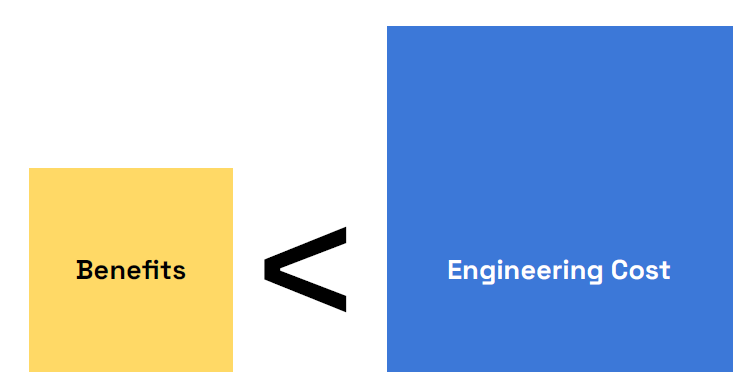
    Benefits < Engineer Cost

    Concept เรื่องความเร็วใน Deliver service ผ่าน Application แล้วส่งผล predict ขึ้นไปบนโทรศัพท์มือถือลูกค้า

    • เช่น Netflix มี Model แนะนำหนังให้ลูกค้า SLA (Service Level Agreement หรือ ข้อตกลงระดับการให้บริการ) ใช้เวลา 3 วินาที
    • เวลาลูกค้า summit service level ที่ 3 วินาที ให้กลายเป็น 1 วินาที แล้วลดความเร็วจะได้มั้ย
    • แต่ต้นทุนทำคอมพิวเตอร์เราส่งข้อมูลมา 50 ล้านก็รายได้กลับมาที่ 10 ล้าน

    Case Study 4 : Cambridge Analytica

    Cambridge Analytica
    • เป็น Case Study เรื่อง Project Almo
    • เป็น project Alamo ที่ Donald Trump ทำไว้เทื่อ 8 ปีที่แล้ว
    • ใช้ต้นแบบจาก Obama เลยว่า พื้นที่ไหนควรใช้ในการหาเสียงแล้วสามารถทำคะแนนได้

    Project Almo เป็นการสร้างฐานข้อมูลผู้มีสิทธิ์เลือกตั้งที่สร้างขึ้นสำหรับแคมเปญหาเสียงเลือกตั้งประธานาธิบดีของโดนัลด์ ทรัมป์ ในปี พ.ศ. 2559

    ทำหนังใน Netflix ขึ้นมาเรื่อง The Great Hack

    • โดย Database จะมีชื่อ เบอร์โทร นามสกุลแล้วก็ที่อยู่ และพรรคการเมืองที่ชอบของคนอเมริกาหลุดออกมา

    จากการดึง API จาก facebook โดยที่ Facebook สั่งให้ลบ แต่ Cambridge ไม่ลบ


    Case 1 : Brexit

    • Carole Cadwalladr เคยไปทำข่าวสอบถามว่าชาว Wale ที่ Ebbe vale ว่า ให้อังกฤษและสหราชจักรเยอะมากว่าควรออกจาก Brexit มั้ย
    • Brexit คือการโหวตอังกฤษออกจาก EU
    • เพื่อให้คนอยากออกจาก Brexit แต่เมือง Ebbe vale ได้เงินสนับสนุนจาก EU เยอะมาก แต่คนโหวตออกเยอะ จึงรู้สึกแปลกใจ
    • เลยเดินไปถามร้านค้าทั่วไปทำไมถึงอยากออก เพราะโดน Immigrant แย่งงานเยอะมาก แต่พอไปดูข้อมูลจริง มีคนต่างชาติมาแย่งงานน้อยมาก

    คนส่วนใหญ่เห็นข้อมูลนี้มาจาก Facebook


    Case Study 5 : Moneyball

    Money Ball
    • Billy Bean เป็นผู้จัดการทีมของทีมท้ายตารางของ Baseball

    ทีมไม่มีเงินแล้วไม่รู้ทำยังไง จึงเอาเงินมาจ้างนักเศรษฐศาสตร์


    Case 1 : Coach and Economist

    Coach and Economist
    • สร้างค่า Regression เพื่อรู้ว่าทำไง ถึงสามารถตัวแปรไหนสามารถข่วยให้ชนะได้
    • โดยนำตัวแปรที่วิเคราะห์ออกมาว่าไปหานักกีฬาที่มี 5 Skill นี้ดี แต่ค่าตัว under value player

    แล้วพา Oakland Athletics สร้างประวัติศาสตร์ชนะ 20 เกมในประวัติศาสตร์ Baseball America


    ข้อมูลเป็นสิ่งที่สำคัญในโลกอนาคตมากดังนั้นจากเคสตัวอย่างทั้ง 5 เคส แสดงเห็นว่าปัจจุบันใครยิ่งรับรู้ข้อมูลได้มากและถูกจะยิ่งประสบความสำเร็จในชีวิตได้มากขึ้น


    ขอบคุณคอร์ส Graduation Day จาก Data Science Bootcamp 11 DataRockie : https://data-science-bootcamp1.teachable.com/courses/enrolled/2684443


  • 20 Ideas from Essential Statistics 101

    20 Ideas from Essential Statistics 101

    สถิติเป็นวิชาที่เกี่ยวกับการรวบรวม จัดระเบียบ วิเคราะห์ และตีความข้อมูล เพื่อนำไปสู่การตัดสินใจและสรุปผลที่มีหลักเกณฑ์ สถิติมีบทบาทสำคัญในการศึกษา วิจัย และการตัดสินใจในหลากหลายสาขา เช่น วิทยาศาสตร์ สังคมศาสตร์ ธุรกิจ การแพทย์และการตัดสินใจต่างในชีวิตประจำวัน การเรียนรู้สถิติจะช่วยให้เราเข้าใจโลกและตัดสินใจได้อย่างมีเหตุผลมากขึ้น


    Essential Statistics

    1. Why we start to learn statistics?
      1. Case analysis of listening to Lisa’s music
      2. Started Statistic
    2. Sample Statistical Case
      1. Case Cooking Food
      2. Case Stock
      3. Case Relationship
    3. Sampling
    4. Probability Sampling
    5. Simple Random Sampling
      1. Case Lottery
      2. Case Simple Random Sampling in Excel
    6. Systematic Random Sampling
    7. Cluster random Sampling
    8. Stratified Random Sampling
      1. Case Beer
      2. Case Population Census
    9. Non Probability Sampling
    10. Convenience Sampling
      1. Case Google Form
    11. Snowball Sampling
      1. Case Ivory
    12. Data Collection
      1. Sample Size
      2. Diminish Return
    13. Margin of Error vs Sample Size vs Budget
    14. Confidence Level vs Sample Size
    15. Descriptive Stat
    16. Central tendency
      1. Mean
      2. Median
      3. Mode
    17. Spread Tendency
    18. Position
    19. Process of Distribution
      1. Normal Distribution
      2. Skewed Left Distribution
      3. Skewed Right Distribution
    20. Outlier

    Why we start to learn statistics?

    • โดยวิชาสถิติเริ่มต้นมีมาตั้งแต่ 300-400 ปีที่แล้ว
    TypeDefinition
    Populationกลุ่มประชากรทั้งหมดที่เราสนใจศึกษา
    Sampleกลุ่มตัวอย่างที่สุ่มมาจากประชากร
    Samplingกระบวนการในการเลือกกลุ่มตัวอย่างจากประชากร
    Generalizationการนำผลที่ได้จากการศึกษากลุ่มตัวอย่าง ไปอ้างอิงถึงประชากร
    • โดย สถิติมักเริ่มจาก population หรือประชากรทั้งหมด

    Case analysis of listening to Lisa’s music

    โดยประมาณคนไทยว่ามี 70 ล้านคน ถ้าอยากรู้คนไทยฟังชอบเพลง lisa กี่คนต้องทำยังไงบ้าง

    1. การที่จะเข้าถึงคนไทย 70 ล้านคนเป็นไปไม่ได้เลย จึงสามารถวัดความชอบว่าคนไทยชอบเพลง lisa มั้ยสามารถวัดได้โดยสุ่มตัวอย่างขึ้นมา Sample และวิธีในการสุ่มตัวอย่างเรียกว่า Sampling
    2. หากสุ่มตัวอย่างมา 100 คน โดยหากต้องรู้ว่าการสุ่มแบบไหนสามารถ Represent ประชากรทั้งหมดได้จริง เรียกว่า Generalization

    สิ่งสำคัญที่สุดคือ วิธีการสุ่มตัวอย่าง แบบไหนถึงจะตัวอย่างที่ represent ประชากรที่ถูกกลุ่มและมีคุณภาพ


    Started Statistic

    Small Data —> Big Data

    เป็นศาสตร์การเรียนรู้ที่เกิดจากกลุ่มตัวอย่างที่ถูกสุ่มขึ้นมา เพราะทุกคนไม่มีใครสามารถเข้าถึงทุกข้อมูลในโลกใบนี้จึงมีการสุ่มตัวอย่างขึ้นมา


    Sample Statistical Case

    Case Cooking Food

    Method

    1. อย่างเช่นการทำกับข้าว โดยการตั้งคำถามเกี่ยวกับน้ำแกง สามารถถามอะไรได้บ้าง
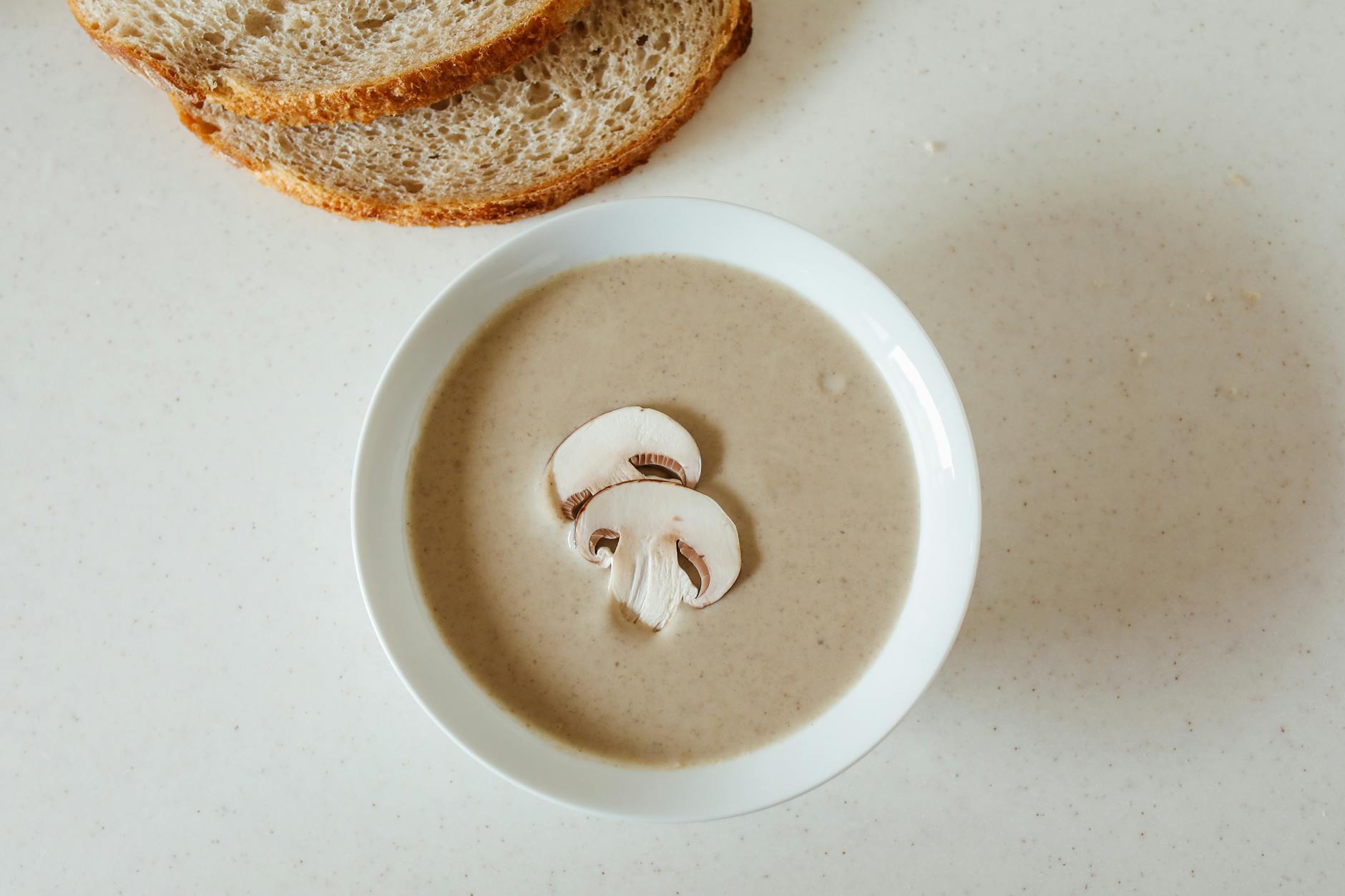
    2. เช่นซุปเห็ด ทำยังไงให้รสชาติออกมาอร่อย
    3. ถ้าอยากรู้ว่าซุปเห็ดสับอร่อยโดยการใช้ช้อนในการชิมสุ่ม Sampling มาเพื่อชิมรสชาติ
    4. หากชิมแล้วอร่อย จะสามารถสรุปผลกลับไปยังทั้งหม้อได้เลยว่า ทั้งหม้ออร่อยด้วย
    Case Mushroom Soup

    Case Stock

    • หากมีหุ้นชนิดหนึ่งที่เราต้องการลงทุนซื้อ จำเป็นต้องศึกษาข้อมูลของบริษัทด้วย
    Case Stock
    1. เราสามารถรู้ว่าข้อมูลได้บางอย่างจากบริษัทเหล่านั้น ซึ่งเหล่านั้นมาจากข้อมูล Sample
    2. เราสามารถทำ Sampling กลับหาหุ้นได้เลยว่า หุ้นตัวนี้จะมีแนวโน้มที่ดีขึ้นจากข่าวอะไรได้บ้าง บริษัทมีผลประกอบการณ์เป็นอย่างไรบ้าง ส่งผลต่อหุ้นมั้ย

    Case Relationship

    • สมมุติผู้หญิงคนหนึ่งคุยกับผู้ชายคนหนึ่งอยู่จะรู้ได้ไงว่า ผู้ชายที่คุยอยู่เป็นคนดี มั้ย
    1. เริ่มถามเพื่อนของผู้ชายว่า ผู้ชายที่เรากำลังคุยอยู่โอเคมั้ย
    2. ผู้ชายคุยกับผู้หญิงหลายคน
    3. หน้าที่การงานของผู้ชาย
    4. ผู้ชายกินเหล้าสูบบุหรี่

    หากเก็บข้อมูลมา 3 เดือนจะสรุปได้ว่าคนนี้โอเคที่จะคบกันเป็นแฟนได้

    Case Relationship

    Things to watch out for in a relationship

    1. ตอนเก็บ Sampling ผู้ชายคนนี้ 3 เดือนแรกดีกับเราหมดเลย ซื้อ Chocolate ซื้อดอกไม้ ให้ของขวัญ ถูบ้าน ซักผ้าให้
    2. ช่วงหมดโปรผ่านไป 3 ปีอาจจะไม่เหมือนเดิม เพราะหมดช่วงโปรสิ่งเหล่านั้นจะน้อยลงด้วยเคยชิน
    3. โดยที่เราไม่รู้จักคนที่คุยด้วยดีพอจนกว่าจะต้องไปตื่นเจอกันทุกเช้าเพื่อที่จะสามารถรู้ว่า lifestyle เข้ากันได้หรือเปล่า
    4. อย่างเช่น ตอนนอนต่างคนต่างกรนจนรำคาญกัน

    คู่ชีวิตเรา มองข้อเสียของกันแล้วรับกันได้มั้ย แต่ที่มีคู่ชีวิตก็ดีสามารถเป็นกระจกเพื่อส่องข้อดี ข้อเสียของอีกฝ่ายได้


    Sampling

    Type of SamplingDefinition
    Probability Samplingการสุ่มแบบใช้ความน่าจะเป็น
    Non-Probability Samplingการสุ่มแบบไม่ใช้ความน่าจะเป็น

    ในชีวิตจริงเรามักใช้การสุ่มแบบใช้ความน่าจะเป็นมากกว่า


    Probability Sampling

    Simple Random Sampling

    การสุ่มตัวอย่างแบบง่าย คือ การสุ่มตัวอย่างที่สมาชิกทุกคนในประชากรมีโอกาสเท่าๆกัน ในการถูกเลือกเข้ามาเป็นกลุ่มตัวอย่าง


    Benefits of Probability Sampling

    1. หากจะใช้กระบวนการนี้ ต้องมีรายชื่อคนไทยทุกคนอยู่ใน program R หรือ Spreadsheet แล้วสุ่มตัวอย่างมา 400 คน
    2. Simple random Sampling ทำได้กับระบบปิดเท่านั้น คนใน Community Discord 400 คน โดยสุ่ม 40 คนเพื่อดู model ว่า แอดทอยสอน Data ใน Discord มั้ย

    Case Lottery

    1. เช่น สุ่มคง 100 คนจากคน 1 คน ทุกคนมีโอกาสถูกสุ่มเข้ามา 1%
    2. จับการรางวัล lottery โอกาสได้เบอร์ 0.1% เพราะมีเบอร์ 0-9
    Case Lottery

    Case Samsung

    Samsung ลดจากการ WFH 1 วันต่อสัปดาห์ —> WFH 1 วันต่อ 2 สัปดาห์ เพราะไม่ได้ติดโควิดเหมือนสมัยก่อน

    • ตัวอย่างเช่นนโยบาย ที่อยากให้ตรวจสอบว่าพนักงาน 3000 คนบริษัทอยาก WFH มั้ยจึงสุ่มสำรวจในแผนก 30 คนเพื่อ Refer ถึงพนักงานโดยรวมเพื่อทราบว่าพนักงานต้องการ WFH มากแค่ไหน

    Case Simple Random Sampling in Excel

    สมมุติการสุ่มแต่ละครั้งโดยเลือก 3 คนจาก 5 คใน Excel ดังนี้

    =RAND()
    
    Case Simple Random Sampling in Excel
    1. แต่ในความจริงถ้าจะทำสุ่มประชากรของประเทศไทย ต้องมีรายชื่อทั้งหมด 70 ล้านคนแล้วสุ่มจึงทำยาก
    2. Facebook สามารถทำ Random Sampling ได้เลยเนื่องจากมีข้อมูลลูกค้าที่อยู่ในประเทศนั้นๆ
    3. โดย Survey ที่ brand ในแต่ละประเทศได้รับจะโอเคเพราะมีข้อมูล User เยอะ

    Systematic Random Sampling

    • เป็นการสุ่มแบบมีระบบที่วางไว้หรือเป็น pattern ตั้งไว้ โดยเลือกสุ่ม 3 คน

    อยากสุ่มคนที่ 1 แล้ว เว้นการสุ่ม 2 คน หลังจากนั้นสุ่มคนที่ 4 ทำแบบนี้ไปเรื่อยๆ จนเป็นระบบดังรูปด้านล่าง

    =RAND()
    
    Case Systematic Random Sampling

    Cluster random Sampling

    1. เป็นการแบบสุ่มแบบแบ่งกลุ่มไว้ก่อน 3 กลุ่ม แล้วสุ่มตาม Cluster
    2. สุ่มเลข 1 ถึง 3 หากสุ่มได้ Cluster ไหนก็ให้เลือก Cluster ในการสุ่มตัวอย่างทำ Survey
    =RANDBETWEEN(1,3)
    
    Case Cluster random Sampling

    Stratified Random Sampling

    เป็นวิธีการสุ่มตัวอย่างที่แบ่งประชากรออกเป็นกลุ่มย่อยๆ (strata) ตามลักษณะที่สนใจ (เช่น เพศ อายุ ระดับการศึกษา) แล้วสุ่มตัวอย่างจากแต่ละกลุ่มย่อย โดยแต่ละกลุ่มย่อยจะมีสัดส่วนเท่ากับสัดส่วนในประชากร

    Stratified Random เป็นวิธีการที่มีใช้ในงาน Market & Research เยอะที่สุด


    Case Beer

    • อยากรู้ว่าคนไทยชอบ กินเบียร์ กี่คน ให้สุ่มจากคน 1,000 คน

    Sample size จะถูกจำกัดด้วย 2 เรื่องคือ Time and Budget

    Calculate Budget

    1. เช่นมีงบการเงิน 500,000 บาท
    2. Cost Per Interview = 500,000/1,000 = 500 บาทต่อคน แล้วคำนวณว่าเป็นไปได้มั้ย
    3. โดยที่เราจะต้องคำนวณ Margin ให้กำไร 40-50%
    4. เช่น CPI 500 บาทต่อคน ค่าทำ Survey ควรจะ 250 บาทต่อคน

    Cost Per Interview คือ ต้นทุนต่อการสัมภาษณ์หนึ่งครั้ง


    Method

    • แบ่งประเทศเป็น 5 ภาคดังนี้
    SectorPercentage
    Northern Region10%
    Northeastern Region35%
    Southern Region15%
    Central Region30%
    Bangkok and Metropolitan Area10%
    1. แล้วกลับไปเสนอลูกค้า 1000 คนไปเสนอตามสัดส่วนในที่แบ่งตามเขตไว้
    2. เก็บข้อมูลจากจังหวัดที่ลูกค้าเยอะๆ เช่น ภาคอีสาน เก็บข้อมูลจากจังหวัดขอนแก่น จังหวัดบุรีรัมย์ จังหวัดโคราช, ภาคเหนือ จังหวัดเชียงใหม่
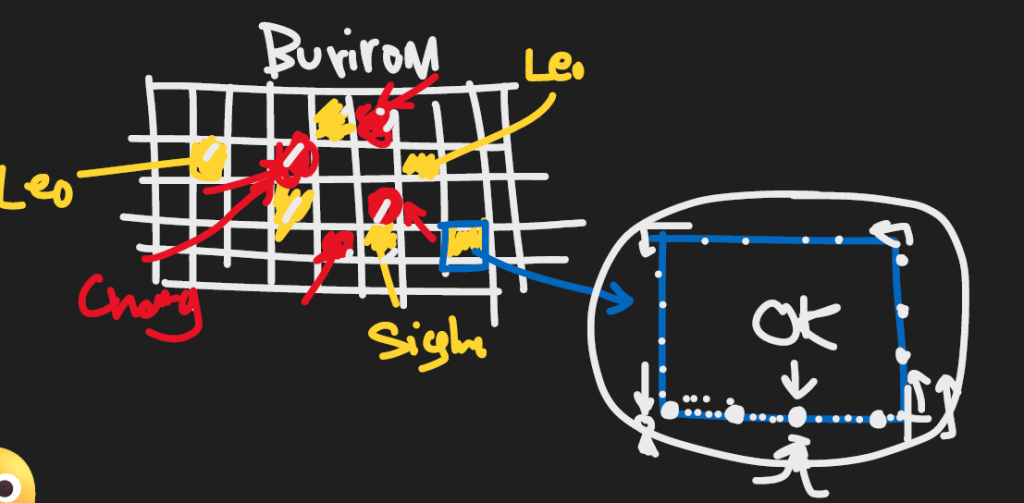
    3. แล้วจะมีแผนที่ของแต่ละจังหวัดเป็นตาราง Grid ของจังหวัดบุรีรัมย์
    Case Grid

    4. ใช้โปรแกรม Computer สุ่มเลยว่าอยากไปเดินสุ่มที่ Block ไหนของตาราง Computer


    The reality of customer interactions

    • แต่เมื่อเอา plan ไปเสนอลูกค้าที่เป็นการสุ่มเลือกพื้นที่สีเหลือง ลูกค้าเลือกพื้นที่สีแดงเลย

    ที่โปรแกรม Computer ในการสุ่มเลือกพื้นที่ต่างๆ ต้องการลดการ bias ในการเลือกพื้นที่

    1. ลูกค้าอยากเลือกพื้นที่เองเพราะลูกค้า Brand Chang อยากเลือกพื้นที่ที่หนีพื้นที่สีเหลืองที่คู่แข่งเก่งเช่น Leo กับ Singha
    2. โดยทีม Research จะต้องพยายามเลือกทั้งจังหวัดที่ Brand Chang เก่งและจังหวัดที่เราไม่เก่งด้วย เพื่อสร้างสมดุลในการเลือก Sample Size
    3. เวลาที่เก็บข้อมูลจริง จะใช้หลักการ Left hand Rule เวลาสัมภาษณ์หลังที่ 1 แล้วก็กระโดดสัมภาษณ์ 4 หลังแล้วสัมภาษณ์ต่อดังรูปสีฟ้า

    Case Population Census

    เริ่มจากไป Search ในสำนักงานสถิติแห่งชาติ

    รัฐบาลจะทำ Survey ว่า

    1. คนไทยมีจำนวนกี่คน
    2. ผู้ชายกี่คน ผู้หญิงกี่คน
    3. คนไทยทำอาชีพอะไร
    4. คนไทยมีความสุขในการใช้ชีวิตมั้ย
    • 10 ปีจะทำ Survey ครั้งนึงโดยการทำถาม Survey ตามบ้าน โดยมีการทำสำมะโนประชากรครั้งล่าสุดปี 2553
    Case Population Census

    สิ่งที่น่าเศร้าคือหน่วยงานรัฐบาลไม่ทำแล้วให้หน่วยงานเอกชนเป็นคนทำแทน Survey 2568


    Non Probability Sampling

    Convenience Sampling

    • เป็นวิธีการสุ่มตัวอย่างที่ไม่ต้องอาศัยหลักการทางสถิติที่ซับซ้อน แต่เน้นความง่ายและความสะดวกในการเข้าถึงกลุ่มตัวอย่าง

    เช่น สร้าง Suvery เป็นแบบสอบถามให้คนกรอก google form


    Case Google Form

    Case Google Form
    • เป็น Case ที่เด็กปริญญาโทมักจะต้องเก็บข้อมูลเพื่อทำวิจัย Project ต่างๆ

    Method

    1. เก็บ Sample Size 400 คน เป็นคนกรุงเทพ
    2. อายุ 20-35 ที่ชอบซื้อออนไลน์
    3. ส่วนใหญ่มักมีการเก็บข้อมูลผ่านการส่งให้เก็บข้อมูลทาง line และ facebook

    ข้อควรระวัง : แต่ถ้าให้เก็บข้อมูลผ่านเพื่อนๆ เช่น เด็ก ผู้หญิง จบโรงเรียนหญิง คนทำแบบทดสอบที่มักจะมาจากผู้หญิง


    TypeMen PercentageWomen Percentage
    Population50%50%
    Sampling20%80%

    หากจะเลือก Sample Size สุ่มให้ดี ควรเลือกกลุ่มที่มีความใกล้เคียง Population เช่นเลือกคนที่เป็นคนตอบแบบสอบถามให้ใกล้เคียง Population เช่น Sampling ควรมีผู้หญิง และผู้ชายเท่ากับ Population

    Sampling ที่สุ่มมาได้ผู้ชาย 20% ซึ่งไม่ตรงกับ Population ซึ่งทำให้ใช้จริงได้ยาก


    Cautions

    1. ทำให้ Sample ไม่สามารถ Represent กับ Population ที่เกิดขึ้นจริงได้
    2. สาเหตุมาจากวิธีการสุ่มตัวอย่างที่เรียก Convenience Sampling เพราะสุ่มตามที่เราสะดวก

    Snowball Sampling

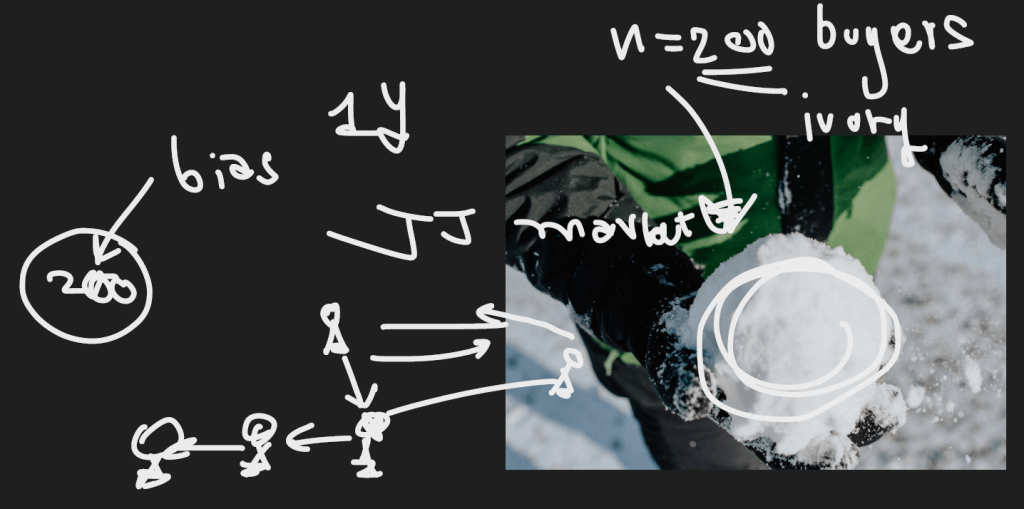
    การหากลุ่มตัวอย่างเริ่มต้นจำนวนเล็กน้อย จากนั้นให้กลุ่มตัวอย่างเหล่านั้นแนะนำสมาชิกคนอื่นๆ ในกลุ่มเป้าหมายเดียวกัน


    Case Ivory

    Case Ivory

    WWF เป็นองค์กรที่ปกป้องสัตว์ใกล้สูญพันธุ์


    ทำไมคนไทยถึงซื้องาช้าง?

    1. เพราะซื้อมาประดับบารมี
    2. ซื้อเพื่อโชว์ฐานะทางบ้าน
    3. ซื้อเพื่อความเชื่อบางอย่างและหน้าที่การเงิน

    เนื่องจากไม่รู้ว่าจะเก็บข้อมูลจากลูกค้ามาจากไหน เนื่องจากปกติไม่ค่อยมีกลุ่มลูกค้าที่ซื้องาช้าง

    Case Snowball Sampling

    Method

    1. ให้หาลูกค้า คนแรกที่ซื้องาช้าง ให้ได้ก่อน แล้วค่อยถามต่อไปเรื่อยๆ เป็น process
    2. แล้วทำ Survey ในประเทศไทย 200 คน
    3. ไปเก็บข้อมูล JJ market (Chatuchak) ที่ร้านขายงาช้าง แล้วสัมภาษณ์คนซื้องาช้างใน 1 ปีแล้วถาม ณ เวลานั้นเลย แล้วขอ Contact คนซื้องาช้างจากลูกค้าต่ออีกที เหมือนกับการโยนหิมะใส่กันไปเรื่อยๆจึงเรียก Snowball

    ได้กลุ่มตัวอย่างมา 200 คน แต่กลุ่มคน 200 คนนี้ความเห็นจะคล้ายๆกัน เพราะเป็นเพื่อนกันเลยขาดความหลากหลายของข้อมูล


    Data Collection

    1. เก็บ data ที่มีคุณภาพมาก่อนก็จะช่วยให้ได้การวิเคราะห์ข้อมูลที่มี make sense และถูกต้องมากยิ่งขึ้น
    2. คำถามแรกที่มักถูกถามคือ ข้อมูลมาจากไหน project data ที่เรามาจากไหน
    3. ถ้าลูกค้าไม่เชื่อกระบวนการเก็บ data ของเรา โอกาสที่ขายงานผ่านจะน้อยมาก
    4. ถ้าไม่เข้าใจวิธีการเก็บ data ที่ดีอาจจะทำให้การวิเคราะห์ data แบบ Regression ตั้งแต่แรกผิดไปเลยก็ได้
    5. ถ้า Sample ไม่ Represent Population ก็อาจจะไม่ต้องทำต่อเลยก็ได้

    Sample Size

    Sample Size

    Method

    1. สุ่มแบบที่ 3 n=300 คนจะได้ผลลัพธ์ที่ดีในการสุ่มแบบ Random Sampling
    2. ยิ่ง Sample Size เยอะ จะยิ่งได้ผลลัพธ์ดีขึ้นเท่านั้น
    3. n จำนวนเยอะ Quality ก็เยอะ ยิ่งเข้าใกล้ population

    สามารถคำนวน Sample Size ได้จาก Website นี้

    VariableDefinitionCalculate
    Population sizeจำนวนทั้งหมดของกลุ่มคนที่คุณสนใจศึกษา1000
    Confidence levelความน่าจะเป็นที่ผลการสำรวจของคุณจะสะท้อนความเป็นจริงของประชากรทั้งหมด95%
    Margin of errorช่วงความคลาดเคลื่อนที่ยอมรับได้ของผลการสำรวจ5
    Calculate sample size

    Confidence level ถ้าทำ Survey นี้ซ้ำ 100 ครั้ง จะมี 95 ครั้งได้ผลลัพธ์เหมือนเดิม เป็นระดับความเชื่อมั่นจากการทำซ้ำ

    • ยิ่งทำซ้ำเยอะๆ ก็ยิ่งได้ผลลัพธ์ที่มั่นใจขึ้นเรื่อยๆ

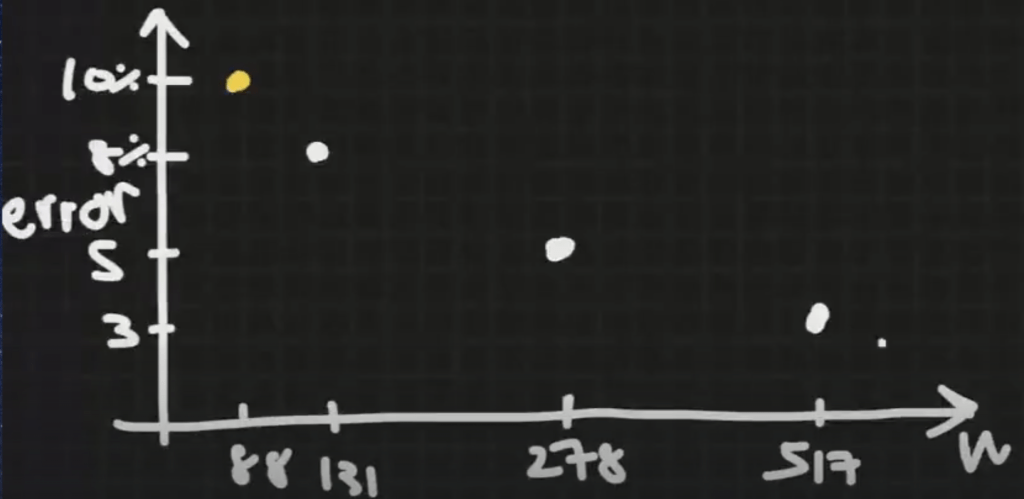
    Margin of error ค่าความคลาดเคลื่อนจากคนที่สุ่ม 278 อาจจะมีคนเห็นด้วย 70% ไม่เห็น 30% แล้วความคลาดเคลื่อนที่ขึ้นจาก 70% ที่ว่ามีคลาดเคลื่อน +-5% = [65%,75%] ได้เป็น lower bound และ upper bound

    ยิ่งความคลาดเคลื่อนของข้อมูลน้อยลง ก็จะสามารถได้ข้อมูลที่แม่นยำขึ้น

    Margin of Error vs Sample Size

    Margin of Error vs Sample Size

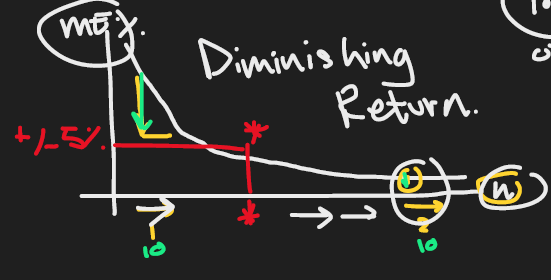
    Diminish Return

    Diminish Return

    Diminish Return สำหรับการเก็บข้อมูล ถ้ายิ่งเก็บ sample size เพิ่มทุกๆ 1 คน จะลด Error ในอัตราที่น้อยลงเรื่อยๆ

    เปรียบเสมือนกับ 1 ชั่วโมงแรกเราฝึกขี่จักรยานจะเก่งขึ้นก้าวกระโดดเพราะไม่เคยฝึก

    แต่ฝึกขี่จักรยานชั่วโมงที่ 2 จะเก่งขึ้นน้อยกว่าชั่วโมงแรก เพราะเรามีพื้นฐานขี่จักรยานเลยเก่งขึ้นน้อยลงกว่าตอนฝึกชั่วโมงแรก

    • นักสถิติคิดไว้แล้วว่าหยุดที่ Margin of Error 5% ที่เส้นสีแดงเพราะคุ้มค่าที่หยุดเก็บ Sample Size เพิ่มแล้ว

    ถ้าเราเก็บ n เยอะขึ้น ก้จะมีต้นทุนค่าใช้จ่ายเยอะขึ้น


    Margin of Error vs Sample Size vs Budget

    Margin of Error vs Sample Size vs Budget
    Margin of ErrorSample SizeBudget
    5%278278,000
    3%517517,000

    หากใช้ Margin of Error 5% – 3%=2% จะมีค่าใช้จ่ายเพิ่ม 517,000-278,000 = 239,000 บาท

    1. ในความจริงถ้าบอกลูกค้าว่าลด Error 2% มีค่าใช้จ่ายเพิ่ม 239,000 บาท แล้วแจ้งลูกค้าอาจจะไม่ยอมจ่าย เพราะราคาแพงเกินไป
    2. ความเป็นจริงลูกค้าเลือก Margin of Error 5%

    ค่า Margin of Error 5% ภาษาอังกฤษเรียก Arbitary ไม่ได้มีค่าตายตัว


    Confidence Level vs Sample Size

    Confidence Level vs Sample Size

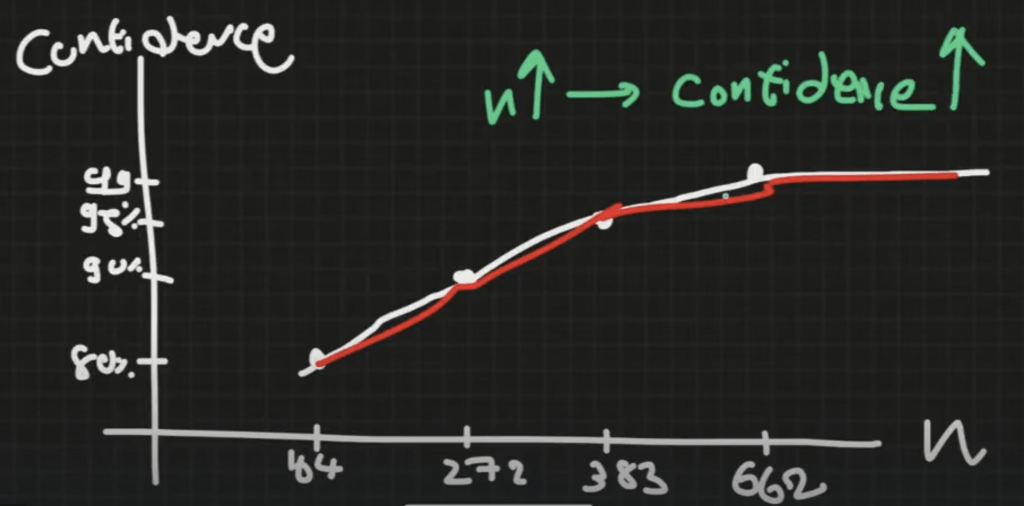
    Confidence Level แปรผันตรงกับ Sample Size

    Sample size = data

    1. ถ้าอยากตัดสินใจได้ดีขึ้นเรื่อยๆ ก็ควรจะเก็บ Data เยอะขึ้นเรื่อยๆ
    2. ถ้าอยากมี Career ที่ดีก็ต้องเรียนรู้ไปเรื่อยๆเลย อนาคตถึงจะสดใส

    ใครที่มีความรู้ที่อยู่ในหัวเยอะและเป็นข้อมูลที่มีคุณภาพก็จะเติบโตไปข้างหน้าได้ดีกว่าคนอื่น

    Recommend Statistic book : Naked Statistics


    Descriptive Stat

    1. ใช้ในการอธิบายค่าต่างๆ ที่สุ่มขึ้นมาจาก Sample
    2. เช่นใช้ค่า Mean, Median, Mode ในการวัดค่ากลางของ Sample Size

    Central tendency

    • การวัดค่ากลางของข้อมูล ควรเริ่มจากการเรียงข้อมูลเพื่อหาค่าเหล่านั้นได้ถูกต้อง
    Central Tendency

    Mean

    ค่าผลรวมของเลขทั้งหมด/จำนวนของเลขทั้งหมด

    ค่าเฉลี่ย = (5+10+10+15+22)/5 = 12.4


    Median

    ค่าตรงกลางของข้อมูล เช่น 5 10 10 15 22 ค่าที่อยู่ตรงกลางสุดคือ 10 เลข 10 จึงกลายเป็น Median


    Mode

    ค่าซ้ำมากสุดของข้อมูล เช่น 5 10 10 15 22 ค่าที่ซ้ำมากสุดคือ 10 จึงกลายเป็น Mode

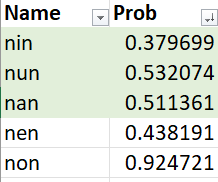
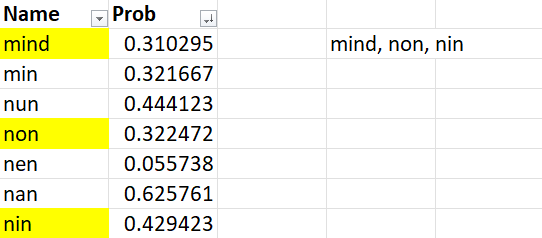
    หากตัวเลขซ้ำกันมากกว่า 1 ตัวเช่น 5 10 10 15 15 ค่าที่ซ้ำมากสุดคือ 10, 15 จะเรียกว่า Bimodal

    Case Study supermarket

    เช่นคนจะเข้าไปซื้อของกินที่ Supermarket กันในช่วงเวลา กลางวันและเย็นเยอะ จึงกลายเป็นช่วงที่โดดเด่นจึงเรียกว่า Bimodal

    Multimodal AI can process virtually any input, including text, images, and audio เนื่องจากสามารถ create 3 อย่างพร้อมกันได้จึงกลายเป็น Multimodal


    Spread Tendency

    • วัดการกระจายตัวของข้อมูล
    TypeDefinition
    SD (variance)การกระจายตัวของข้อมูล
    Rangemax – min = ค่ามากสุด – ค่าน้อยสุด (พิสัย)
    Standard Deviation Formula

    Position

    TypeDefinition
    Minค่าต่ำสุดของข้อมูล
    Maxค่าสูงสุดของข้อมูล
    Percentileค่าของข้อมูล ณ จุด 99 จุด ที่แบ่งข้อมูลซึ่งเรียงจากน้อยไปหามากออกเป็น 100 ส่วน โดยที่แต่ละส่วนมีจำนวนข้อมูลเท่า ๆ กัน

    ถ้าคุณสอบได้คะแนนอยู่ในเปอร์เซ็นไทล์ที่ 80 หมายความว่าคุณได้คะแนนสูงกว่า 80% ของผู้สอบคนอื่นๆ ทั้งหมด


    Process of Distribution

    process ที่นักสถิติมี 2 วิธี ใช้ตัวเลขและกราฟในการวิเคราะห์ข้อมูล

    1. Numerical ตัวเลข
    2. Graphical กราฟ
    Histogram Graph
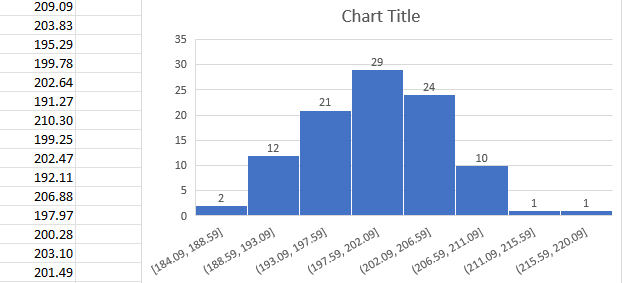
    • หลังสุ่มตัวเลขมา 100 เลขแล้วสามารถสร้าง Histogram ได้ดังรูปครับ

    จะสามารถได้ผลลัพธ์ที่มีการแจกแจง 3 แบบดังนี้

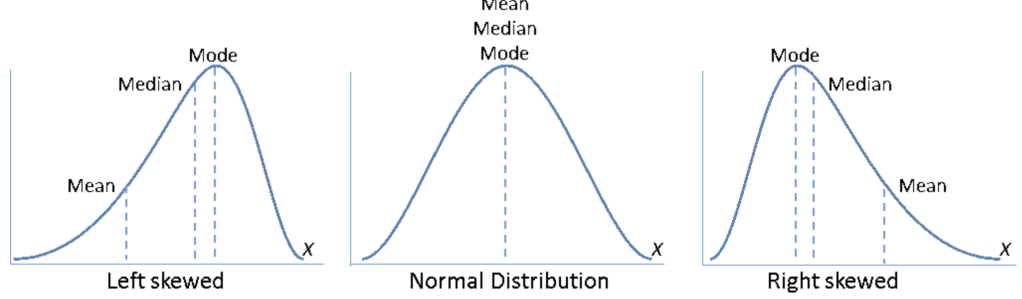
    TypeGraphRelationSample
    Normal Distributionกราฟรูประฆังคว่ำ สมมาตรMean = Median = Modeคะแนนสอบที่มีการ
    กระจายตัวดี
    Skewed Left Distributionหางยาวไปทางซ้ายMean < Median < Modeคะแนนสอบที่นักเรียนส่วนใหญ่ได้คะแนนสูง
    Skewed Right DistributionหางยาวไปทางขวาMean > Median > Modeคะแนนสอบที่นักเรียนส่วนใหญ่ได้คะแนนต่ำ
    3 Distribution

    Technique หางของกราฟไปทางฝั่งไหน ให้เบ้ไปทางฝั่งนั้น

    • ถ้าข้อมูลมีการเบ้ เรามักจะใช้ค่า Median ในการวัดค่ากลาง

    Normal Distribution

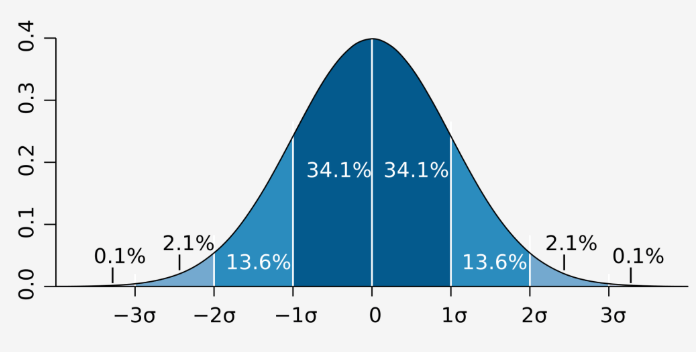
    1. (Bell Shape Curve) การกระจายตัวปกติ
    2. โดยพื้นที่ใต้กราฟมีค่าเป็น 1
    Normal Distribution
    Area under the graphPercentage
    1 SD68.2%
    2 SD95%
    3 SD99.7%

    Skewed Left Distribution

    • อย่างเช่นมีการสอบแล้วนักเรียนลืมไปสอบ 5 คนทำให้คะแนนสอบลดลงไปเยอะ
    • หากมีนักเรียนไม่ได้สอบ 5 คนจะทำให้ค่า Mean ตกจาก 66 คะแนน เป็น 52 คะแนน
    Skewed Left Distribution

    Skewed Right Distribution

    คนรวยมีจำนวนน้อย คนจนมีจำนวนมาก จะเบ้ขวา

    สามารถเช็ค Thailand GDP per Capita ได้ที่ link

    • GDP = เอารายได้คนทั้งประเทศ / จำนวนคนทั้งหมด = mean

    Prepare Two Graph

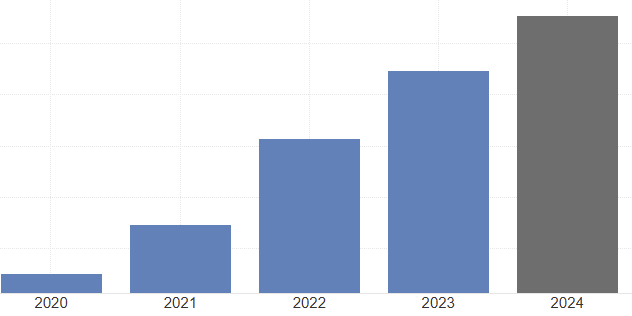
    2020-2024 GDP
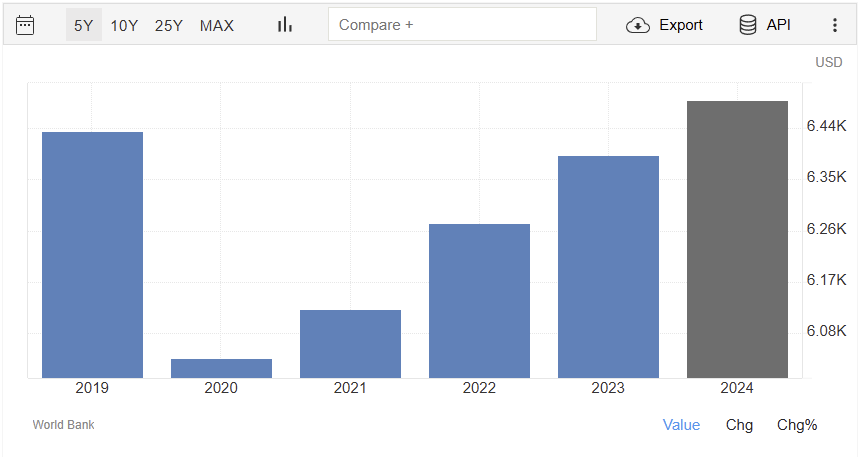
    2019-2024 GDP

    ถ้าดูแค่กราฟแรก รายได้เพิ่มมา 500 เหรียญในรอบ 5 ปี เพราะคนรวยในประเทศรายได้เพิ่ม

    หากนับปี 2019 ก่อนเกิดโควิดจะเห็นได้ว่ารายได้ในประเทศในรอบ 5 ปี ไม่เพิ่มเลย เราแค่มีรายได้กลับมาใกล้กับปีที่มี 2019


    Outlier

    Outlier

    Method

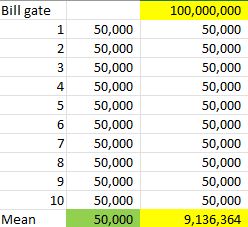
    1. ตอนแรกค่าเฉลี่ยคนในประเทศอยู่ 50,000 บาท 10 คน แต่มี Bill gate เพิ่มเข้ามาจะทำให้ค่าเฉลี่ยเพิ่มขึ้นจาก 50,000 บาท เป็น 9,136,634 บาท
    2. การเพิ่มเข้ามาของ Bill Gate เรียกว่า Outlier
    3. จึงเป็นสาเหตุให้รายได้ของประเทศมีการกระจายตัวเบ้ขวาเพราะคนรวยเพิ่มมาบางคนทำให้ค่าเฉลี่ยนในประเทศเปลี่ยนไปมาก

    Case Singapore GDP

    ที่ Singapore GDP สูงแต่คนในประเทศลำบากเช่นค่าน้ำ 60 บาท

    GDP per capital ไม่สื่อถึงการกระจายรายได้ แต่ยังใช้ค่าเฉลี่ยอยู่เพราะยังหาวิธีที่ดีกว่าไม่ได้

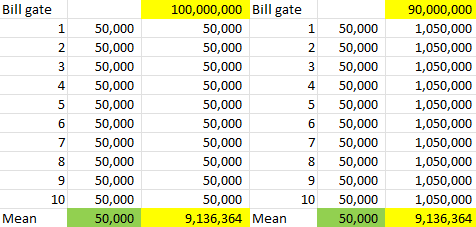
    GDP เท่าเดิม แต่คนในประเทศ 90% สามารถมีความสุขได้โดยการที่คนรายได้สูง 10% ของประเทศ ยอมจนลง 10% กระจายรายได้ของคนในประเทศนี้จะดีขึ้นได้ตามรูปด้านล่าง

    หาก bill gate แบ่งเงินรายได้ 10% คนในประเทศรายได้ขึ้นหลายเท่าได้เลย

    หาก Bill Gate แบ่งเงินรายได้ 10% คนในประเทศรายได้เพิ่มขึ้นหลายเท่าได้เลย


    หวังว่าการบทความสรุปเกี่ยวกับสถิติและเคสตัวอย่างที่ยกตัวอย่างไป จะสามารถนำไปประยุกต์ใช้ในชีวิตประจำวันแล้วทำให้ตัดสินใจดีขึ้นโดยอ้างอิงสถิติทางทฤษฎีไปสู่ชีวิตจริงครับ


    ขอบคุณคอร์ส Essential Statistic 1 จาก Data Science Bootcamp 11 DataRockie : https://data-science-bootcamp1.teachable.com/courses/enrolled/2684443


  • 10 Ideas from Google Sheets 101 เพื่อให้สามารถจัดการข้อมูลให้เป็นระเบียบมากขึ้น

    10 Ideas from Google Sheets 101 เพื่อให้สามารถจัดการข้อมูลให้เป็นระเบียบมากขึ้น

    Teached by Kasidis Satangmongkol (DataRockie Owner)

    💕💕💕 หลังจากได้เรียน Google Sheets 101 จาก Data Science Bootcamp 11 จึงอยากสรุปความรู้เป็นบทความเพื่อพัฒนาความเข้าใจให้มากขึ้นสำหรับ Google Sheet คือโปรแกรม Spreadsheet ที่ใช้งานได้ฟรี ทำให้สามารถสร้าง แก้ไข และทำงานร่วมกับผู้อื่นได้แบบ Real-time


    1. Why Google Sheets?
    2. Data Types
      1. Type of Data
      2. Type of Category Data
      3. Punctuation
    3. Array Formula
      1. Horizontal Structure
      2. Vertical Structure
      3. Matrix Structure
    4. Cell References
    5. Function
    6. And or Not
    7. Conditions
      1. Condition term
      2. IF
      3. NESTED IF
      4. IFS
      5. SWITCH
    8. Aggregate Function
    9. Aggregate function with Conditions
      1. SUMIFS
    10. Filter and Sort
      1. Filter
        1. Filter by hand
        2. Filter with and, one condition, or
      2. SORT

    Why Google Sheets?

    ปกติควรใช้ Spreadsheets tool ในการเก็บ วิเคราะห์ และนำเสนอข้อมูล

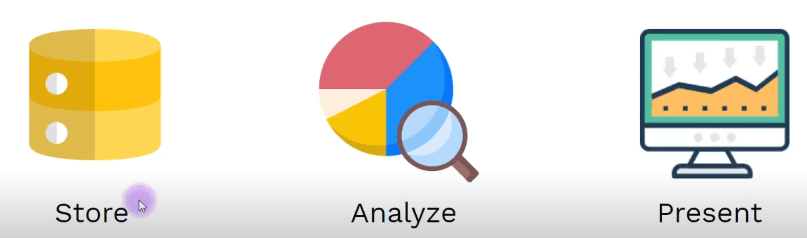
    Spreadsheet Method
    Spreadsheet MethodDefinition
    Storeเก็บรวมข้อมูล (Structure Data)
    Analyzeทำความสะอาดและวิเคราะห์ข้อมูล
    Presentนำเสนอ insights ที่มีประโยชน์ต่อแบรนด์/ เรื่องที่เราสนใจ

    Data Types

    Type of Data

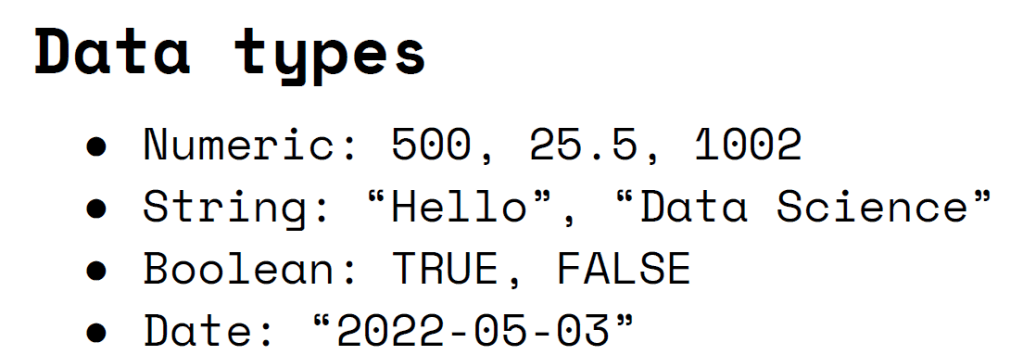
    Data Types
    Data TypeDefinition
    Numericตัวเลข
    Stringตัวอักษร
    BooleanTrue or False
    Dateวันที่

    Foundation Date : YYYY-MM-DD


    Type of Category Data

    TypeDefinition
    Dimensionประเภทของข้อมูลที่เป็น Category
    Measurementระเภทของข้อมูลที่เป็น Numeric

    Explain the different between dimension and measurement in a table

    dimension and measurement

    Punctuation

    Punctuation
    TypePunctuationDefinition
    Double quote” “use for message
    Ampersand&to connect 2 message

    Array Formula

    มีไว้กรณีสามารถพิมพ์คำสั่งครั้งเดียวแล้วได้ผลลัพธ์ หลายๆค่าพร้อมกัน

    Arrayformula Shortcut : CTRL + SHIFT + ENTER

    TypeDefinitionPunctation
    Horizontal Structureข้อมูลเรียงแนวนอน,
    Vertical Structureข้อมูลเรียงแนวตั้ง;
    Metrix Structureข้อมูลเรียงแนวนอนก่อน แล้วแสดงผลแนวตั้งต่อ, ;

    Horizontal Structure

    A7={1, 2, 3, 4, 5}
    
    --------------------------------
    จะแสดงผลในแนวนอนดังนี้ 1 2 3 4 5 
    

    Vertical Structure

    A9={"Toy"; "Anna"; "John"; "David"}
    --------------------------------
    Toy แสดงผลในแนวตั้ง
    Anna
    John
    David
    

    Matrix Structure

    ={100, 200; 300, 400; 500, 600} 
    ----------------------- 
    100 200
    300 400
    500 600 
    แสดงผลในแนวนอนก่อน แล้วหลังจากจะแสดงผลแนวตั้งต่อจากแนวนอน 
    
    Results from Three Types of Array Formulas

    Cell References

    การ lock cell สามารถทำได้โดยการกด Press F4 to lock cell

    Shortcut TypeDefinition
    A1ไม่มีการ lock cell ใดๆ เลย
    $A$1Absolute formula จะไม่มีการเลื่อนแถวเลย
    A$1ปล่อยฟรี column A lock only row 1
    $A1lock only column A ปล่อยฟรี row 1

    Method by I2 = %percent ที่เงินเดือนของพนักงานแต่ละคนจะเพิ่มขึ้น

    Sample of lock cell

    Function

    • หน้าที่ของ Function การเปลี่ยน input ให้กลายเป็น output
    Input to Output
    function_name(arg1,arg2,[arg3],[arg4])
    Required Argument
    Optional Argument
    
    TypeDefinition
    Require Argumentตัวแปรที่จำเป็น ต้องมีสูตรถึงจะใช้ได้
    Optional Argumentตัวแปรที่ไม่จำเป็นต้องมี เป็นแค่ ตัวแปรเสริม

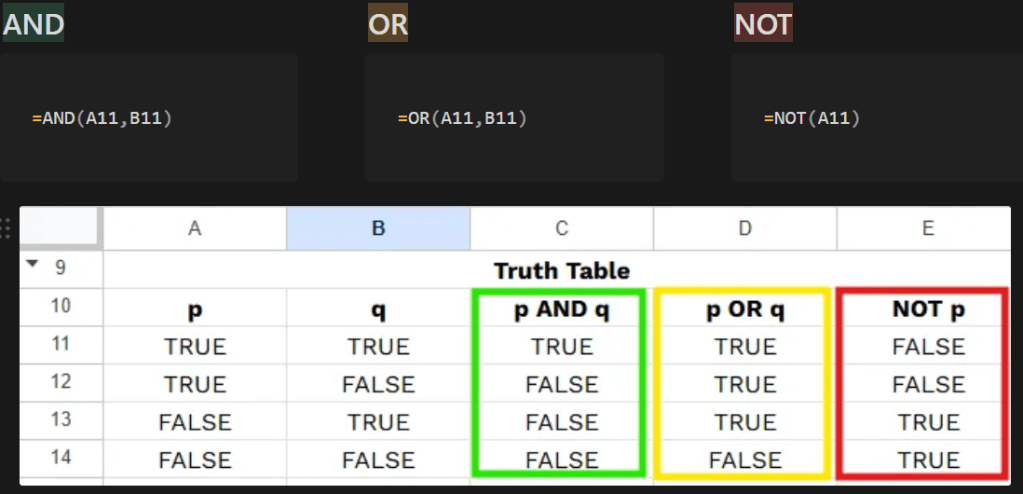
    And or Not

    Array Function ไม่สามารถใช้กับ AND, OR, NOT

    TypeDefinition
    ANDจะแสดงค่าจริงต่อเมื่อ 2 เงื่อนไขเป็นจริง
    ORจะแสดงค่าจริงต่อเมื่อ 1 เงื่อนไขเป็นจริง
    NOTจะแสดงค่าไม่จริง
    Prepare AND, OR, NOT

    Conditions

    TypeCondition
    IFแสดงผลลัพธ์แบบ 1 เงือนไข
    IFSแสดงผลลัพธ์ IF ซ้อน IF
    NESTED IFSผลลัพธ์แบบมี IFS ตัวเดียวโดยทำอ่านง่าย
    SWITCHใส่ Range Condition แค่ 1 รอบง่าย

    Condition term

    SalarySegment
    ≥100KHigh
    ≥50KMedium
    ElseLow

    IF

    IF(F2:F6>=100000,"High","Low")
    

    NESTED IF

    ArrayFormula(IF(F2:F6>=100000,"High",IF(F2:F6>=50000,"Medium","Low")))
    

    IFS

    ArrayFormula(IFS(F2:F6>=100000,"High",
    F2:F6>=50000,"Medium",
    F2:F6<50000,"Low"))
    
    NESTED IF VS IFS

    NESTED IF vs IFS

    QualityNESTED IFIFS
    PatternIF ซ้อน IFสูตรสั้นกว่า
    Approachสูตรอ่านยากเมื่อมีหลายเงื่อนไขอ่านสูตรง่ายกว่า
    1. SEGMENT : ถ้า column F ≥ 100,000 ให้แสดง “High”, Column F ≥ 50,000 ให้แสดง “Medium” นอกนั้นแสดง “Low
    2. SEGMENT (IFS) : จะแยกเงื่อนไขพร้อมกันทีเดียวเลย

    SWITCH

    • สามารถหาความสัมพันธ์ระหว่าง 2 ตาราง แล้วใส่ Range Condition แค่ 1 รอบทำให้สูตรสามารถอ่านได้ง่าย

    SWITCH vs IFS

    TypeRange
    SWITCHมี Range Condition 1 รอบ Column G
    IFSมี Range Condition หลายรอบ Column G
    ---SWITCH---
    ArrayFormula(SWITCH(G2:G6,
    1, "London",
    2, "Madrid",
    3, "Tokyo"))
    ---IFS----
    ArrayFormula(IFS(G2:G6=1,"London",
    G2:G6=2,"Madrid",
    G2:G6=3,"Tokyo"))
    

    SWITCH หาก column G = 1 show “London”, = 2 show “Madrid”,= 3 show “Tokyo

    Switch vs IFS

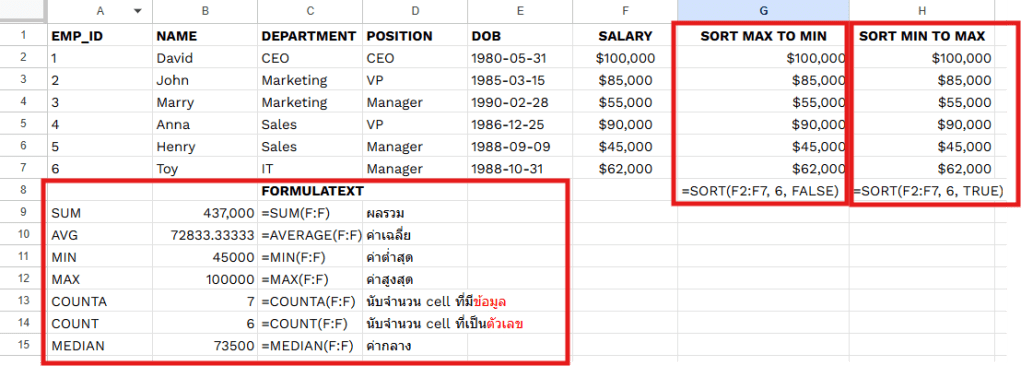
    Aggregate Function

    Aggregate FunctionDefinition
    SUMผลรวม
    AVGค่าเฉลี่ย
    MINค่าต่ำสุด
    MAXค่าสูงสุด
    COUNTAนับจำนวน cell ที่มีข้อมูล
    COUNTนับจำนวน cell ที่เป็นตัวเลข
    MEDIANค่ากลาง
    Aggregate Function

    Aggregate function with Conditions

    COUNTIFS

    Countifs
    TypeDefinition
    Criteria_range1ช่วงที่ใช้ในการหานับค่า
    Criterionตัวเลขหรือข้อความที่ต้องการหานับค่า

    Requirement : เราสามารถสรุปผลของข้อมูลเบื้องต้นโดยการนับจำนวน Brand หรือ Model ที่เราต้องการ

    G3=COUNTIFS(C:C,"AMD",D:D,"Ryzen 5")       
    ค้นหา "Brand AMD" ที่อยู่ Column C และ "Model Ryzen 5" ที่อยู่ Column D
    G4=COUNTIFS(C:C,"AMD",E:E,">300")         
    ค้นหา "Brand AMD" ที่อยู่ Column C และ Column E ที่มี "Quantity > 300"
    G5=COUNTIFS(C:C,"AMD",B:B,"<2021-06-05")  
    ค้นหา "Brand AMD" ที่อยู่ Column C และ Column B ที่มี "Date < 2021-06-05"
    G6=COUNTIFS(C:C,"AMD",B:B,">=2021-06-06") 
    ค้นหา "Brand AMD" ที่อยู่ Column C และ Column B ที่มี "Date >= 2021-06-06"
    G7=COUNTIFS(C:C,"AMD",B:B,"<2021-06-06")  
    ค้นหา "Brand AMD" ที่อยู่ Column C และ Column B ที่มี "Date < 2021-06-06"
    
    COUNTIFS Formula

    SUMIFS

    SUMIFS
    TypeDefinition
    Criteria_range1ช่วงที่ใช้ในการหารวมผลลัพธ์
    Criterionตัวเลขหรือข้อความที่ต้องการหารวมผลลัพธ์

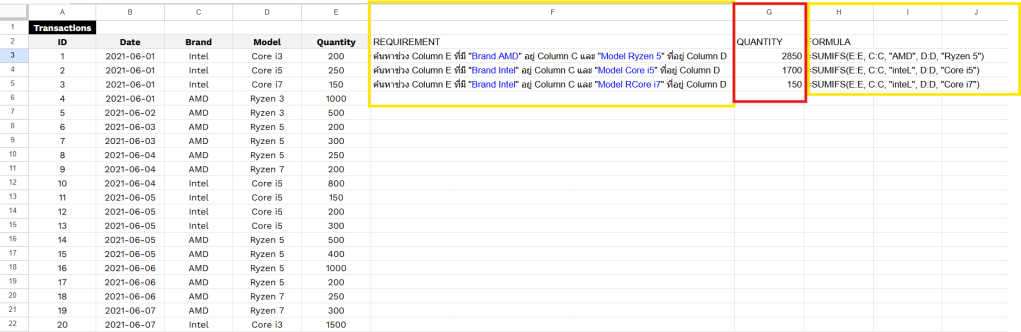
    Requirement : เราสามารถ หาผลรวม Brand and Model ว่ามี Quantity เท่าไร

    SUMIFS Formula
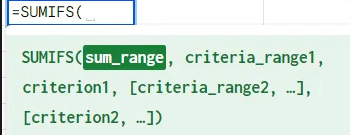
    G3=SUMIFS(E:E, C:C, "AMD", D:D, "Ryzen 5")   
    ค้นหาช่วง Column E ที่มี "Brand AMD" อยู่ Column C และ "Model Ryzen 5" ที่อยู่ Column D 
    G4=SUMIFS(E:E, C:C, "inteL", D:D, "Core i5") 
    ค้นหาช่วง Column E ที่มี "Brand Intel" อยู่ Column C และ "Model Core i5" ที่อยู่ Column D
    G5=SUMIFS(E:E, C:C, "inteL", D:D, "Core i7") 
    ค้นหาช่วง Column E ที่มี "Brand Intel" อยู่ Column C และ "Model RCore i7" ที่อยู่ Column D 
    

    ตัวอักษรตัวเล็กกับตัวใหญ่ สามารถค้นหาได้เหมือนกัน ต้องระวัง


    Filter and Sort

    Filter

    Filter เพื่อดึงเฉพาะข้อมูลที่ต้องการนำมาใช้ในการทำงาน “โดยดึงมาทีเดียวพร้อมกันทุก Column”

    Filter by hand

    • press filter in google sheet เลือก Filter by Condition —> Date is before —> Exact Date —> “2021-06-06”
    Filter with hand

    Filter with and, one condition, or

    Filter with brand “AMD” only
    =FILTER(A3:E22,C3:C22="AMD") 
    เลือกช่วงทั้งหมด พร้อม Column Brand ที่มี "AMD"
    Filter AND
    =FILTER(A3:E22,C3:C22="AMD",D3:D22="Ryzen 5") 
    เลือกช่วงทั้งหมด พร้อม Column Brand ที่มี "AMD" และ Column Model "Ryzen 5"
    Filter OR
    =FILTER(A3:E22, (C3:C22="AMD") + (D3:D22="Core i7")) 
    เลือกช่วงทั้งหมด พร้อม Column Brand ที่มี "AMD" หรือ Column Model "Ryzen 5"
    

    SORT

    SORT FORMULA =SORT(range, sort_column, is_ascending) 
    

    is_ascending = True or False

    TypeOrder
    FALSEเรียงจาก มากไปน้อย
    TRUEเรียงจาก น้อยไปมาก
    Sort with one condition
    =SORT(A3:E22,3,TRUE)
    เรียงข้อมูล Column ที่ A3 ถึง E22 โดยที่ Column Model เป็น "Column ที่ 3" ซึ่งเรียงจาก"มากไปน้อย"
    Sort with two condition
    =SORT(A3:E22,3,TRUE,5,FALSE)
    เรียงข้อมูล Column ที่ A3 ถึง E22 โดยที่ Column Brand เป็น Column ที่ 3 ซึ่งเรียงอักษรจาก"น้อยไปมาก" และ Column Quantity เป็น Column ที่ 5 ซึ่งเรียงจาก"มากไปน้อย"
    

    หวังว่า บทความนี้จะเป็นประโยชน์ในการช่วยให้ทุกท่านสามารถนำความรู้จาก Google sheet 101 ในไปประยุกต์ใช้ในชีวิตส่วนตัวและชีวิตการทำงานที่สามารถทำให้ทุกท่านทำงานได้รวดเร็วและสะดวกยิ่งขึ้นครับ


  • 10 Ideas from Data Science Bootcamp batch 11 Live 01 ที่นอกจากสอน data แล้ว ยังสอนวิธีการเรียนรู้ที่ดีทำให้เปลี่ยน Mindset ให้ดีขึ้นได้ด้วย

    10 Ideas from Data Science Bootcamp batch 11 Live 01 ที่นอกจากสอน data แล้ว ยังสอนวิธีการเรียนรู้ที่ดีทำให้เปลี่ยน Mindset ให้ดีขึ้นได้ด้วย

    Teached by Kasidis Satangmongkol (DataRockie Owner).

    ✅✅✅การที่มีโอกาสลงเรียน Data Science Bootcamp batch 11 ทำได้รับ mindset ใหม่ๆ ที่ช่วยให้เรามีความมุ่งมั่นเพื่อให้ทำสิ่งต่างๆ สำเร็จ (manifestation) มี W3Schools ให้ศึกษาหาความรู้ดีๆ ได้ตลอดเวลา ขอบคุณสำหรับโอกาสในการเรียนรู้ครับ แอดทอย 😘😘😘


    Table of Content

    1. General Bootcamp
    2. W3Schools Academy
    3. Language Skills
    4. Education
      1. How to Learn
      2. Good Learn
      3. Good Mindset
      4. Research skills
    5. Our Curriculum
      1. Curriculum
      2. Plan Study with Sprint and Agile
      3. Plan for learning
      4. Learning Journey
    6. Class Support
    7. Rule of Bootcamp
      1. Rule No. 1 Skills in combination are more powerful than individual skills.
      2. Rule No. 2 Never beyond 80%
    8. Define Data Analyst, Data Scientist, Data Engineer
      1. Data Analyst in bootcamp
    9. Model 4 M Limitless
    10. Build Your Presence Online
      1. Important things for applying for work

    General Bootcamp

    • อธิบายการเรียน bootcamp เบื้องต้น
    • โรงเรียนนี้พยายามจะเปลี่ยนจาก video based เป็น text-based ประมาณ 30% :ซึ่งทำให้สะดวกต่อการเรียนรู้ (No AI help)
    • ปัจจุบันคนเราสามารถเขียนภาษาได้เข้าใจง่ายกว่า AI เขียน ขนลุก 😍😍😍

    W3Schools Academy

    สำหรับการเรียน Data หรือ Coding ถ้าจะไม่พูดถึง W3Schools ก็ไม่ได้ เนื่องจากเป็นแหล่งเรียนรู้ที่คนยอมรับและนิยมเข้าไปศึกษาหาความรู้เพิ่มเติม หากเราไม่รู้จัก Function ของโปรแกรม R, SQL, Python ในการเขียนโปรแกรมก็สามารถเข้าไปหาอ่านได้ใน W3school ผู้เรียนจะมีโอกาสได้ทดลองเขียนโปรแกรมตามคำแนะนำ พร้อมคำอธิบายละเอียดเมื่อเกิดข้อผิดพลาด ทำให้เข้าใจเนื้อหาได้ง่าย❤️❤️❤️แต่การเรียน Data Science Bootcamp batch 11 สามารถมีโอกาสสอบ W3School

    Website : https://www.w3schools.com/

    W3School

    Highlight of this class : ได้เรียนเนื้อหา W3School ทำ partnership ด้วยกัน


    Language Skills

    • Language Skills มีความสำคัญอย่างมาก เพราะเป็นเครื่องมือหลักในการสื่อสาร สร้างความเข้าใจระหว่างบุคคล และเป็นพื้นฐานสำคัญในการเรียนรู้ โดยเฉพาะ Skill Writing และ Reading
    Language SkillsWords per minute
    Reading200-250
    Speaking120-150
    Listening40-60
    Writing120-150

    คนเขียนจะใช้เวลานาน แต่อ่านจะใช้เวลาเร็วดังนั้น Writing and Reading is Metaskill


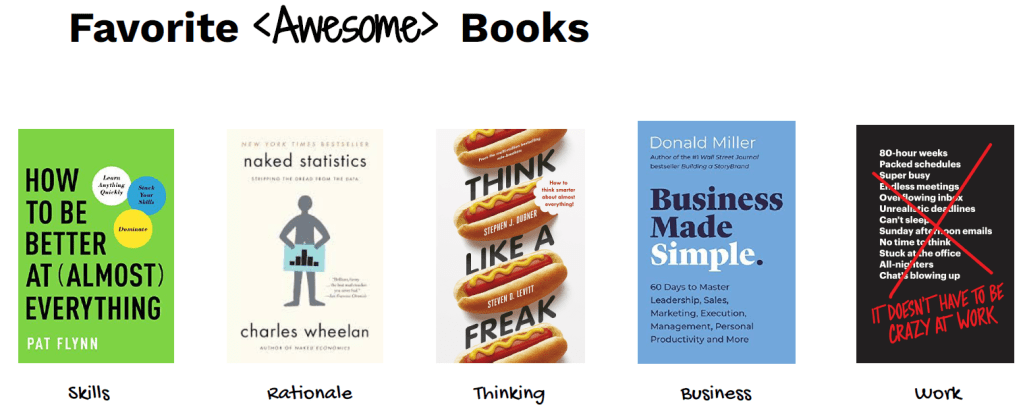
    5 books recommend this course

    5 Books Recommend

    These books can be ordered on Amazon.

    BookAuthorSkillDefinition
    How to be better at (almost everything)Pat FlynnSkillsPat Flynn is generalist can a lot of create music, fitness, write a book, do business and create content
    Naked StatisticsCharles WheelanRationaleCharles wheelan is economist but can write statistic to make another people understand
    Think like A FreakStephen J. Dubner and Steven LevittThinkinghow to ask question
    Business Made SimpleDonald millerBusinessto create write and business
    It doesn’t have to be crazy at workDavid Heinemeier Hansson and Jason FriedWorkhow to work from basecamp company

    to understand statistic you must read english book.


    Education

    1. คนทำ Data จะรู้เรื่องเดียวไม่ได้ จำเป็นต้องรู้หลายเรื่องเช่น business, marketing เพื่อที่จะขึ้นตำแหน่งได้เรื่อยๆ
    2. การเรียนรู้เป็นสิ่งที่ไม่มีวันสิ้นสุด และสามารถเก่งขึ้นได้เรื่อยๆ

    How to Learn

    • วิชาที่ทุกคนจะได้เรียน ทุกคนไม่ต้องเลือกเพราะ “แอดทอยเลือกให้หมดแล้ว
    • สิ่งที่เปลี่ยนแอดทอยได้คือ mindset ที่จะทำเพื่อพ่อ แม่ คือความขยัน
    • ดังนั้นคนเราควรพยายามคิดแบบ deep thinking ให้เยอะ เพื่อเพิ่มโอกาสในการอยู่รอดในอนาคตได้
    Class Day to learn
    Main ClassSaturday
    Support ClassSunday
    On demand ClassWeekday

    Good Learn

    1. Good sleep
    2. Good Food
    3. Good Exercise
    4. Drink a lot of water

    Good Mindset

    1. ไม่ควรอ่านหนังสือบนเตียงนอนเพราะไม่งั้นจะง่วงนอน
    2. คนรู้ว่าจะเรียนแล้วจะดี แต่คนมักไม่ยอมเรียน 555
    3. สิ่งที่แรกที่ควรทำตอนเช้า อ่านหนังสือ อ่านบทความ ออกกำลังกาย take course เขียน content
    One Hour Focus
    • ควรเรียน 1 ชมไปเลย ดีกว่าการแบ่งทีละ 15 นาที 4 ครั้ง
    • ต้องพยายามอย่าโดน Disrupt ในการเรียน

    Research skills

    Research Skills
    • Method Research สามารถเรียนรู้ด้วยตัวเอง Research ข้อมูลและเขียนขึ้นมา
    • Solving Problem Yourself

    Skill

    1. Google is your friend
    2. แต่หาใน google ไม่เจอสามารถมาถามใน discord ได้
    3. Answer are already in the internet

    ทักษะการ search เป็นทักษะที่สำคัญมากในการเรียนรู้ได้ตัวเอง


    Our Curriculum

    Curriculum

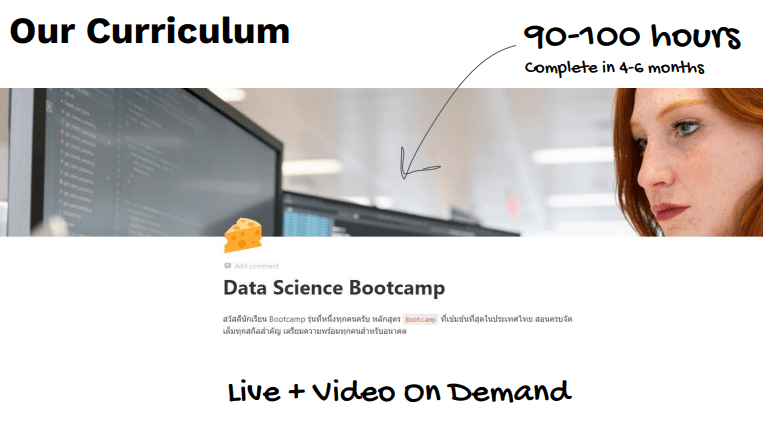
    Our Curriculum
    • รุ่นแรกๆ มีนักเรียน 200-300 คนแล้วเรียนผ่าน notion
    • ทุกสัปดาห์นักเรียนจะได้สกิลใหม่ๆ เพื่อพัฒนาไปเรื่อยๆ ทีละสัปดาห์เป็น Sprint
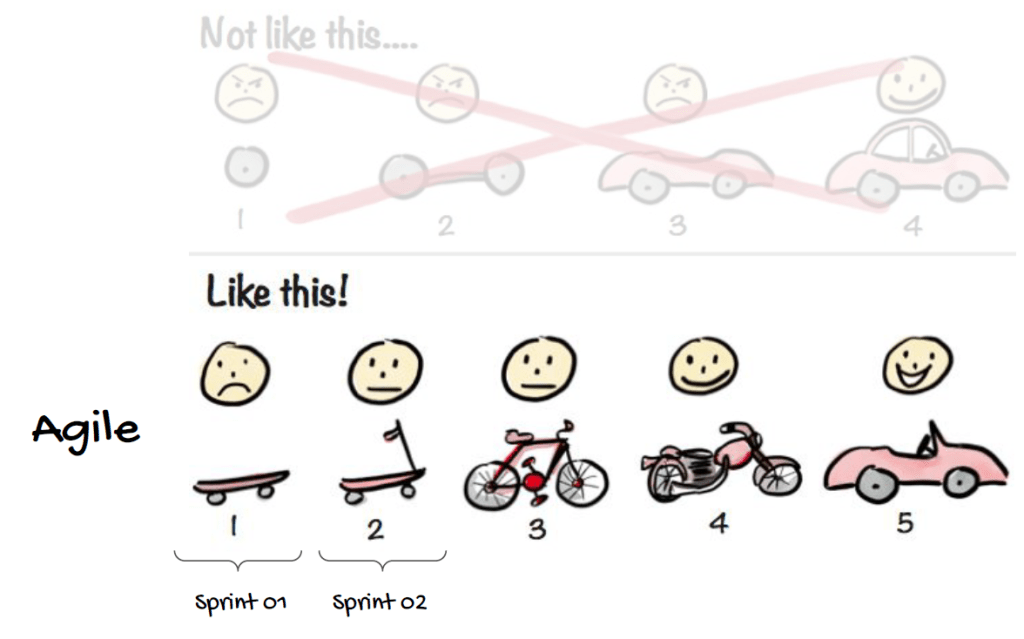
    • การเรียนแบบเป็น Agile จะช่วยจับจังหวะการเรียนรู้ได้ดี การทำงานที่รวดเร็วว่องไว เน้นผลลัพธ์ที่มีประสิทธิภาพมากกว่าขั้นตอน เช่น 1.Week 1 เรียน Welcome to The Course bootcamp 2.Week 2 เรียน Build a second brain ทบทวน Week 1

    การทำแบบนี้ไปเรื่อยๆ จะช่วยให้สามารถจำเนื้อหาและประยุกต์การใช้ทำงานจริงได้


    Plan Study with Sprint and Agile

    1. You must break step of learning into Sprint.
    2. มนุษย์เราสามารถจัดการเรียนในแต่ละสัปดาห์ๆ เพิ่มให้เราเก่งขึ้น Skill ละ 1 week
    3. Agile จะเป็นการเรียนรู้จากเมื่อวานที่ดีขึ้นเรื่อยๆ
    Sprint and Agile

    This school create product that is yourself can design by add skill to have add value.


    Plan for learning

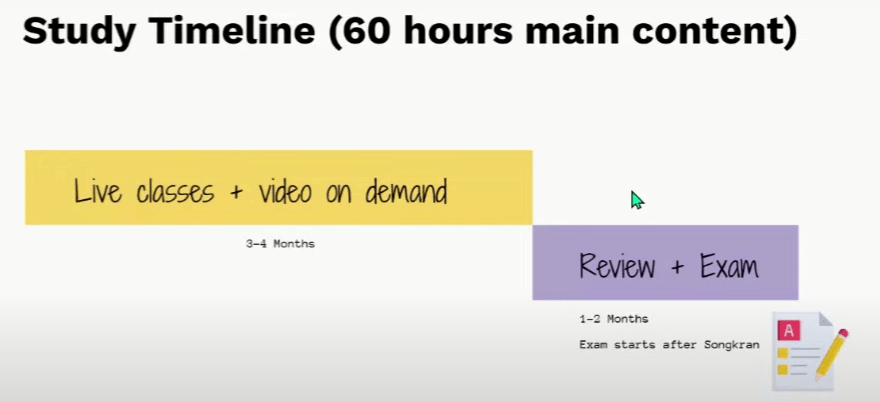
    Study Timeline
    • โดยอาจจะมีกิจกรรมดีๆ เพิ่มเวลาเรียนจากสิ้นสุดเดือนพฤษภาคมเป็นเดือนมิถุนายน
    Break down your goal

    ถ้าแบ่งเวลาวันละ 40-60 นาทีก็สามารถเรียนจบได้เลย ถ้าเราเรียนรู้ทุกวัน


    Learning Journey

    Our Learning Journey

    Learning path

    1. ไม่เรียนข้าม sprint
    2. เรียน on-demand ก่อนเข้า
    3. ทำการบ้าน
    4. ทบทวนบทเรียนและ take note
    MonthLearning Path
    Jan 2025Spreadsheets + Databases
    Feb 2025Programming +Data Transformation
    March 2025Statistics + Business Analytics + ML
    Apr 2025Python + Dashboard

    Class Support

    1. มักจะมี class เสริมในวันอาทิตย์โดยส่วนใหญ่
    2. class เสริมจะช่วยให้นักเรียนได้รู้เกี่ยวกับความรู้อื่นๆที่มีประโยชน์ Data Scientist, Data Engineer, Business Analyst
    Class Support

    Rule of Bootcamp

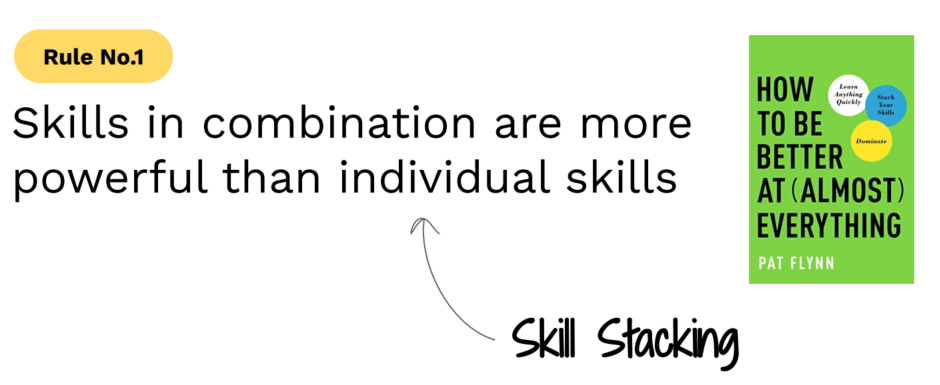
    Rule No. 1 Skills in combination are more powerful than individual skills.

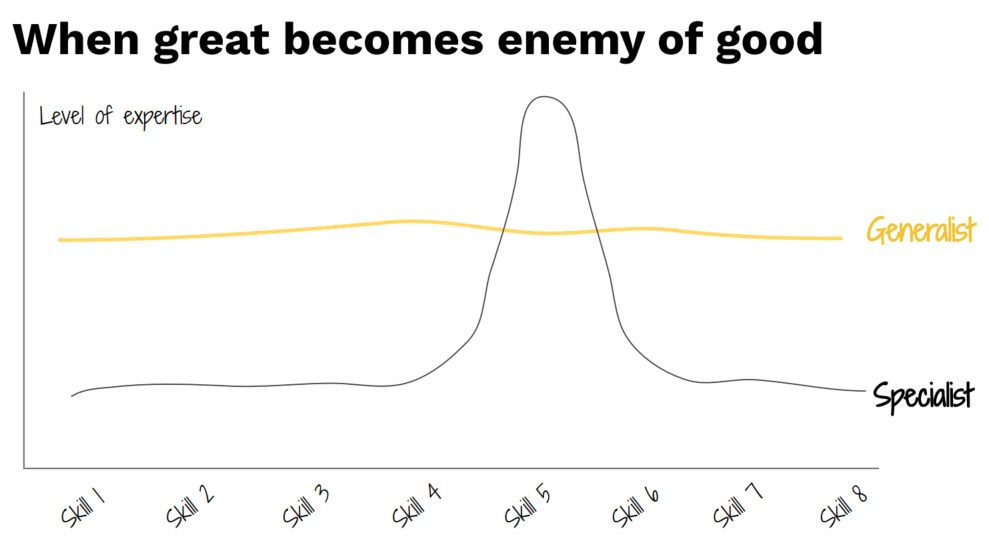
    รู้เนื้อหากว้างในทุกด้านให้มากกว่าค่าเฉลี่ย แต่ไม่จำเป็นต้องเก่งที่สุดทุกเรื่อง

    Rule No. 1
    • Pat Flynn is generalist can a lot of create music, fitness, write a book, do business and create content.
    • ต้องวิ่งและเล่นกล้ามพร้อมกัน ดีกว่าเลือกทำอย่างใดอย่างนึงมากกว่า เช่น วิ่งอย่างเดียว
    Mental of this school

    Generalist > Specialist


    Rule No. 2 Never beyond 80%

    Diminishing Return

    Diminishing Returns เป็นหนึ่งในกฎเชิงเศรษฐศาสตร์ ซึ่งเราเรียกกันว่า กฎแห่งผลตอบแทนที่ลดลง (Law of Diminishing)

    Diminishing Returns Case

    1. หากทำได้ 80% แล้วควรไปเรียนวิชาอื่นต่อดีกว่า
    2. อยากกินพิซซ่ามาก พอกินชิ้นแรกอร่อยมาก แต่กินชิ้นที่ 7-8 เริ่มอิ่มแล้วไม่คุ้มที่จะกินแล้ว
    3. ถ้าเรียนไปแล้ว 1 ชม แล้วได้ผลตอบแทนไม่คุ้มกับที่เรียน ควรที่จะไปเรียนวิชาอื่นเลย

    ทรัพยากรที่ยิ่งใหญ่ที่สุดในชีวิตมนุษย์คือเวลา


    Define Data Analyst, Data Scientist, Data Engineer

    1. คนเราเป็น data anlyst อยู่แล้ว ขึ้นอยู่กับแต่ละคนมี Skill ในตัวเองกี่ %
    2. คนทั่วไป 10% แอดทอยอาจจะเป็น 70% แต่ขอให้เองกว่าคนทั่วไป
    3. น้องชายแอดทอยเป็นนักกฎหมายใช้ Data analyst แบบใช้ unstructure data
    TypeDefinitionSkill
    Structured Dataข้อมูลที่จัดระเบียบSpreadsheet , Table
    Unstructured Dataข้อมูลที่ไม่มีรูปแบบImage , Texts
    Semi-structured Dataข้อมูลที่มีโครงสร้างบางส่วนEmails
    Data Analyst
    JobDefinitionTool
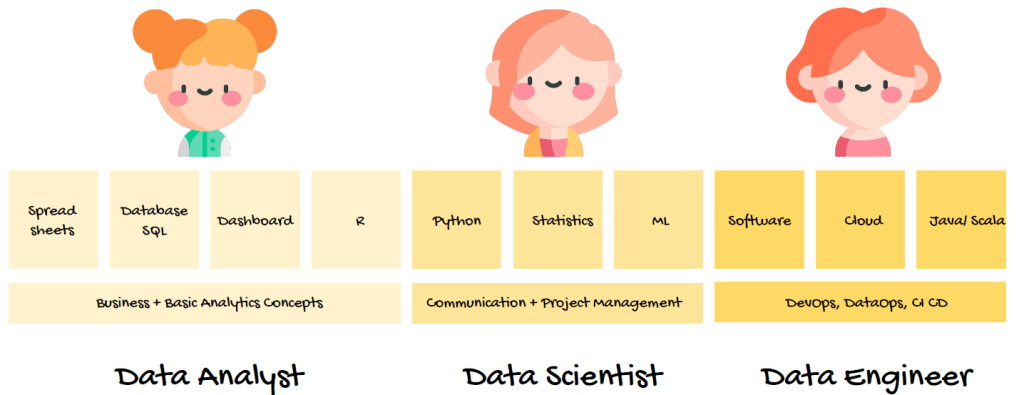
    Data Analystวิเคราะห์ข้อมูลที่มีอยู่เพื่อหา Insight ในการตัดสินใจทางธุรกิจSpreadsheets+SQL+
    Dashboard
    Data Scientistสร้างแบบจำลองทางสถิติ เพื่อทำนายผลลัพธ์หรือค้นหา PatternPython+Statistics+ML
    Data Engineerสร้างและบำรุงรักษาระบบโครงสร้างพื้นฐานของข้อมูล เพื่อให้ข้อมูลพร้อมใช้งานSoftware+Cloud+
    Java/Scala
    Data Analyst vs Data Scientist vs Data Engineer

    Data Analyst in bootcamp

    1. Data Analyst is Essential Skill not sexy skills
    2. Skill ด้านล่างคือสิ่งโรงเรียน bootcamp จะได้เรียนทั้งหมด
    Data Analyst in bootcamp

    Model 4 M Limitless

    Jim Kwik, author of Limitless

    Limitless
    Model 4 MDefinitionSample
    Mindsetความเชื่อและมุมมองที่ส่งผลต่อวิธีการคิดและการตัดสินใจ ควรมีแนวคิดที่ยืดหยุ่นและพร้อมพัฒนาI live, I learn, and I repeat the cycle.
    Motivationแรงผลักดันที่ช่วยให้เราเริ่มต้นและมุ่งมั่นในการทำสิ่งต่างๆLearning new skills enhances one’s quality of life.
    Methodแผนและกระบวนการที่ใช้ในการบรรลุเป้าหมาย ควรมีวิธีการที่เป็นระบบWake up early, then study, then write, and then share what you learn.
    Momentumการทำอย่างสม่ำเสมอและต่อเนื่องเพื่อสร้างนิสัยdo it every day
    1. เราสามารถทำอะไรก็ได้ ไปทุกวันจนกลายเป็น momentum ได้ง่าย
    2. ทำให้การเข้า live วันเสาร์เป็นเรื่องธรรมดา เพื่อที่จะสามารถเรียนรู้ไปเรื่อยๆ
    3. ต้องพูดภาษาอังกฤษได้

    Build Your Presence Online

    ต้องมี LinkedIn ไว้เพื่อสมัครงาน

    ใช้ Dataset สำหรับทดลองสร้าง project ของตัวเอง :

    Build Your Presence Online
    Type of PortDefinition
    Portfolioผลงานที่สิ่งที่เราอยากจะนำเสนอให้โลกได้เข้าใจ หรือนำเสนอการวิเคราะห์ข้อมูลให้บริษัทที่เราจะไปสัมภาษณ์ได้เข้าใจว่าเราทำอะไรเป็นบ้าง
    Githubเว็บไซต์สำหรับเขียน code
    Websiteสร้างเว็บไซต์ของตัวเอง เช่น WordPress
    Blogsเขียน Blogs เช่น Medium

    Important things for applying for work

    1. แล้วเขียน content ให้คนดูเยอะๆ ถึงจะมีโอกาสได้งานเยอะขึ้น
    2. โรงเรียนนี้ เน้นการสร้าง project ขึ้นมาเพื่อแสดงว่าเราทำงานได้จริง
    3. การบ้านเป็นสิ่งที่ทุกคนได้ทำแล้วได้เน้นในการลงมือทำ
    4. ถ้าเป็นเด็กจบใหม่ แค่มี portfolio ก็มีโอกาสได้งานแล้ว
    5. ต้องมี linkedIn ไว้เพื่อสมัครงาน

    เรียนจบอะไรไม่สำคัญ สำคัญที่ปัจจุบันมี manifestation เพื่อที่จะเก่งขึ้นก็พอ


    บทความนี้จัดทำขึ้นโดยหวังว่าจะเป็นประโยชน์แก่ผู้อ่านในด้าน Mindset และ Data เพื่อให้ได้รับความรู้และไอเดียที่นำไปปรับใช้ได้

    https://data-science-bootcamp1.teachable.com/p/data-science-bootcamp-11


  • 10 Method for Power BI to build your reports and dashboard

    10 Method for Power BI to build your reports and dashboard

    This project explores the use of Power BI to create dashboards that provide insights for improved business planning and decision-making within organizations. It also demonstrates how structured data can be presented in a clear and accessible manner through data storytelling.


    Table of Content

    1. References, Resources & Files
      1. Data Files
      2. Practice Files
    2. Navigate the power BI interface and import data
      1. Learning Objective
      2. Your Role : Data Analyst
      3. Start Power BI
    3. Transform data using Power Query
      1. Transform data process
      2. Remove column “Rush Shipment”
      3. Replace Value
    4. Insert and format a visualization
      1. Visual
      2. General
    5. Practice Data Visualization in Power BI
      1. Relationship
    6. Add more visuals to enhance storytelling
      1. Card Chart
      2. Table
    7. Publish the report to the Power BI workspace
    8. Cumulative Activity Scenario
      1. Products
      2. Inventory
    9. Create Sales reports
      1. Full Sale Report
    10. Create management reports
      1. Full Management Reports

    References, Resources & Files

    This project contains the following three files:

    Data Files

    • This is an Excel file containing cookie shipping data that use to create reports have 2 sheets.
    • Sheet 1, named “Orders” shows the following data.
    1. Order ID : The cookie shipping process based on each order.
    2. Customer ID : The order of 5 customer IDs connected to the “Customers” sheet.
    3. Rush Shipment : These shipments send express or regular.
    4. Cookies Shipped : These are cookies that have been shipped to customers.
    5. Revenue : Revenue from cookie sales
    6. Cost : Costs of cookie sales
    7. Order date : The date of shipment
    • Sheet 2, named “Customers” shows details of customers who purchased products through 5 specific customers.
    1. Customer ID : Ordering of 5 customers with ID numbers linked to the “Order” sheet.
    2. Customer name : Show the information of the shipping company.
    3. Phone : The company phone number.
    4. Address : The company address
    5. City : City name
    6. State : State name
    7. Zip : Zip Number
    8. Country : Country of shipment

    The data files contain raw, uncleaned data.


    Practice Files

    • A dataset of chocolate product information for a company that use to create reports have 2 sheets.
    • Sheet 1, named “Orders” contains the following data:
    1. Order ID :The chocolate chip product distribution process based on orders.
    2. Order_date : The chocolate chip product shipping dates by order.
    3. Retail_number : List of retailers connected to the “Retailers” sheet.
    4. Quantity : The quantity of the product.
    5. Unit Price : Price per unit.
    6. Total Amount : Quantity * Unit Price
    7. Product : Chocolate Chip
    • Sheet 2, named ‘Retailer_Names‘, shows the following data:”
    1. ID : list of retailers linked to the ‘Orders’ sheet“.
    2. Retailer_Name : The name of the retail company
    3. Country : The countries of shipment

    The practice files contain raw, uncleaned data.


    Final Files

    • This data file is for Emma’s coffee shop capstone task that use to create reports have 5 sheets.
    • Sheet 1, named “Orders” contains the following data:
    1. Order ID : Show the order list of Coffee shop
    2. Customer ID :Show the customer sequence connected to the ‘Customer ID’ sheet.
    3. Product ID : Show the product sequence linked to the ‘Customer ID’ sheet.
    4. Quantity : The quantity of coffee.
    5. Unit Price : The price of coffee per unit.
    6. Order date : The date of the coffee sale.
    • Sheet 2, named “Feedback” displays the following data:
    1. Feedback ID : Order of displaying customer feedback and suggestions.
    2. Customer ID : Show the customer order based on the “Orders” sheet.
    3. Rating : Coffee Rating
    4. Feedback : Text displaying customer feedback.
    5. Feedback date : Date of coffee shop reviews.
    • Sheet 3, named “Inventory” displays the following data:
    1. Product ID : Show the product sequence from the “Orders” sheet.
    2. Stock Level : Stock levels of coffee
    3. Reorder Level : The stock level at which a new order should be placed.
    4. Supplier : Who buys products for another person.
    • Sheet 4, named “Customers ID” displays the following data:
    1. Customer ID : Show the customer list connected to the “Orders” sheet.
    2. Customer Name : Customer’s name of Coffee Shop.
    3. Email : Email of customer’s Coffee Shop.
    • Sheet 5, named “Product ID” displays the following data:
    1. Product ID : Show the product list connected to the “Orders” sheet.
    2. Product Name : Name of product in Coffee shop.
    3. Category : Category of product in Coffee shop.
    4. Price : Price of product in Coffee shop.

    • Understand the basics of spreadsheets.
    • Familiarity with data cleaning and IF/SUM functions in spreadsheets is required.
    • The Microsoft account used to publish reports to Power BI.

    Learning Objective

    • Explore additional Power BI features like filtering publishing and graphs customization.
    • Build report with visualizations
    • Manage data relations and transform data with power Query

    you could build a data model and start to build some visuals and add some filters to our data. Then, we’ll look on how to add a theme and share your report and dashboards with others.


    Your Role : Data Analyst

    You are a Data Analyst for Cookie Bliss, your mission is to create a Power BI report to help visualize key metrics more effienctly and then publish the dashboard to share it with your teammates, providing them with sales insights for better decision-making


    Start Power BI

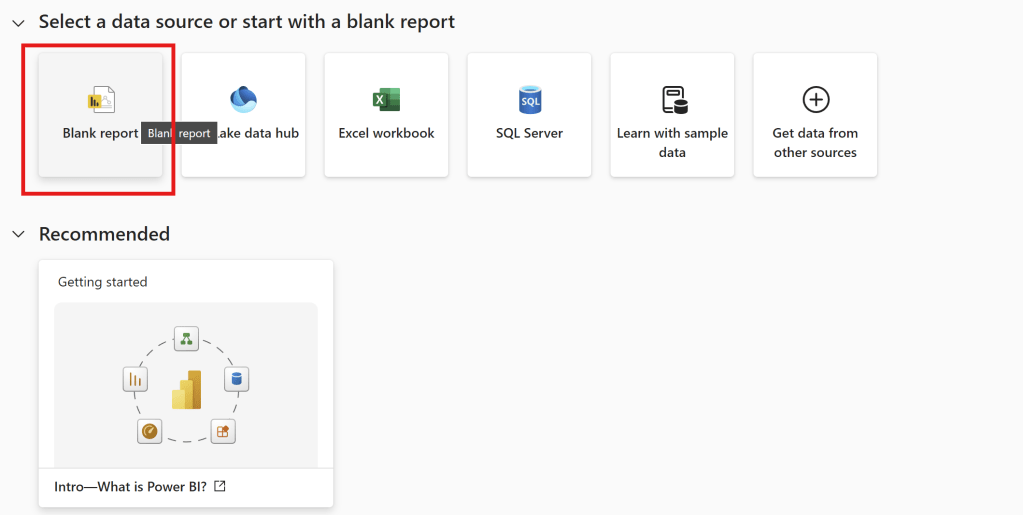
    • Then, open Power BI.
    Blank Report
    • Then, Choose Blank Report
    Visualizations Pane

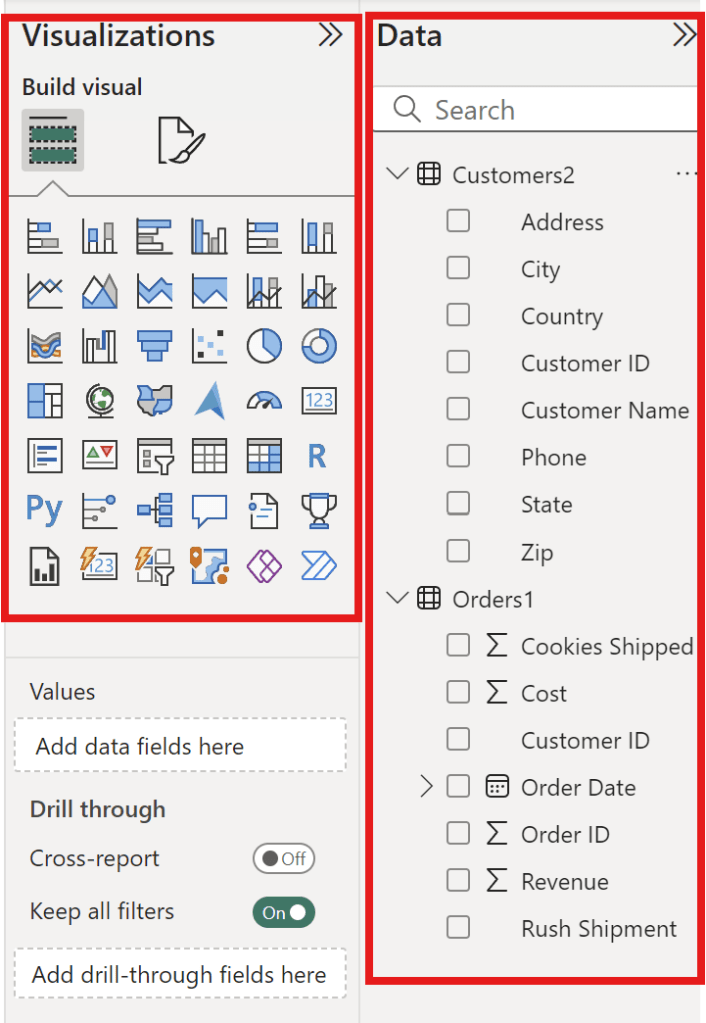
    The side column of this table highlighted in red above the picture has four rows call “Visualizations Pane“.

    Visualizations Pane TypeDefinition
    Report ViewThe Dashboard Report
    Table ViewDataset Details
    Model ViewData Relationship Model
    DAX Query ViewDAX Query Editor
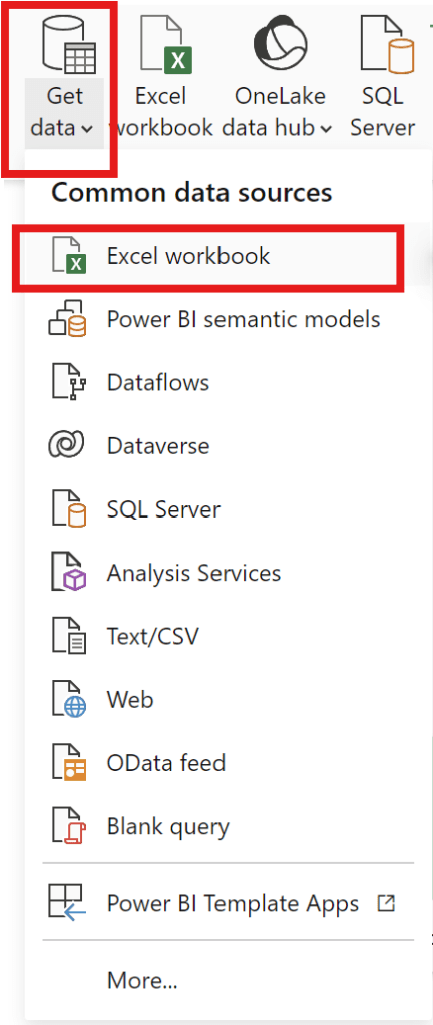
    • To create a dashboard, data must be selected.

    Get Data –>Excel Workbook –>Select the file you want to use to create a dashboard.

    Get Data

    start from export file “data

    • and can add data can be exported from various common data sources.
    • –> Choose file “data
    • –> Choose Customer2 table and Order1 table then click load.
    Load Data

    Transform data using Power Query

    how to transform data before starting to build our report.

    • can check the Data and Visualization areas.
    Check Data and Visualization Zone
    • Picture above show the Data and Visualization areas to see how each data element should be displayed.

    Transform data process

    Let’s start in the Table view.

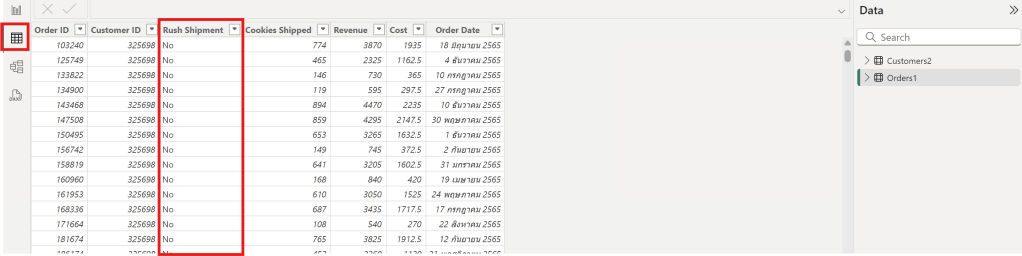
    1. In the Table view, the Rush Shipment column appears to be unnecessary from Order1 Table
    Rush Shipment Column

    2. In the Table view, the Customer2 table has a column with both “United States” and “US” as values, which should be standardized to one name.

    Customer2 table with United States and US

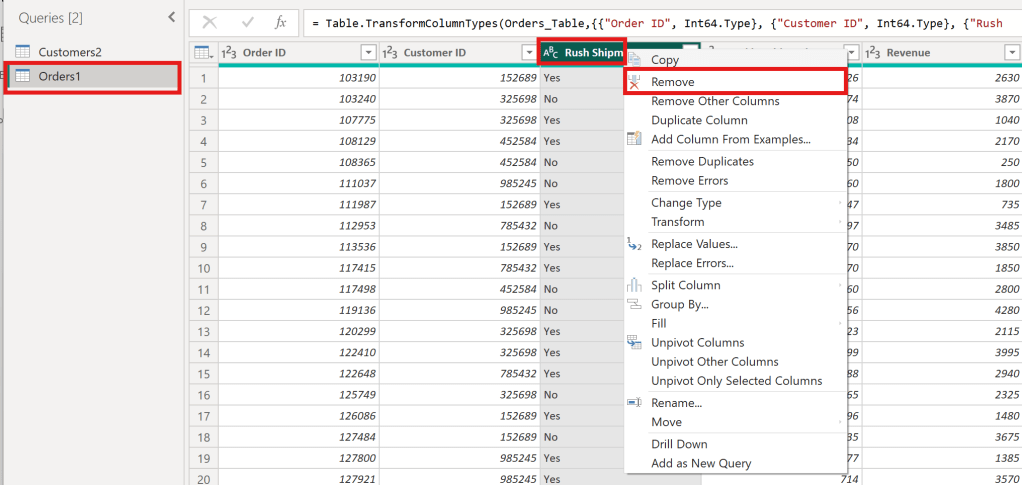
    Remove column “Rush Shipment”

    —> Choose orders 1 Table —> Choose Column Rush Shipment —> click Remove

    Remove Column Rush shipment
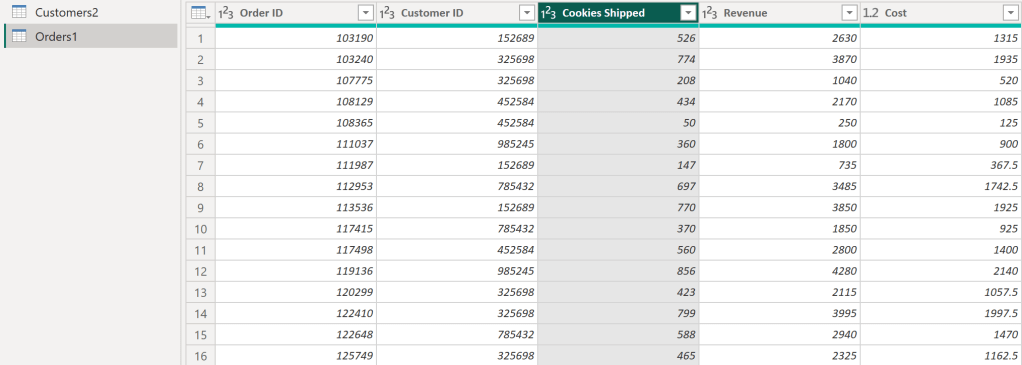
    • After following the steps in the image, It will get the desired columns as follows:
    • The Rush Shipment column has been removed.
    Rush Shipment column has been removed

    Then, clicking “Close & Apply” will result in a cleaned data table.


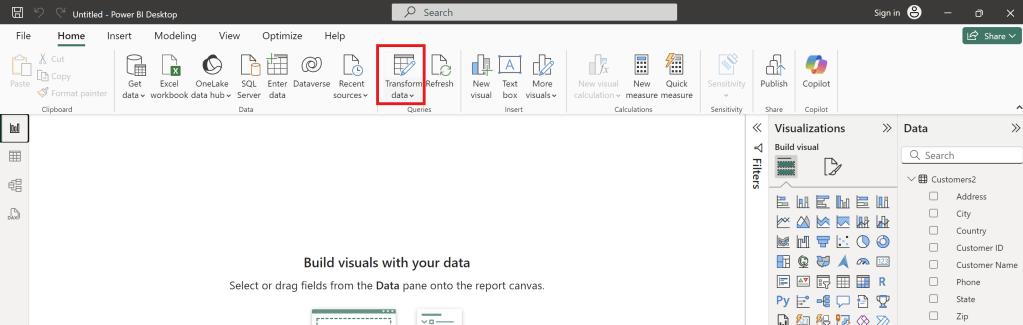
    Replace Value

    • Click Transform Data to Replace values.
    Transform Data to replace values.
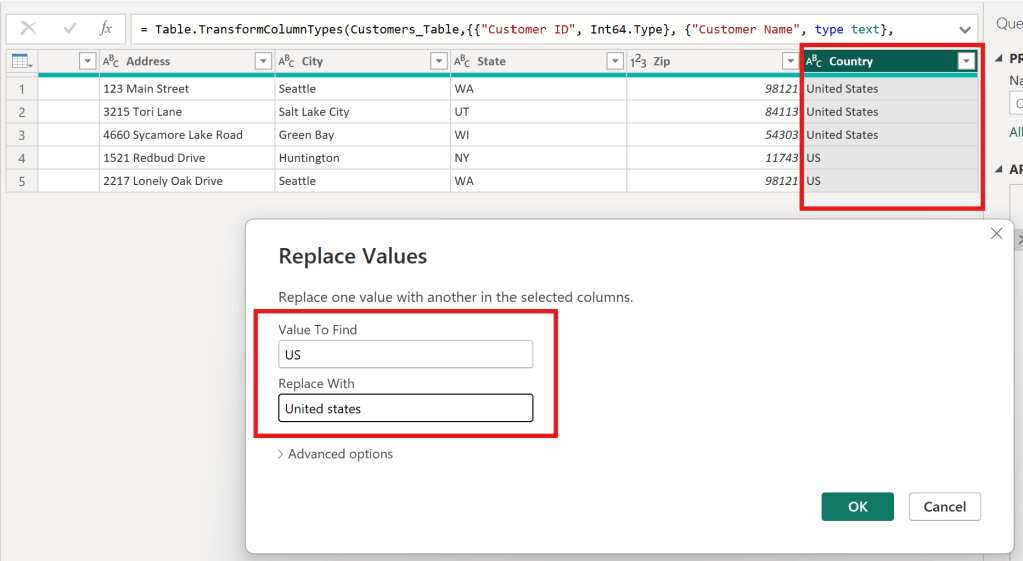
    • In the Customer 2 table, replace all “US” values in the Country column with “United States.” and then click OK
    to change US to be United States
    • As a result, Country column successfully replaced value as below.
    successfully replaced value

    Insert and format a visualization

    • learn how to visualize data from multiple tables and customize graph formatting options.
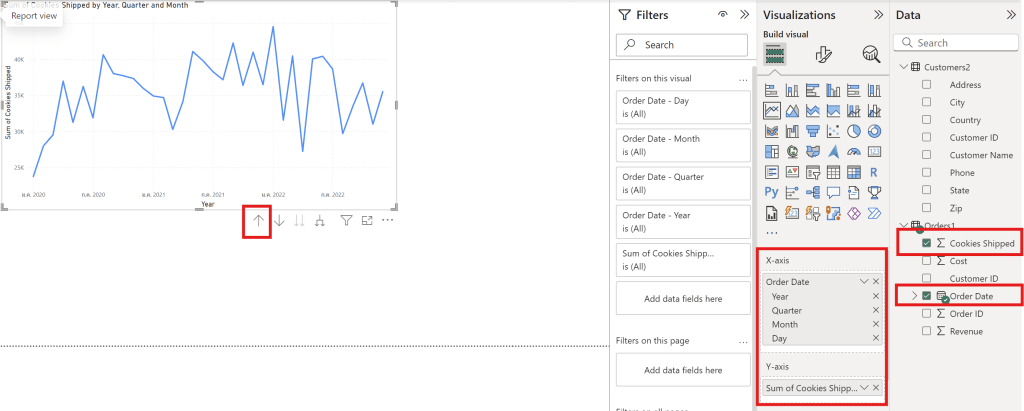
    • create a line chart.
    • Use the up arrow to change the data scale (day, month, and year)
    AxisColumn of Data File
    Y-axisSum Cookies shipped
    X-axisOrder Date
    Line Chart

    Visual

    • can adjust the visual appearance of the data through the following Visual Format options.
    Visual
    • can edit Values.
    • can choose Data label to show number in graph.

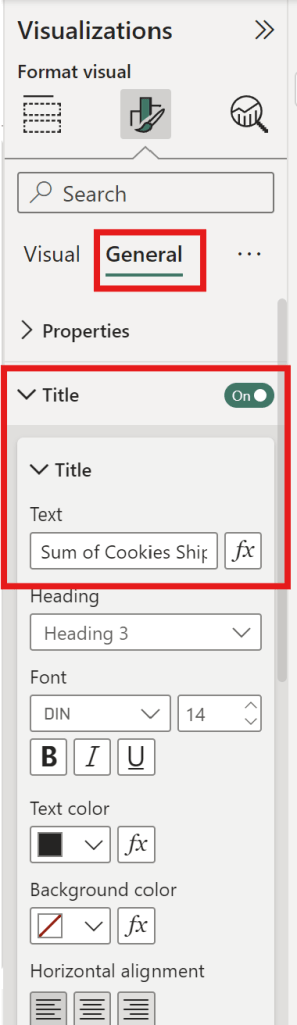
    General

    • can adjust the font size.
    • can adjust the graph’s position.
    • can adjust the graph’s color.
    • can change the title.
    General

    Practice Data Visualization in Power BI

    • You are a data analyst working with a chocolate factory and would like to help them visualize their data.
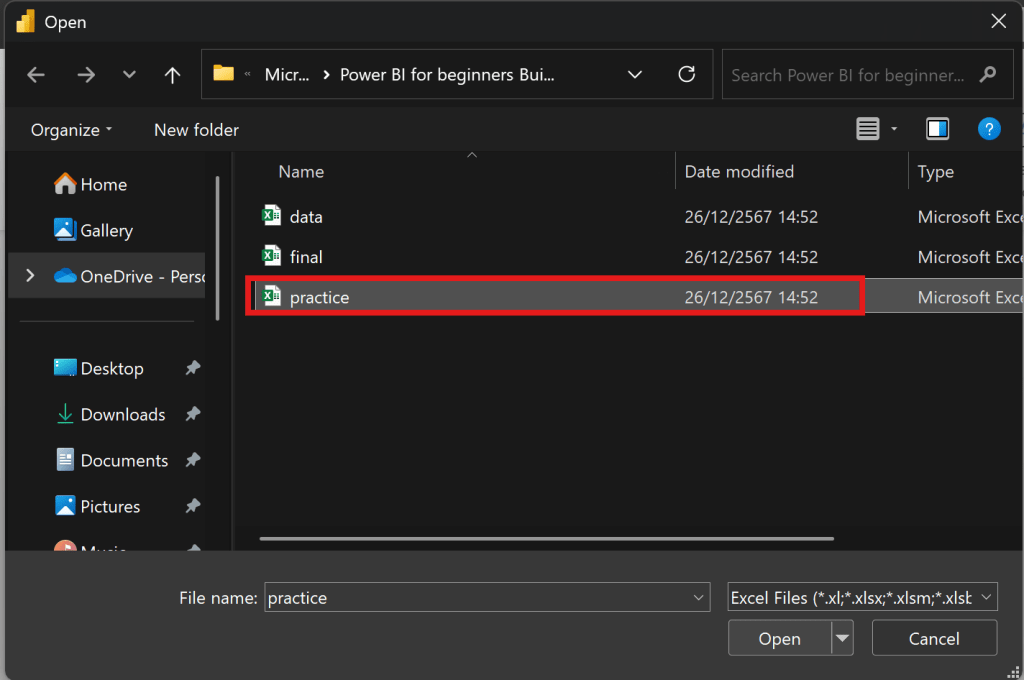
    • The data is presented in the readings under “practice.xlsx” You need to import this data to Power BI, do the necessary transformation and data cleaning using Power Queries and then build the relationship betweendiffrerent columns. Finally, I need you to create a line chart that shows the evolution of sales over time.
    • start from export file “practice
    export file “practice
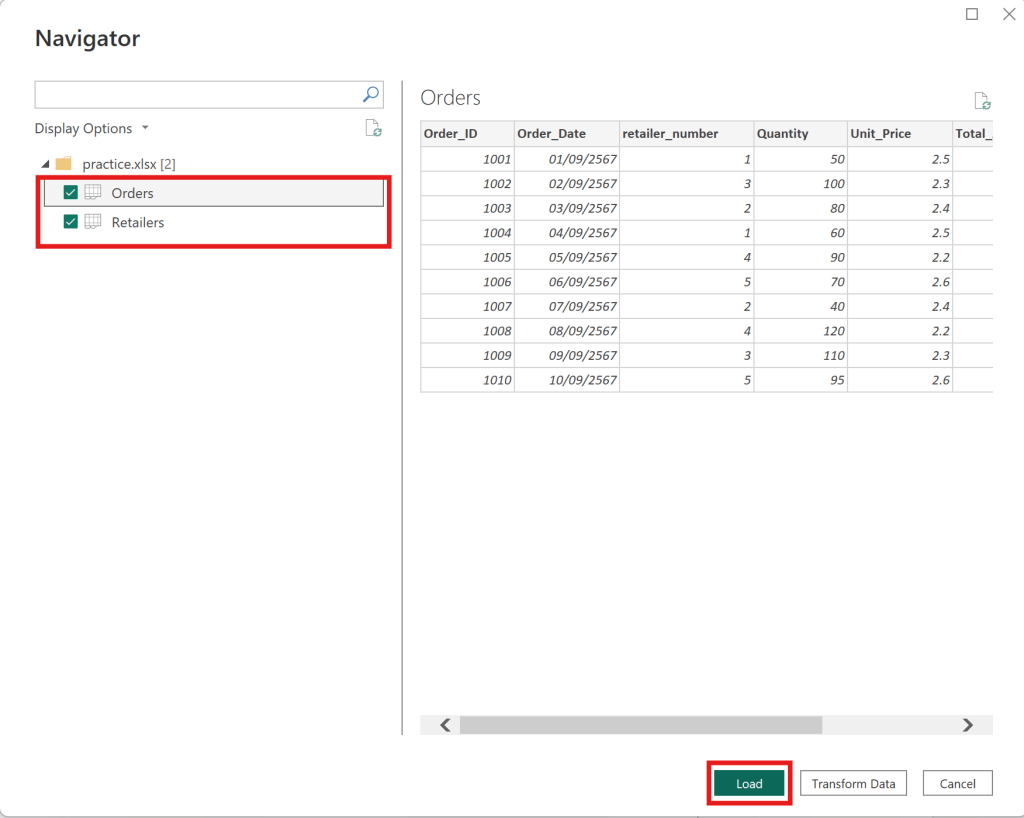
    • upload Orders table and Retailer table —> click load as below
    Orders table and Retailer table
    • Choose the Retailer Table to use Replace Value.
    • Change “UK” to “United Kingdom“.
    Change “UK” to “United Kingdom”.

    Then close and apply, and return to the dashboard.


    Relationship

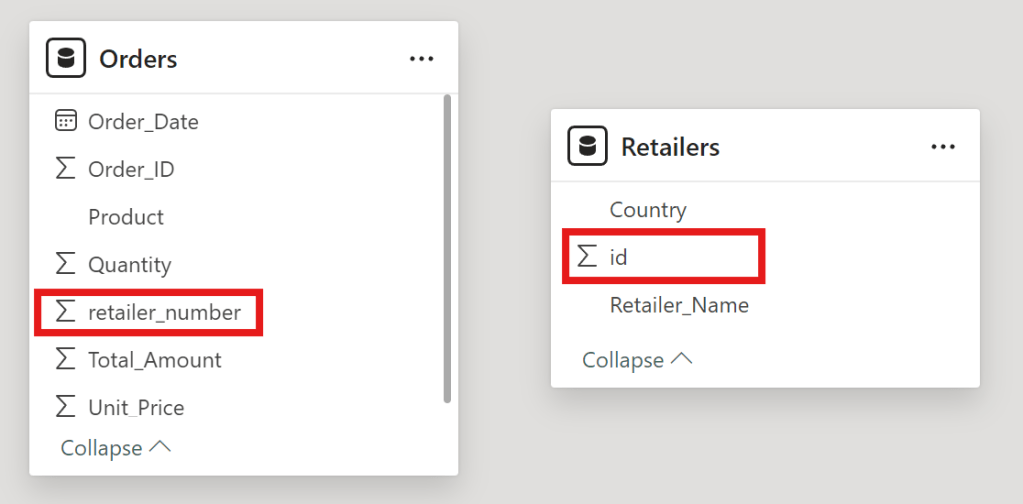
    • To create a relationship between orders and retailers in Power BI
    relationship between orders and retailers.
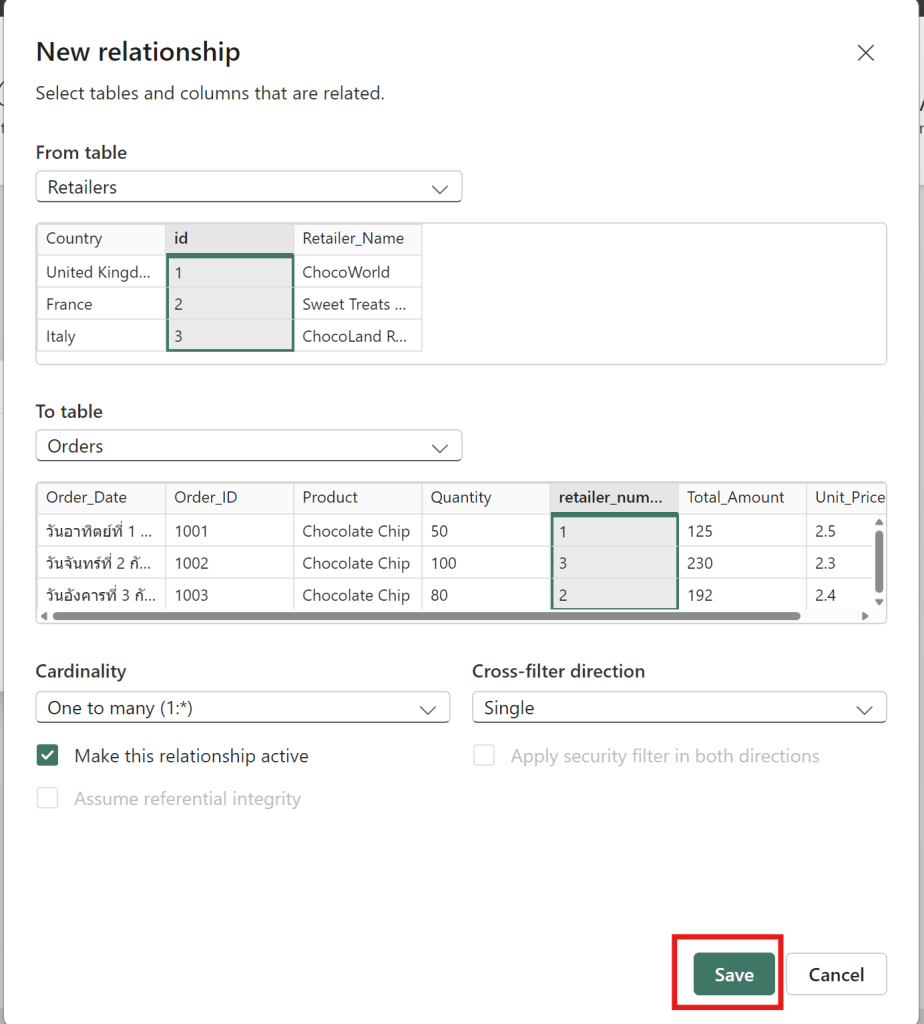
    • drag id to retailer_number
    • then click save to connect new relationship between Retailers id and Order retailer number
    connect between Retailers id and Order retailer number
    • Now that the data is cleaned and the relationship is created.

    to create Line Chart between Order_date and Quantity

    Line Chart between Retailers id and Order retailer number
    • then click line chart
    AxisColumn Data Files
    X-AxisOrder date by day
    Y-AxisQuantity

    Now I can see the data by day of the quantity of chocolate bars sold. Now that you have a better handle of importing and preparing data into PowerBI and inserting your first visual.


    Add more visuals to enhance storytelling

    • show how to add additional graphs and pages to a report, as well as explore filtering options using maps, tables and bar graph.

    Card Chart

    • to show the total revenue that we earned here at the Cookie Bliss.
    how to create card chart
    • Choose card
    • Choose fields as sum of revenue of Orders1 Table.
    card chart with revenue

    then it show revenue value


    Table

    • Show table of customer name
    customer name
    • Drag Customer name column then it show table of customer name.
    Customer name Table

    Then it can show the interaction between Customer Name and Revenue value on the dashboard.


    Map

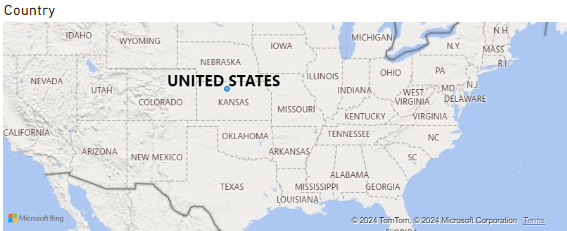
    • Choose map and then select country column
    • then it show maps of country
    Map

    Publish the report to the Power BI workspace

    • then can change theme of dashboard by this theme.
    Change theme
    • add the customer id and the phone number is good choice
    customer id and phone number
    • then add this title name as “Cookie Bliss Sales dashboard
    Cookie Bliss Sales dashboard
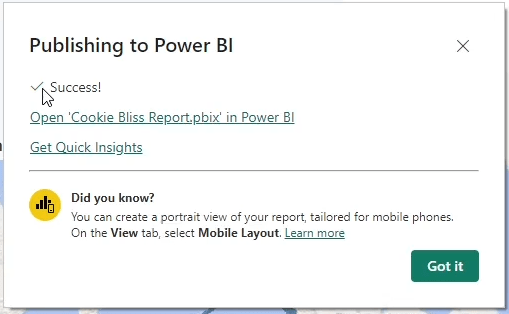
    • publish to Power BI —> My workspace
    • When it have success It finish publish Power BI
    Publish Power BI

    Cumulative Activity Scenario

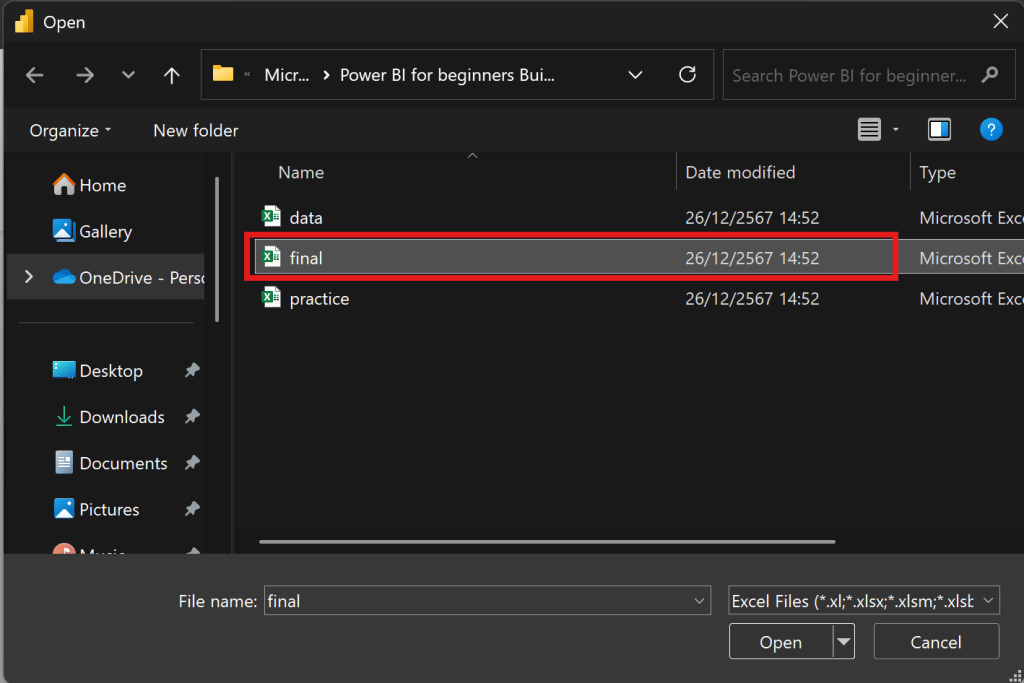
    • then get data final files to upload and do visualization
    Choose Final File

    then choose all 5 tables Customers, Feedback, Inventory, Orders and Products


    Products

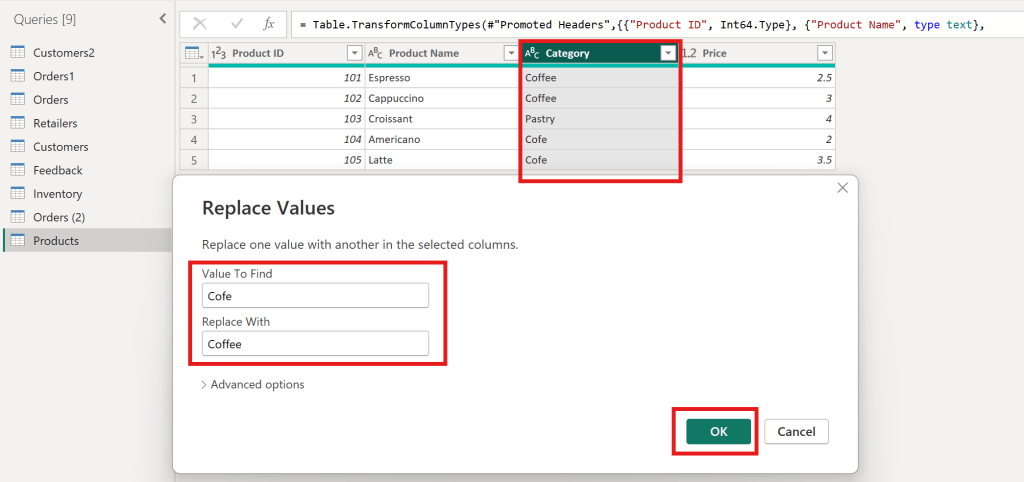
    • In Product table must clean data first
    Replace Value Product table
    • Value to find “Cofe” replace with “Coffee
    • to make category have Coffee and Pastry

    Inventory

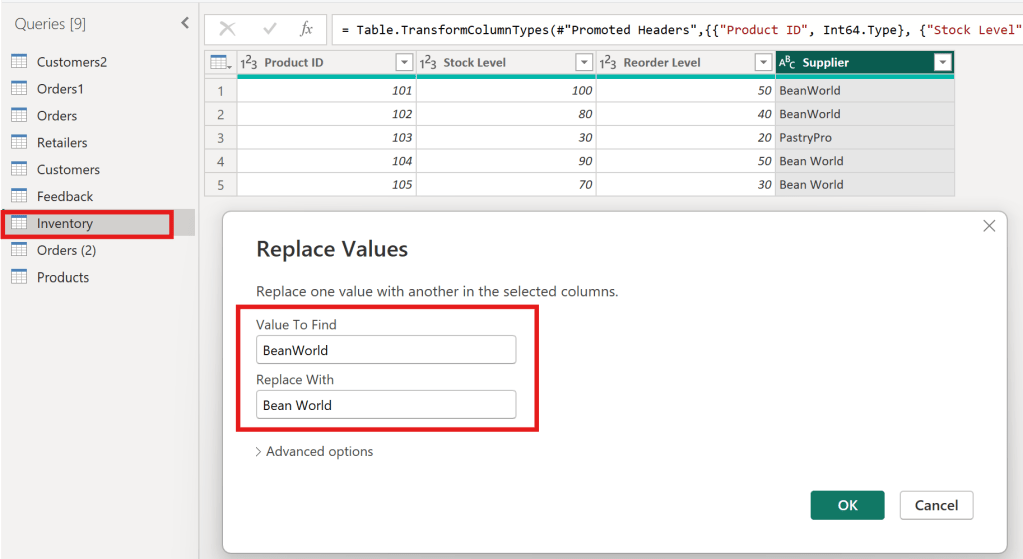
    • In Inventory table must clean data first
    Replace Value Inventory table
    • Value to find “BeanWorld” replace with “Bean World
    • to make supplier have BeanWorld and PastryPro

    Create Sales reports

    • Create Title Sales Report
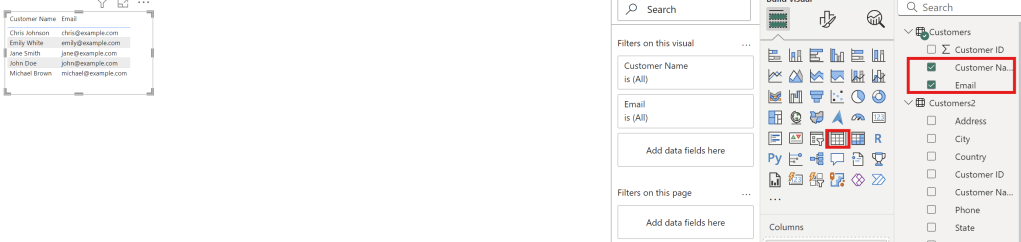
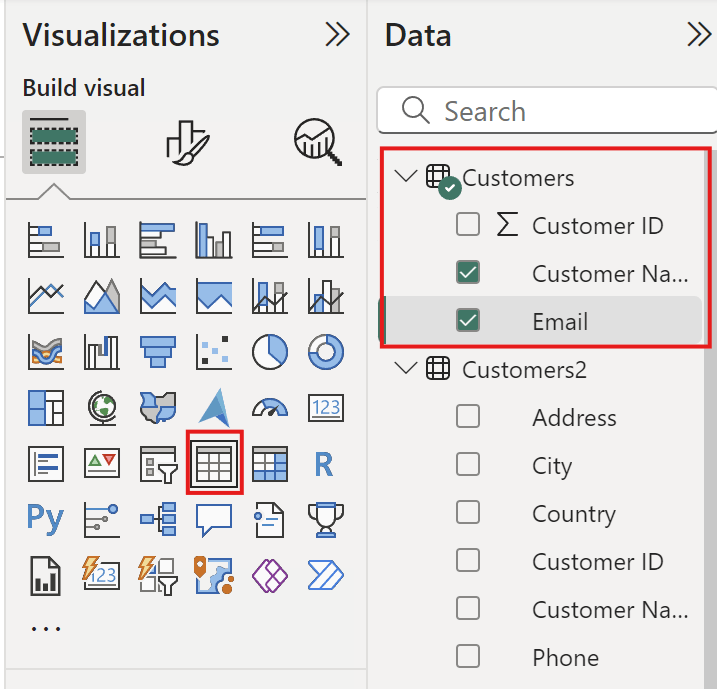
    • Create Table
    Create table in Sale Report
    • Select Customer name and Email to create table

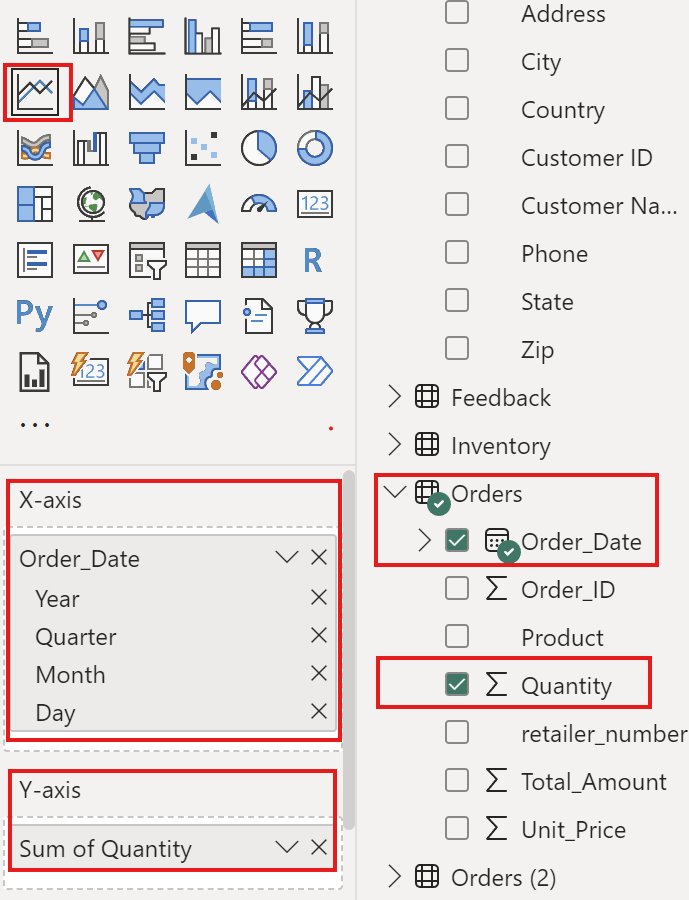
    • Create line chart
    Create line chart with order date and Quantity
    AxisColumn Final Files
    X-AxisOrder Date
    Y-AxisQuantity

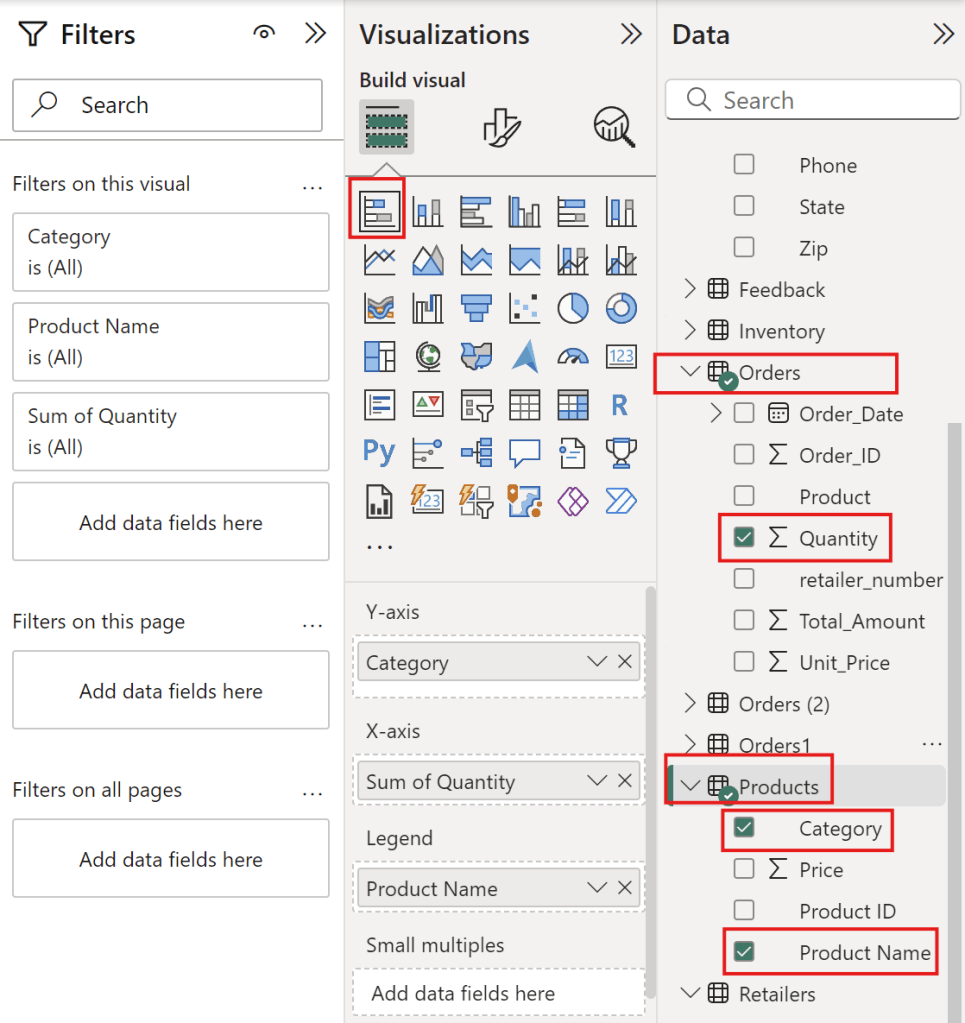
    • Create stacked bar chart
    Create stack bar chart with Category, Product Name and Quantity
    TypeColumn Final Files
    Y-AxisCategory
    X-AxisSum of Quantity
    LegendProduct Name

    to see coffee that people love eat it.


    Full Sale Report

    Sale Report

    Create management reports

    • Create Title as management reports
    • Create card of average rating
    card of management report
    • Select Feedback table with Rating column and value with average of rating.

    • Create table with customer name and emails
    table with customer name and emails
    • Select Column as customer name and Email

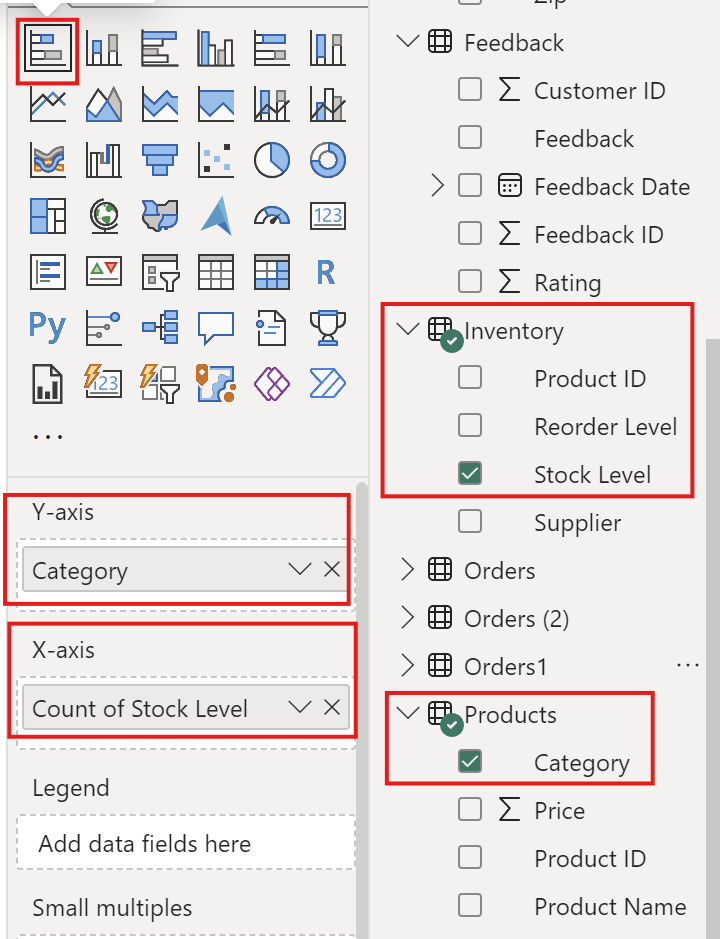
    • Create stack bar chart
    Create stack bar chart with category and Stock level
    AxisColumn Final Files
    Y-AxisCategory
    X-AxisStock Level
    • Create clustered column chart
    clustered column chart with Reorder Level and Supplier
    AxisColumn Final Files
    Y-AxisCount of Reorder level
    X-AxisSupplier

    Full Management Reports

    Management Report

    Summary

    I hope this project helps users create dashboards in Power BI, improve their proficiency with the tool, and learn effective techniques for using titles, colors, and themes.

    Coursera : https://www.coursera.org/account/accomplishments/verify/YWAXF815EXNK

  • 5 Steps with Project introduction SQL

    5 Steps with Project introduction SQL

    • SQL (Structured Query Language) is a powerful programming language used for managing and manipulating relational databases. It allows users to create, retrieve, update, and delete data efficiently within a database system. SQL is widely used across industries for tasks ranging from data analysis to database management.
    5 Method Of Introduction SQL
    1. Database
    2. Tables
    3. SQL Data Types
    4. Introducing Queries
    5. Writing Queries

    Table of Content

    1. Relational Database
      1. Database
        1. Patrons Table
        2. Database Benefits
      2. Tables
        1. Definition
        2. Create Table Name
        3. Record and Field
          1. Records
          2. Fields
        4. Table manner
        5. Assigned seats
        6. Create books table
      3. SQL data types
        1. String
        2. Integers
        3. Floats
        4. Schema
    2. Querying
      1. Benefits of SQL
      2. Keyword
      3. Selecting multiple fields
      4. Selecting all fields
      5. Aliasing (Rename Column)
      6. Selecting Distinct Records
      7. Distinct with multiple fields
      8. Using views
      9. Viewing your query
      10. SQL flavors
      11. Two popular SQL flavors
      12. Comparing PostgreSQL and SQL Server

    Relational Database

    • A relational database is a type of database that organizes data into structured tables (relations) with rows and columns.

    Database

    purpose of introduction with SQL

    1. Understand databases and their structure
    2. Extract Information from databases using SQL
    Table show relation patrons, books and checkouts

    Patrons Table

    Column (field name)Definition
    card_numcard number
    namename
    member_yearthe year the patron became a library member.
    total_finethe total overdue

    Relational Database – -> relation between tables of data insider the database


    Database Benefits

    • Database have more storage than spreadsheet application.
    • Many users can write queries to gather insights from the data at the same time.
    when a database is queried, the data stored insider the database not change.

    Tables

    Definition

    • databases are organized into tables, which hold related data about a particular subject.
    • tables are organized into rows and columns.
    • in the world of databases, rows are often referred to as records and columns as fields.
    relation between patrons table and checkouts table connect with card_num column,
    book table and checkouts table connect with id column.

    Create Table Name

    • lowercase
    • no space and in table name (use underscores instead)
    • plurals

    Record and Field

    Records

    • Laying the table : records
    • A record is a row that holds data on an individual observation.
    records pf patron table

    Fields

    • Laying the table : fields
    • A field is a column that holds one columns of data for all records.
    fields of patrons table

    Table manner

    Qualification
    Singular name
    No lowercase
    No space
    be different from other field name
    be different from the table name
    restrict of create name

    Assigned seats

    • A unique identifier is used to identify records in a table.
    • Distinct and often number.
    unique identifier

    Create books table

    • A database has been set up for this course and the books table is available here.
    • Run the code to explore what data books holds!.
    SELECT * FROM books;
    

    SQL data types

    • When a table is created, a data type must be indicated for each field. The data type is chosen based on the type of data that the field will hold a text and number.
    String data type : field name, Integer data type : field member_year, Floats data type : field total_fine
    SQL Data typeAttribute
    Stringletters or punctuation
    Integerswhole number
    Floatsfractional number

    String

    • String is a sequence of characters such as letters or punctuation.
    • VARCHAR is a flexible and popular string data type in SQL.
    String field : field name

    Integers

    • Integers is whole number
    • INT is popular integer data type in SQL.
    Integer field : field member_year

    Floats

    • Float store numbers that include a fractional part
    • NUMERIC is popular float data type in SQL
    Float field : field total_fine

    Schema

    A schema shows a database’s design, such as what tables are included in the database and any relationships between its tables.

    Schema show database’s design

    Querying

    Introducing queries

    Benefits of SQL

    • use SQL to find which books James checked out from the library in 2022.
    relation between card_num checkouts tables and patrons table.
    • use SQL queries to uncover trends in website traffic, customer reviews, and product sales.
    Question
    Which products had the highest sales last week?
    Which products get the worst review scores from customers?
    How did website traffic change when a feature was introduced?

    Keyword

    Keyword is word for operations. Common keywords : SELECT, FROM

    • The SELECT keyword indicates which fields should be selected
    • The FROM keyword indicates the table in which these fields are located
    Keyword SELECT and FROM
    SELECT name FROM patrons;
    

    Selecting multiple fields

    • Can select field to that want show data example card_num and name
    SELECT card_num, name FROM patrons;
    
    • It will show field that select first as picture below.
    SELECT card_num, name vs SELECT name, card_name

    Selecting all fields

    • if you want to show all data use asterisk(*) to select all four field name.
    SELECT * FROM patrons;
    
    SELECT * FROM patrons;

    Writing queries

    Aliasing (Rename Column)

    • Use aliasing to rename column.

    Use SELECT name AS first_name to change field name from name to be first_name.

    SELECT name AS first_name, year hired
    FROM employees;
    
    SELECT name AS first_name

    Selecting Distinct Records

    • if you select year_hired it will show result duplicate year 2020 and 2021
    • we can add the DISTINCT keyword before the year_hired that make data show 4 year distinct.
    SELECT DISTINCT year_hired
    FROM employees;
    
    SELECT DISTINCT year_hired FROM employees;

    Distinct with multiple fields

    • add the DISTINCT keyword before the fields to select
    • the department id and year_hired fields still have repeat values individually, but none of the records are the same
    SELECT DISTINCT dept_id, year_hired
    FROM employees;
    
    SELECT DISTINCT dept_id, year_hired FROM employees;

    Views

    • A view is a virtual table that save SQL SELECT statement
    • When accessed, views automatically update in response to updates in the underlying data.
    CREATE VIEW employee_hires_years AS
    SELECT id, name, year_hired
    FROM employees;
    

    CREATE VIEW, then the name will create the new view.


    Using views

    • we can query it just as we would a normal table by selecting FROM the view.
    SELECT id, name
    FROM employee_hire_years;
    
    SELECT id, name FROM employee_hire_years;
    -- create the view:
    CREATE VIEW library_authors AS
    SELECT DISTINCT author AS unique_author
    FROM books;
    
    -- Select all columns from library_authors
    SELECT * FROM library_authors
    
    sample of CREATE VIEW use case.

    Viewing your query

    • You have worked hard to create the below SQL query:
    SELECT DISTINCT author AS unique_author
    FROM books;
    

    SQL flavors

    • Both free and paid
    • All used with relational database
    • Vast majority of keywords are the same
    • All must follow universal standards

    PostgreSQLSQL Server
    Free and open-source relational database system.Has free and paid version
    Created at the university of California, BerkeleyCreate by Microsoft
    “PostgreSQL” refers to both the PostgreSQL database system and its associted SQL flavorT-SQL is Microsoft SQL flavor, used with SQL Server databases

    Comparing PostgreSQL and SQL Server

    --PostgreSQL:
    SELECT id, name
    FROM employees
    LIMIT 2;
    --SQL Server:
    SELECT TOP(2) id, name
    FROM employees;
    
    PostgreSQL vs SQL server

    SQL Server using the TOP keyword instead of LIMIT. Notice that this keyword is the only difference between the two queries!


    Summary

    “I hope the foundational knowledge for advancing projects in the following five areas will be helpful for everyone:

    1. Database
    2. Tables
    3. SQL Data Types
    4. Introducing Queries
    5. Writing Queries”

    link from : https://www.datacamp.com/completed/statement-of-accomplishment/course/105fbc7d0c0243f35770512f02a1ad437c184bd7

    Introduction to SQL course


  • 5 Steps of Data Analysis By Using Microsoft Excel

    5 Steps of Data Analysis By Using Microsoft Excel

    Data analyst is an essential tool that enables organizations to gain deeper insights into their data. Utilizing Microsoft Excel for efficient data processing facilitates accurate and prompt decision-making while identifying trends and uncovering new business opportunities.


    Table of content

    1. The 5 steps for analyzing the sales_data_analysis.xlsx file in Microsoft Excel 365 are as follows
      1. Upload a document using the free online version of Microsoft Office 365
      2. Perform data analysis using sorting and filter tools.
      3. Perform data mining using the IF Function
      4. Create references between tables and search for information with VLOOKUP
      5. Perform data analysis using Pivot Table
        1. Pivot table
    • Excel can help data analysis
    • Excel work with a prepared spreadsheet that contains sale

    The 5 steps for analyzing the sales_data_analysis.xlsx file in Microsoft Excel 365 are as follows

    Upload a document using the free online version of Microsoft Office 365

    One drive to upload excel file

    Click add newFile upload then upload → sales_data_analysis_23.10.2024

    • Go to Insert → Table to create a table that uses the header in the first column to filter data. → Click OK.
    • To Create a table to filter data, see the picture below.
    Create Table in microsoft excel 365
    • Then filter the data shown in the picture below.
    can filter data by columns such as Num, Date, Month, Sales Rep, Region, Customer ID, etc.

    Set it up so that when you scroll down to view data in the rows below, the first column remains visible. This makes it much easier to reference the headings.


    Perform data analysis using sorting and filter tools.

    Which column should be prioritized for sorting data to make it more effective?

    representative header and then select sort A to Z to sort it in alphabetical order

    Sort the Sales Rep column from A to Z.
    • after click it has been rearrange by alphabetical Sales Rep
    • then to make it back to select sort in column date again
    • can sort the Region by North.
    Filter by North Region.
    • To remove the filter, click the ‘Select All‘ checkbox to display sales from the North, South, and West regions, and then click.
    • Then filter the Sales Rep column by the name David Garcia.
    Calculate in the bottom right corner.
    What you can see from data?
    Average of $7,893
    Count of 9
    Sum of $71,040
    • you can see aggregate value in the bottom right corner.

    This is how to use the sorting and filtering tools to rearrange your data.


    Perform data mining using the IF Function

    • The idea behind data mining is to take the data you already have and create new or additional data from it.
    • The IF function is frequently used.

    Samples show that when an order includes 20 chairs or more, the client receives a 5% wholesale discount.

    Discount Column 3 Method
    1. Create a discount column to the right to reflect this.
    2. In the column, use ‘Y‘ for orders with a quantity ≥ 20.
    3. In the column, use ‘N‘ for orders with a quantity ≤ 20.

    Code for column Discount

    =IF(J5>=20,"Y","N")
    
    Create a discount column based on the quantity in the number column.
    • Final Price column

    Code for column Final Price

    =IF(J5>20,0.95*L5,L5)
    
    Create a Final Price column based on discount and number column.
    • column of Discount with Y is number ≥ 20 price is discount 5% final is 95% from total column
    • column of Discount with N is number ≤ 20 price is same as the total

    Create references between tables and search for information with VLOOKUP

    Goal is to insert the company name using the client ID.

    1. Create column Company Name between Customer ID and Color
    2. Create column Company Name Representative between Company name and model

    The explanation of the variables used in VLOOKUP.

    VLOOKUP(lookup_value, table_aray, col_index_num, [range_lookup])
    

    Create Company name column

    =VLOOKUP(F5,'Customer Info'!$A$4:$C$12,2,FALSE)
    

    Create Company name representative

    =VLOOKUP(F5,'Customer Info'!$A$4:$C$12,3,FALSE)
    
    Customer Info sheet data

    to connect data between sales data and customer info sheet

    Type of VLOOKUP
    Create column Company name and Company Name Representative column in sale data sheet

    can adding a dollar sign in front A4 and C12 to make data not change


    Perform data analysis using Pivot Table

    Method to start

    • Typing control A and it will automatically highlight all the data in the table
    • Then insert ———> Pivot table ———> click okay
    Create Pivot table in new worksheet
    • Recommend selecting new worksheet so it placement does not affect the other data that already exists

    Pivot table

    • define categories as either filters, columns, rows, value
    TypeDefinition
    Filter2 Category
    ColumnCategory can specified as a column to fit with data
    RowCategory can specified as a row to fit with data
    ValuesMust use with number
    • 1. drag Final Price to Value of pivot table
    • 2. drag Sales Rep to columns of pivot table
    • 3. drag Month to row of pivot table
    Table prepare month with Sale Rep

    how many chairs of each model were sold in each month?

    Pivot table many chairs of each model per month.
    • Finally you have learned how to create pivot tables to summarize and look at comparisons within your data.

    Access full Microsoft excel through below link:

    Coursera Project Network Certificate

    https://www.coursera.org/account/accomplishments/verify/2F13S7V2LEZF

    Summary

    Data analysts help organizations gain valuable insights from data. Using Microsoft Excel enhances decision-making by processing data efficiently and identifying trends and opportunities.


  • 10 Social Listening of Data Analyst สามารถหา trend ของข้อมูลได้

    10 Social Listening of Data Analyst สามารถหา trend ของข้อมูลได้

    ทำไมเราถึงควรใช้ Social Listening Tool ด้วย

    • สามารถเข้าใจข้อความที่ลูกค้าพูดถึงแบรนด์ของเราได้ดีขึ้น
    • เข้าใจสิ่งที่ลูกค้าชอบและไม่ชอบแบรนด์คืออะไรบ้าง พร้อมข้อเสนอแนะเพิ่มเติม
    • Crisis management ปัญหาที่จะเป็นอันตรายต่อองค์กร ต้องรู้จักวิธีรับมือทาง Social media
    มีการแชร์ Hashtag ของเราไปกี่ครั้ง Engagement เป็นอย่างไร

    คอร์ส Social Listening ฟรีจาก DataRockie : https://data-science-bootcamp1.teachable.com/courses/enrolled/2121068

    Social Listening

    1. How Social Listening Work
    2. Content in Social Media
    3. How Starts with Keywords
    4. Keyword Strategy
    5. An Overview of Our Data
    6. Tool for Social Listening
      1. Google Trends
      2. Zocial Eye is The Only Tool You Need
      3. Supermetrics
      4. Google Sheets & Looker Studio
    7. Case Study : Oppo Find N2 Flip Launch
    8. 3 Key Steps for Effective Social Listening
      1. Extract Data for Zocial Eye
        1. Extract Data From Platform
          1. Facebook Data
          2. Instagram Data
          3. Application Program Interface
        2. Set Up Campaign
        3. Check Period
        4. Review Messages
        5. Export Data
      2. Analyst Data for Zocial Eye
        1. Tag & Category
        2. Sentiment Analysis
        3. Aggregate Data
      3. Present Data Visualization Basics
        1. Report & Dashboard
        2. Slide Making
    9. Limitations of Social Listening Data
    10. Summary

    Social Listening Tools เป็นเครื่องมือที่ธุรกิจใช้เพื่อติดตามและวิเคราะห์ความคิดเห็นของผู้บริโภคบนโซเชียลมีเดียและช่องทางออนไลน์ต่าง ๆ ข้อมูลที่ได้รับจากการรับฟังเหล่านี้สามารถให้ข้อมูลเชิงลึกสำคัญเพื่อใช้ในการวิจัยตลาด ช่วยให้ธุรกิจปรับปรุงผลิตภัณฑ์และแคมเปญการตลาดได้อย่างมีประสิทธิภาพ


    How Social Listening Work

    ควรใช้ keywords ในการดึง (extract) ข้อมูลจาก social media platforms ต่างๆ เช่น ถ้ามีคนโพสต์หรือคอมเมนต์เกี่ยวกับ “Samsung” ระบบจะสามารถดึงทุก contents ที่มีคำว่า “Samsung” มาให้หมดเลย

    เป็นการสร้าง keyword ของแบรนด์เหล่านั้นและรุ่นเหล่านั้นขึ้นมา เพื่อให้สามารถไปค้นหาใน hashtag ได้ platform ออนไลน์ต่างๆ

    Hashtag
    # Samsung
    # SamsungGalaxy
    # withGalaxy
    Hashtag
    • แล้วจะส่งเหล่านี้ผ่าน facebook , twitter แล้ว extract data ข้อมูลออกมา

    Content in Social Media

    Content in Social Media จัดเป็น unstructure data เพื่อจัดข้อมูลที่ไม่มีโครงสร้าง

    TypeDefinition
    Content typeประเภทของเนื้อหา
    Accountบัญชีผู้ใช้
    Date & Timeวันที่และเวลา
    Contentเนื้อหา
    Engagementการมีส่วนร่วม
    รูปภาพจาก Social Listening — Data Analyst Edition by DataRockie

    วิธีการของ Social Listening จะเปลี่ยนจาก unstructure data เป็น structure data

    • สามารถดึง post กับ comment ได้ดังรูป
    • สามารถนำ comment ไปปรับปรุง content ได้
    Post ตามรูปแนบ รูปภาพจาก Social Listening — Data Analyst Edition by DataRockie

    How Starts with Keywords

    • ต้องมีการกำหนดคำขึ้นมาก่อนว่าควรใช้คำไหนเริ่มต้นก่อนดีกว่ากัน

    ต้องไปศึกษาแบรนด์นั้นๆเลยว่า คำ” ไหนที่แบรนด์เหล่านั้นใช้บ่อย

    Popular hashtags

    BRANDMODEL
    SamsungGalaxyS23FE
    ซัมซุงGalaxy+S23+FE
    galaxyUnboxing
    galaxyTH
    SamsungTH
    SamsungGalaxyTH

    เทคนิคที่หลายๆ platform รองรับคือการใช้อักขระพิเศษอย่างเช่น + (สำหรับ AND) หรือ – (สำหรับเขียน negative keywords)

    Galaxy+S23+FE hashtag ที่มีการ mention “Galaxy” และ “S23” และ “FE” ในโพสต์เดียวกัน แต่ไม่จำเป็นต้องเขียนติดกันก็ได้


    Keyword Strategy

    โดยทั่วไปเครื่องมือ social listening จะให้เราใส่ keyword ได้หลายรูปแบบ โดยแบ่ง keyword ออกเป็น 3 ประเภท (ตามเครื่องมือของ Zocial Eye ของบริษัท Wisesight)

    TypeDefinition
    Main Keywordใช้ดึงข้อมูลหรือ message เข้ามาที่ระบบ
    Sub Keywordใช้จับกลุ่ม message เช่น การทำ tag/ category
    Negative Keywordใช้ลบ message ที่ไม่เกี่ยวข้องออกจากระบบ
    รูปภาพประกอบ Main Keyword, Sub Keyword, Negative Keyword
    รูปภาพจาก Social Listening — Data Analyst Edition by DataRockie

    ZOCIAL EYE คือ เครื่องมือวิเคราะห์ข้อมูลโซเชียลมีเดีย ที่สามารถดึงข้อมูลจากแหล่งโซเชียลมีเดียต่างๆ ไม่ว่าจะเป็น Facebook, Twitter


    An Overview of Our Data

    Overview of Our Data แสดงรายละเอียดของตัวแปรที่ผลต่อข้อมูลและความหมายของตัวแปรเหล่านั้น

    Tool for Social Listening

    เครื่องมือ Social listening จริงๆมีให้เลือกเยอะมากดังนี้

    • Brand Watch
    • Sprout Social
    • Keyhole
    • Meltwater
    • Brand24

    ราคา package จะขึ้นอยู่กับสองปัจจัยหลักๆคือ

    • จำนวน keywords เช่น 10 คำ, 20 คำ เป็นต้น
    • จำนวน messages ที่เราสามารถดูดเข้าในระบบได้
    • ยิ่ง keywords และ messages เยอะขึ้น ราคาจะสูงขึ้นด้วย

    เครื่องมือ social listening ที่บทความนี้จะนำมี 4 รายการดังนี้

    1. Google Trend
    2. Zocial Eyes
    3. Supermetrics
    4. Google Sheets & Looker Studio

    Google Trends คือ เว็บไซต์ Social Listening ฟรีจาก Google สำหรับค้นหาและตรวจสอบความนิยมของ keyword จากคนใช้งานบน Google และ Youtube ณ ช่วงเวลาใดเวลาหนึ่งจากทั่วโลก ที่ทำให้เรารู้ว่าตอนนี้กลุ่มเป้าหมายของเรากำลังสนใจเรื่องอะไร และใช้คีย์เวิร์ดแบบไหน ได้อย่าง Real-Time และ Worldwide

    ให้เห็นภาพกันมากขึ้น ลองเอากระแสสุดปังอย่าง ‘หมีเนย’ กับ ‘หมูเด้ง’ มาค้นหาเทรนด์ความนิยม จะเห็นจากกราฟว่าในช่วงวันที่ 09 ก.ย. 68 มีคนให้ความสนใจและเสิร์ชคีย์เวิร์ดคำว่า ‘หมูเด้ง’ มากกว่า ‘หมีเนย’ เกือบเท่าตัว

    หมีเนย vs หมูเด้ง

    Zocial Eye is The Only Tool You Need

    • ทำ social listening เกี่ยวกับข้อมูลที่ลูกค้าสนใจแล้วนำไปทำ visualization เป็น graph ให้ลูกค้าใช้งาน
    • นำข้อมูลที่เป็น trend ไปนำเสนอลูกค้าด้วย
    • Zocial Eye ทำได้ตั้งแต่ใส่ keywords เพื่อ extract ข้อมูล ทำความสะอาด ติด tag/ category ทำ sentiment ไปจนถึงการ visualize ข้อมูลให้เข้าใจง่าย

    Zocial Eye เป็นเครื่องมือ social listening / analytics เบอร์หนึ่งของประเทศไทย เปิดให้บริการมาตั้งแต่ปี 2007 รายได้มากกว่า 230 ล้านบาท (2565) ปัจจุบันมีพนักงานมากกว่า 250 คน


    Supermetrics

    สามารถดึงข้อมูลจาก Social Media Platforms ด้วยตัวเอง เช่น Facebook, Instagram, Twitter โดยใช้ Supermetrics + Google Sheets


    Google Sheets & Looker Studio

    โดย 2 เครื่องมือที่นิยมใช้ในงาน Social Listening คือ Excel/ Google Sheets และ BI Tools เช่น Looker Studio หรือ Power BI เพื่อทำรายงาน dashboard ติดตามผลง่ายๆ

    ใช้สำหรับ Social Listening ใช้ Google Sheets + Looker Studio เป็นหลัก


    Case Study : Oppo Find N2 Flip Launch

    ทีมการตลาดของ Oppo Global ได้หา insights ว่าลูกค้าที่ใช้โทรศัพท์จอพับมีปัญหาอะไรบ้าง (จากการทำ research และ social listening) พบว่าสามปัญหาที่ลูกค้าบ่นเยอะที่สุดคือ

    1. แบตเตอรี่ของ Foldable Smartphone ใช้งานได้ไม่เต็มวัน ต้อง Charge บ่อยๆ
    2. คนยังกังวลเรื่องหน้าจอ กลัวว่าจะพังง่าย พับบ่อยเป็นรอย
    3. หน้าจอด้านนอกเล็ก ใช้งานไม่สะดวก (อ้างอิงจากคู่แข่งโดยตรงอย่าง Galaxy Z Flip)
    Problem of user experience
    รูปภาพจาก Social Listening — Data Analyst Edition by DataRockie

    Oppo Global นำ insights ที่ได้มาใช้พัฒนา Oppo Find N2 Flip แก้ปัญหา pain points ที่ลูกค้าเจอ เปิดตัว official launch ที่ประเทศอังกฤษในเดือน ก.พ. 2023 โดยเน้นที่สามปัญหาข้างต้น

    หลังจากเปิดตัว Oppo Find N2 Flip ได้รับเสียงตอบรับจากกลุ่ม Mass Segment ดีมาก ราคาเปิดตัวต่ำกว่าของ Samsung Galaxy Z Flip4 ประมาณ 10,000 บาท

    ด้านล่างเป็น Feedback จากลูกค้าในวีดีโอไลฟ์เปิดตัว และโพสต์โปรโมชันบน Facebook Oppo Thailand

    Comment in Social Media
    รูปภาพจาก Social Listening — Data Analyst Edition by DataRockie

    Tip – เวลาเรานำ comments จริงๆของลูกค้ามาใส่ใน report เรียกว่า verbatim หรืออีกชื่อคือ word of word งานวิจัยสาย qualitative จะใช้แบบนี้กันเยอะเลย


    3 Key Steps for Effective Social Listening

    Social Listening MethodDefinition
    Extractดึงข้อมูลตาม keyword ที่เรากำหนดจาก social media platforms ต่างๆ
    Analyzeทำความสะอาดและวิเคราะห์ข้อมูล
    Presentนำเสนอ insights ที่มีประโยชน์ต่อแบรนด์/ เรื่องที่เราสนใจ
    • Extract ใช้ Main keyword ในการดึงข้อมูลขึ้นมา
    • ระหว่าง Extract กับ Analyze ใช้ Negative key word ในการดึงข้อมูลที่ไม่สำคัญทิ้งไป
    • Sub keyword ใช้ในการวิเคราะห์ เช่น กล้อง ราคา promotion
    Zocial Eye Dashboard
    รูปภาพจาก Social Listening — Data Analyst Edition by DataRockie

    Extract Data for Zocial Eye

    Extract Data From Platform

    การดึงข้อมูลจาก Platform ต่างๆ

    1. Facebook Data
    2. Instagram Data
    3. Application Program Interface

    Facebook Data
    • จะเริ่มดึงข้อมูลจาก Social Media Platform โดยใช้ Supermetrics ในการดึงข้อมูลจาก facebook public page
    • สามารถใช้ application นี้ฟรี 14 วัน

    ตัวอย่างนี้เป็นการลองดึงข้อมูลจาก Facebook Public Post แบบง่ายๆด้วย Supermetrics แค่เลือก data source -> page -> period -> dimensions/ metrics ที่ต้องการ


    Instagram Data

    Extract ข้อมูลผ่าน IG Data

    • โดยการดึงข้อมูลจาก Instagram ผ่าน hashtag

    Application Program Interface
    รูปภาพ API Process จาก Social Listening — Data Analyst Edition by DataRockie

    API ย่อมาจาก “Application Program Interface” (ส่วนต่อประสานโปรแกรมประยุกต์) ในบริบทของ API คำว่า “Application” หมายถึงทุกซอฟต์แวร์ที่มีฟังก์ชันชัดเจน ส่วน “Interface” อาจถือเป็นสัญญาบริการระหว่างสองแอปพลิเคชัน ซึ่งสัญญานี้จะกำหนดวิธีที่ทั้งสองสื่อสารกันโดยใช้คำขอและการตอบกลับ

    • Zocial eye สามารถดึงพวก content ใน twitter ให้เราได้เลย

    Set Up Campaign

    • ข้อดีคือระบบจะดึงข้อมูลที่เราต้องการให้เราได้เลย โดยไม่ต้องสนใจความซับซ้อนของ API เนื่องจากหลังของพวก twitter มีการเปลี่ยนแปลงบ่อย
    • ใส่ “Message” ที่เราอยากดึงข้อมูลออกมาตามนี้ได้เลย
    รูปภาพ keyword and sub keyword จาก Social Listening — Data Analyst Edition by DataRockie

    Check Period

    หาช่วงเวลาให้ตรงกับที่เราสนใจก่อน แล้วจะได้เปรียบเทียบข้อมูลทั้ง 3 platform facebook, new and other

    check period หาช่วงเวลาให้ตรงกับที่เราสนใจก่อน แล้วจะได้เปรียบเทียบข้อมูลทั้ง 3 platform facebook, new and other
    รูปภาพจาก Social Listening — Data Analyst Edition by DataRockie
    • สามารถดูหน้าโพสต์นั้นผ่าน All channels skoodio Page ได้เลย
    • สามารถเปลี่ยน sub keyword หรือ message ที่จะหาได้ตลอดเลย
    • สามารถดู sentiment ได้ตรง top message engagement ได้เลย
    รูปภาพจาก Social Listening — Data Analyst Edition by DataRockie
    • สามารถเก็บได้แค่ public account ได้

    Review Messages

    • เราสามารถเข้าไปดู Messages หรือข้อความทั้งหมดที่ระบบ Zocial Eye ดึงมาให้เราได้เลย
    Task and Definition

    Export Data

    • เลือก period ที่เราต้องการ เช่น last 30 days คลิกที่ปุ่ม Export เพื่อส่งข้อมูลไปที่อีเมลของเรา ข้อมูลจะมาในไฟล์ Excel .xlsx format

    กดปุ่ม export แล้วดึง all channel ออกมาให้หมดเลย แล้ว กด summit แล้วจะได้ข้อมูล


    Analyst Data for Zocial Eye

    ก่อนเราจะวิเคราะห์ข้อมูลได้ ต้อง make sure ว่าข้อมูลเราสะอาดก่อน ideal = 100%

    Analyst Data for Zocial Eye
    Process รูปภาพจาก Social Listening — Data Analyst Edition by DataRockie
    1. Delete Message ที่สัญลักษณ์ถังขยะ
    2. Exclude account ลบ message ที่มาจาก Account นั้นให้กด Exclude
    3. Adjust sentiment เปลี่ยนได้โดยเลือก Postive, Negative, Neutral
    4. Adsign category เลือก category ที่สนใจ

    Tag & Category

    • Tag & Category คือการสร้าง Dimension ไปแปะข้อความที่เราเก็บข้อมูลมา

    เราสามารถติด tag หรือ category ที่แต่ละข้อความเพื่อจัดหมวดหมู่ สร้าง dimensionไว้ใช้วิเคราะห์ข้อมูลต่อไป ในหนึ่งโปรเจ็คอาจมีมากกว่า 1 category(s) ในแต่ละ category มีได้มากกว่า 1 tag(s)

    ตัวอย่างการแบ่ง Category เป็นภาพใหญ่ Tag เป็นภาพย่อยอีกที
    TypeDefinition
    Categoryภาพใหญ่ของการจัดกลุ่ม เช่น ประเภทสินค้า (CPU, IP68)
    Tagภาพย่อยที่ให้รายละเอียดเฉพาะเจาะจง เช่น กันน้ำ, กันน้ำกันฝุ่น ภายใต้ประเภทเทคโนโลยี
    ตัวอย่าง Project, Category, Sentiment, Tag
    Project, Category, Sentiment, Tag

    Assign Tags in Google Sheets

    Topic, Brand, Promotion, Camera, Interest

    Sentiment Analysis

    • sentiment analysis with AI

    มาลองใช้ gemini.google.com ช่วยทำ sentiment analysis ง่ายๆ ได้ทั้งภาษาไทยและอังกฤษ

    • ตัวอย่าง prompt engineer 101

    Do sentiment analysis for this “message” using options [“neutral”, “positive”, “negative”].


    Aggregate Data

    • ก่อนที่เราจะเข้าสู่ Phase 3 [Present] ของโปรเจ็ค Social Listening เราจะทำการ Aggregate Data ให้อยู่ในรูปแบบ Table ที่เข้าใจง่ายๆก่อน
    • เครื่องมือที่เราใช้ทำ Aggregate Data ที่ง่ายที่สุดคือ Pivot Table ใน Excel/ Google Sheets หรือจะใช้ BI Tools ที่กำลังเป็นที่นิยมตอนนี้ เช่น Looker และ Power BI ก็ได้

    Aggregate Data แปลไทยง่ายๆว่าการสรุปผลสถิติ

    TypeDescription
    Dimensionข้อมูลที่เป็น category เช่น ในตัวอย่างนี้เป็น sentiment
    Measurementข้อมูลที่เป็น numeric เช่น ในตัวอย่างนี้เป็น Total Message, Total Engagement
    สามารถดู Measurement ของ Like, Share, Comment and Total Engagement
    รูปภาพจาก Social Listening — Data Analyst Edition by DataRockie
    • และใช้ Dimension กับ measurement ใน pivot บน excel หรือ google sheet จะง่ายที่สุด
    สามารถดู Dimension ของ Channel, Sentiment, Category
    รูปภาพจาก Social Listening — Data Analyst Edition by DataRockie

    Present Data Visualization Basics

    การนำเสนอข้อมูล Social Listening ใช้ความรู้พื้นฐาน Data Visualization ง่ายๆ

    • Charts ที่เรานิยมใช้กัน เช่น Line, Pie, Bar, Simple Table และ Word Cloud
    1.  Line Chart นิยมใช้แสดงผล Time Series เป็น chart หลักที่เราใช้ในการรายงานผล สอง metrics ที่เราดูเทรนด์ในทุกโปรเจ็คคือ message และ engagement
    Line Chart

    2. Simple Table ใช้แสดงข้อมูลง่ายๆ Users สามารถ copy data นำไปใช้ต่อได้สะดวก เช่น export ไปใส่ spreadsheets เพื่อสร้าง visualization ที่เค้าต้องการ

    Simple Table for Skooldio data

    3. Bar Chart เป็นอีกหนึ่ง common chart ที่เราใช้ในทุกโปรเจ็ค เปลี่ยนข้อมูลใน table ให้กลายเป็น simple visualization แสดงผล categories ต่างๆ โดยทั่วไปจะเรียง category จากมากไปน้อย

    Bar Chart for Sub Keyword

    4. Pie Chart ใช้แสดงข้อมูลแบบ categories ที่รวมกันได้ 100% (The Whole) ตัวอย่างนี้เราแบ่งกลุ่ม mentions ตามประเภทของ influencers เป็น pico, micro, nano และ mid-tier ตามจำนวน followers

    Pie Chart for influencers categories

    5. Word Cloud ใช้แสดงผลข้อความ phrase หรือ #hashtag ที่มีการ mentions เยอะๆในข้อมูล font size ยิ่งใหญ่ แปลว่ามีการพูดถึงคำนั้นเยอะ

    Word Cloud สำหรับคำที่มีการพูดถึงเยอะ

    Zocial Eye Dashboard มี common charts ทั้งหมดนี้ให้เราใช้งานได้เลย แต่ถ้าอยากจะ export data ออกมาทำเองแบบ manual ก็ได้เช่นกัน (หรือเอา raw data ไปขึ้น BI tools)


    Report & Dashboard

    Looker Studio – https://lookerstudio.google.com/

    เราสามารถโหลดข้อมูลที่ได้จาก Social Listening Tools เข้า Business Intelligence (BI) Software เช่น Looker Studio, Power BI หรือ Tableau เพื่อทำ Report และ Dashboard เสนอผลวิเคราะห์

    สำหรับ Program Google Looker Studio มีขั้นตอนดังนี้

    1. Export file csv to looker studio
    2. + Blank Report page in looker studio
    3. click to upload file
    4. add to report
    5. แล้วสามารถใส่ chart ตามใจชอบ
    Sample Looker Studio

    Slide Making

    ทีม Data Analyst ใช้ Slide Presentation ในการนำเสนอ Insights ที่น่าสนใจ

    Software ที่เราใช้ทำ Slide Presentation เช่น

    • PowerPoint (Windows)
    • Keynote (Mac OS)
    • Google Slides (Web-Based)
    • Canva (Web-Based)

    Tip – หลายคนอาจจะไม่รู้ แต่ Slide Making คืออีกหนึ่งทักษะสำคัญของการเป็น Data Analyst ที่ดีเลย หรือที่เราเรียกกันว่า Communication Skill (ใน Job Description/ Requirement)

    Slide Making

    Limitations of Social Listening Data

    ข้อจำกัดของข้อมูล Social Listening ที่เราเก็บเข้ามาในระบบ

    • เราไม่สามารถแยกระหว่าง Organic vs. Paid ได้ นอกจากเราจะเป็นเจ้าของ Page/ Channel นั้นๆถึงจะรู้ว่าโพสต์ไหนบ้างใช้เงินอัดโฆษณา
    Boost post

    เรื่องการ Update ระบบ Social Listening จะมีรอบในการวิ่งกลับไปเก็บข้อมูลล่าสุด เช่น Post วันที่ 1 ก.ย. 2023 จะมีการวิ่งกลับไปเก็บอีกสองครั้งวันที่ 8 และ 15 ก.ย. 2023 หลังจากนั้น ระบบจะหยุดเก็บข้อมูลแล้ว ทำให้ตัวเลขบน Social Media กับใน Report อาจจะไม่ตรงกันเป๊ะ 100%

    Social Media Inaccuracy
    • Social media platforms บางตัวยังไม่เปิดให้ใช้งาน Public API เช่น TikTok (อัพเดท ต.ค. 2023) หรือมี API ให้ใช้ แต่ไม่ส่งค่าบางอย่างกลับมาเช่น Facebook API ยังไม่แชร์ค่า Video Views บน Page กลับมาให้เราวิเคราะห์ต่อ ต้องไปดึงแบบ manual เอง
    • facebook ยังเก็บบาง metric ไม่ได้เช่น ยอดวิวของวิดีโอ
    • ⚠️⚠️⚠️Social Listening ตอนนี้จะเก็บข้อมูลจาก Public Profile เท่านั้น ถ้าเป็น Account ส่วนตัวหรือ Private Post ที่ปิดกั้นการมองเห็น รวมถึง Ads ต่างๆ ด้วยเทคโนโลยีตอนนี้ ระบบจะยังเก็บข้อมูลมาไม่ได้นะครับ

    Summary

    รุปสำหรับ 3 ขั้นตอนในการทำโปรเจ็ค Social Listening

    1. Extract
    2. Analyze (+Clean)
    3. Present

    หวังว่าบทความเรื่อง Social Listening นี้จะเป็นประโยชน์กับทุกท่าน


    ขอบคุณคอร์ส Social Listening ฟรีจาก DataRockie : https://data-science-bootcamp1.teachable.com/courses/enrolled/2121068